The Impact Of Animation On Website Traffic And Video SEO
Table of Contents
Animated videos can explain your product, demonstrate a process and help customers evaluate your services. This guide covers video SEO for your website and YouTube, alongside ways to measure useful views and enquiries. Better visibility, rankings and sales are not guaranteed.

What is video SEO?
SEO stands for search engine optimization: helping search engines discover and understand useful content that answers a searcher’s question.
Video SEO applies those principles to video content. Google website results and YouTube discovery are different systems; an improvement on one platform does not automatically improve the other.
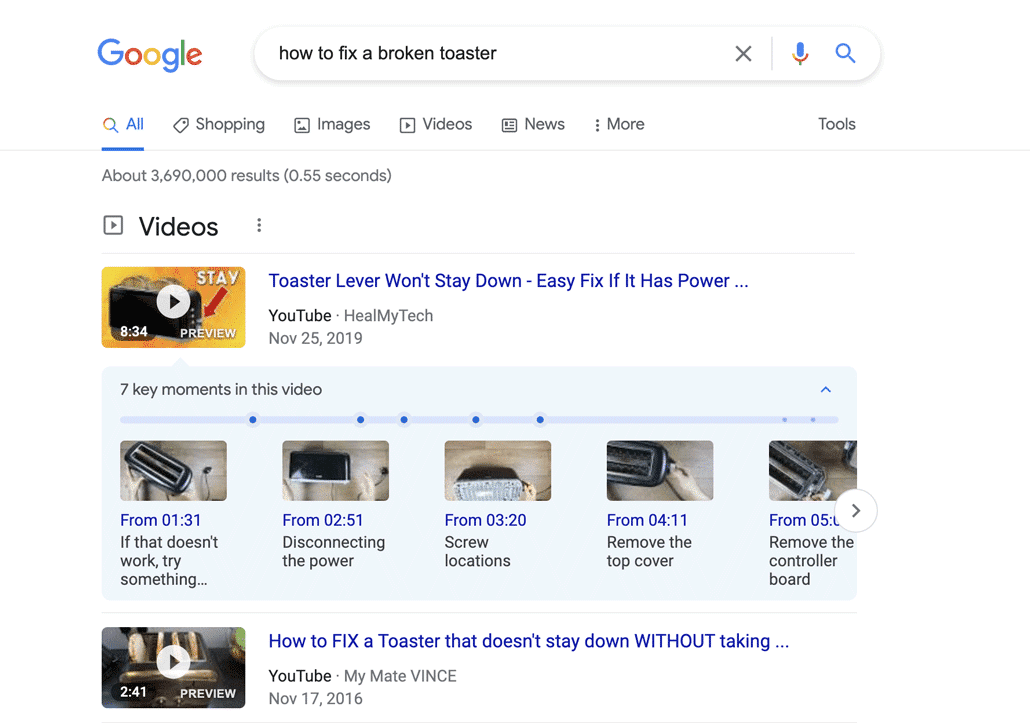
What are the benefits of video SEO?
Video SEO drives traffic to your site
Posting videos online can help you generate increased awareness for your company, product, or service by driving traffic to your website site using video SEO tactics and implementation.
For example, a plumbing business could publish a clear video answering “How do I unclog a Japanese toilet?” alongside useful instructions. Match the content to the question, make the video accessible and track whether visitors reach an appropriate service or enquiry page.

Video SEO increase awareness
Publishing relevant videos on YouTube, Instagram or TikTok can introduce your business to viewers. Use accurate titles and descriptions appropriate to each platform, then measure any referral visits and enquiries rather than assume followers will become customers.
Videos increase the amount of time people spend on your site
A useful video can help visitors understand a topic or evaluate a service. Measure engagement and completed enquiries separately; longer viewing by itself does not establish an improvement in Google rankings.
Video SEO can help increase sales
Relevant visitors may become customers when the video answers their questions and the page offers an appropriate next step. Track qualified enquiries and outcomes, not just views or traffic; more visits alone do not guarantee more sales.

How does animation help with video SEO?
Animation can illustrate products, abstract ideas or processes that are difficult to film. Choose animation when it serves the message and audience, not because the format guarantees better search performance.
Use an accurate thumbnail and a clear opening. Compare viewer feedback, retention and enquiries for your own content; there is no basis here to claim that animation always outperforms live action.
How do you optimize animated video for SEO to increase website traffic?
1). Research your video title
What would someone search for if they were going to watch your video? There’s probably a few different phrases people could search for that would bring up your video on YouTube or Google.

Brainstorm the questions your intended viewers need answered. Keyword research, including tools such as TubeBuddy, can suggest language to investigate, but estimated volume should not override the video’s topic or the viewer’s intent.
Write a clear, accurate title that describes what the viewer will learn. Do not force an unrelated high-volume phrase into it.
2). Update the file name
Use a descriptive file name to keep production assets organized. Renaming a file before upload is not a documented shortcut to higher search rankings.
3). Decide which platform to upload to
Choose a host based on player experience, accessibility, analytics, cost and distribution needs. A website embed and a YouTube upload can serve different goals. Measure platform discovery and website referrals separately rather than assume one host guarantees either.
Check the host’s crawlable embed and metadata support. Google may show both a qualifying website page and a third-party version; hosting choice alone does not decide which ranks.
4). Include title keywords in your description
Write a useful description of the video and its intended audience. Use relevant topic language naturally; do not add unrelated keywords or repeat phrases just to target more searches.
5). Add a transcript

Provide an accurate transcript and captions to help people access and understand the video. Review automatic captions for names, technical terms and omissions. Keep useful supporting text accessible on the page, without promising that a transcript alone will improve rankings.
6). Embed the most important video first
On a page with several videos, make their purpose clear. Positioning one first does not guarantee that Google will index it; a dedicated watch page may be appropriate when viewing a single video is the main purpose.
7). Reuse videos where they help the reader
You can reuse a video on a watch page and a related article. Choose each page’s purpose deliberately; do not remove useful embeds just because the same video appears elsewhere.
8). Pick a great thumbnail
Having a great thumbnail can make or break your video. Test different thumbnails to see which version gets people to click play the most often. Not sure how to do that? Check out this article to learn how to improve your video conversion rate.

9). Put your video near the top of the page
If watching the video is the main reason to visit the page, make the player prominent and easy to use. For an instructional article, place it where it best supports the explanation. Positioning is a user-experience decision, not a guarantee of higher rankings.
10). Get people to watch and share your video
Share your video with relevant viewers and learn from their feedback. YouTube considers query-specific engagement alongside other factors; this does not mean that a new unwatched video cannot be discovered or that early drop-offs automatically remove it from every search engine.

Advanced Video SEO: Technical Implementation and Structured Data
Technical work helps crawlers find and understand videos. Follow Google’s video guidance and distinguish discovery, indexing and search appearance. None is guaranteed by adding a player or markup.

11). Implement Schema Markup (Structured Data)
VideoObject structured data describes a video. Use accurate information consistent with the visible content, and check existing player/plugin output before adding more markup.
- What it is: A piece of code you add to the page HTML that explicitly tells search engines the video’s title, description, duration, upload date, and a link to the thumbnail image.
- Why it Matters: Markup can support eligible video features; it does not guarantee a specific result format or search position.
- Actionable Tip: Use the Rich Results Test to check supported markup and errors. Check actual indexed status separately in Search Console.
12). Create and Submit a Dedicated Video XML Sitemap
Standard XML sitemaps tell search engines about your web pages. A Video XML Sitemap specifically tells them about the video content on those pages, providing crucial metadata in one clean, centralized file.
- What it is: Video information supplied in an XML sitemap, associated with the page where the video appears. It can describe the thumbnail, title, description and player or file location.
- Why it Matters: A sitemap is a discovery aid, not a guarantee of indexing or a processing deadline.
- Actionable Tip: Inspect the sitemap your site actually generates. Verify video support and licensing in your installed plugin or hosting product rather than assume that a standard sitemap includes videos.
13). Optimize Player Responsiveness and Load Time
Video players can add loading work. Test page speed and real mobile playback together; performance work should not hide the main content from readers or crawlers.
- Solution: Keep the player responsive. Defer noncritical loading only where appropriate, avoid delaying an immediately visible main video, and do not depend on a click or scroll event for crawler-visible content. Follow Google’s lazy-loading guidance and test the rendered HTML.
Advanced YouTube Optimization: Signals for Ranking

Treat YouTube as a separate discovery channel. Optimize the actual video and viewer experience, not just website metadata.
14). Strategic Use of Tags (Beyond the Obvious)
YouTube says tags usually play a minimal discovery role, apart from useful cases such as common misspellings. Prioritize accurate titles, thumbnails and descriptions.
- Practical approach: Add only relevant tags. Do not insert unrelated competitor names or excessive tags as a shortcut to suggested videos.
15). Leveraging YouTube Cards and End Screens
Cards and end screens can offer a relevant next step; their use does not guarantee higher rankings.
- Cards: Link to relevant content where available. External website cards require YouTube Partner Program eligibility and policy-compliant destinations.
- End Screens: Use the final 5–20 seconds for an appropriate video, playlist or subscription prompt. Website-link eligibility and viewing restrictions apply; end screens require a video at least 25 seconds long and are not available on made-for-kids videos.
16). Playlist and Channel Optimization
Organize related videos into useful playlists with accurate titles and descriptions so viewers can follow a topic.
- Strategy: Group related explainers around a customer question or use case. Measure whether viewers continue to relevant videos; grouping alone does not guarantee better rankings for the playlist or every video.
Correlation Between Video Metrics and Search Rank

Use video metrics to improve the viewer experience and evaluate your goals. YouTube Search considers relevance, engagement and quality, with results also affected by personalization. Do not treat a single metric as a universal Google and YouTube ranking rule.
17). Watch Time (Retention) is King
Review retention in the context of the video’s length, purpose, audience and traffic source. A higher retention percentage than another video does not by itself establish which one will rank higher.
- Actionable Insight: Investigate repeated drop-offs in your video analytics. Check whether viewers got their answer, encountered confusing content or arrived with the wrong expectation before deciding what to edit. Animation does not inherently guarantee higher retention.
18). Comments, Likes, and Shares (Engagement)
Comments, likes and shares can provide audience feedback. They are not proof that the page will rank better in Google or that viewers will become customers.
- Actionable Insight: Ask a specific, relevant question when feedback would help you improve the video. Measure the response rather than promise a higher response rate.
19). Click-Through Rate (CTR) from Search
CTR describes how often an impression leads to a click. Compare like-for-like periods, search queries, traffic sources and positions; a CTR change alone does not prove a ranking improvement or its cause.
Actionable Insight: Test accurate titles and thumbnails without misleading viewers. CTR also depends on where and to whom the result appears, competition and intent; assess subsequent viewing and enquiries as well as clicks.
Video SEO Final Note
Understand things will change over time.
Search results and audience needs change. Update this guide when advice is outdated or a useful explanation is missing, not simply to change its date. Review comparable complete reporting periods and record substantive edits; freshness alone does not guarantee improved rankings.
Still have questions about video SEO?
Do you have a question about video that wasn’t addressed in this FAQ? Use this form to send us your question and we’ll follow up with an answer. We’ll also post the question and answer to this page so other people can benefit from the knowledge.

What is Video Igniter Animation?
Video Igniter Animation is an online animated video production service. By working with our team online, you can get your custom animated video produced faster and for less than hiring a brick and mortar animation studio.
We can help you create any kind of 2D animated video or 3D animation you can imagine. Check out our animated video portfolio!
Watch our explainer video on our home page to learn more about how we can help you create an animated video. For examples of the kinds of animation our team can produce, check out the demo reel below:
Looking For An Animated Video Company In The U.S.?
Video Igniter is headquartered in Seattle, Washington.
Success Stories & Testimonials
“Video Igniter offered us the critical combination of creative value, clear communication, and patience with stakeholder feedback. We ended up with truly high-quality design assets for our video series largely due to the extra level of commitment — and the right balance of efficiencies with flexibility in the process when called for.”
Larry Schlessinger – Sr. Creative Program Manager, Amazon Web Services
“Video Igniter came to us with a number of creative and engaging ideas and were able to create an exciting, impactful video in a short period of time. And the best part was that it cost much less than other options of similar quality. The video they made is a great marketing tool for us.”
Alex Raymond – Founder, Kapta Systems
“I am beyond satisfied with my experience with Video Igniter. The first drafts of the work were almost exactly what I had in my head when developing the concept. After that each step along the way was seamless until arriving at a perfect finished product. And all this at a tremendous value. Anyone who has considered creating a marketing video should check out Video Igniter.”
Anonymous Customer Feedback

Get in touch!
Schedule a call to discuss your animated video project.
Get a quote for us to create your animated video.
Request access to our newest price sheet.
Get a custom quote for your animated video and our production team will follow up with next steps.