Explainer Video Maker
Table of Contents
If you’re looking for an explainer video maker to help you create a custom animated explainer video, you’re in the right place! Video Igniter has helped hundreds of companies produce explainer videos. In this article, we answer the most popular questions we receive about making explainer videos to help you find the right production option for your explainer video.
In this FAQ, we’ll cover:
- What are the different types of explainer video makers?
- How do you create an explainer video?
- What is the best explainer video software?
- How do you find and hire an explainer video creator?
- How do you make a free explainer video?
- How do you save money on your explainer video budget?
Examples of Explainer Videos You Can Make With Video Igniter
Video Igniter can create any kind of 2D or 3D animated explainer video for you. Check out our animation portfolio here. Request access to our demo reels and price sheet here.
Contact us or schedule a call to start making your video.

Are you looking for an example of a different style of animation? Send us a message to let us know what kind of animation example you want to see and we will follow up with relevant production samples.
What are the different types of explainer video makers?
Online Explainer Video Maker Options (Stock Design)
There are a handful of online video makers that provide libraries of pre-created characters, objects and scenery. You can use their online tools to lay out the objects in your scenes and then add motion so that characters and objects move in sync with your voiceover.
Notable services to check out include PowToon, Vyond, Wideo and Canva.
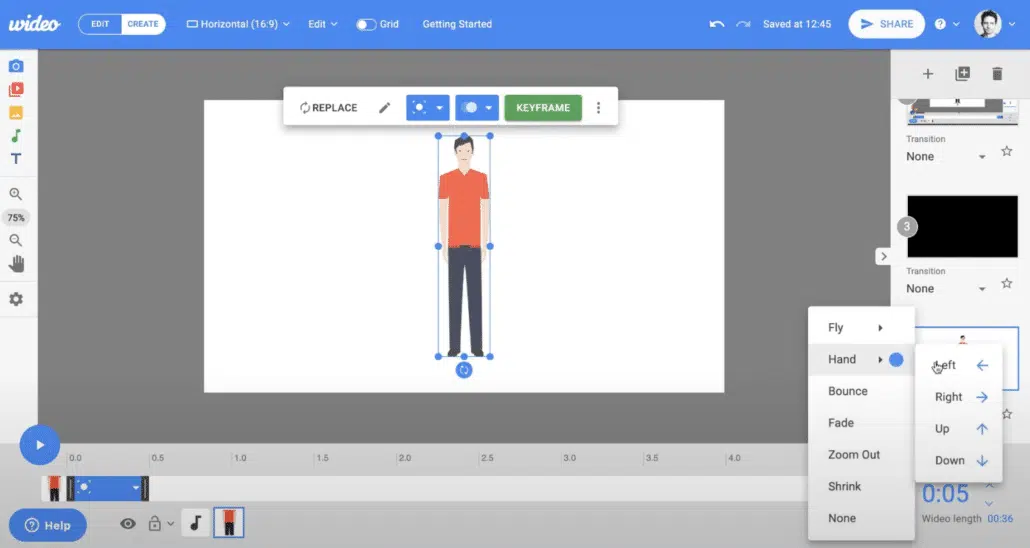
Pros: This is the lowest cost option for making an explainer video. These services cost under $100/month and it only takes a few hours of your time to create the content.
Cons: The explainer videos you can make with these sites all look the same because everyone is using the same set of pre-created characters, scenes, templates and objects. If you’re looking to make a custom branded video, this isn’t the ideal option for you.
Online Explainer Video Maker (Custom Animation)
If you’re looking for an online explainer video maker that makes custom animated videos instead of using stock animations and templates, check out Video Igniter Animation – that’s us :)
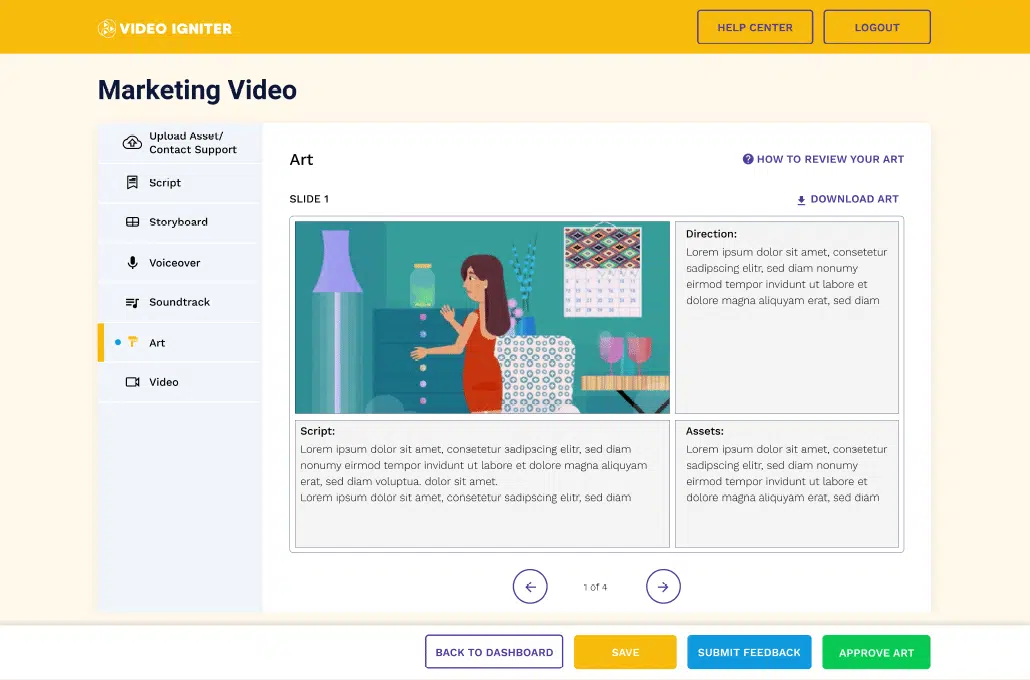
All you have to do is describe the explainer video you want select your desired budget (high end animation, low cost animation or the middle-of-the-road option).
From there, our professional animation team gets to work creating the script, storyboard, voiceover, illustrations, and soundtrack for your explainer video. You get an opportunity to review all of these and request edits online. Once they all get your approval, we animate your explainer video for you!
Pros: We can help you make any kind of 2D or 3D animated explainer video that you can imagine for less than the price of hiring a full animation studio. Everything is custom made so your explainer video is going to be a one of a kind original work of art!
Cons: Video Igniter uses real humans to make your explainer video so it’ll take a few days or weeks to create your video.
Explainer Video Software
If you’re highly motivated to make your explainer video yourself and have it be fully customized, you could get yourself a copy of Adobe After Effects and make the video from scratch.
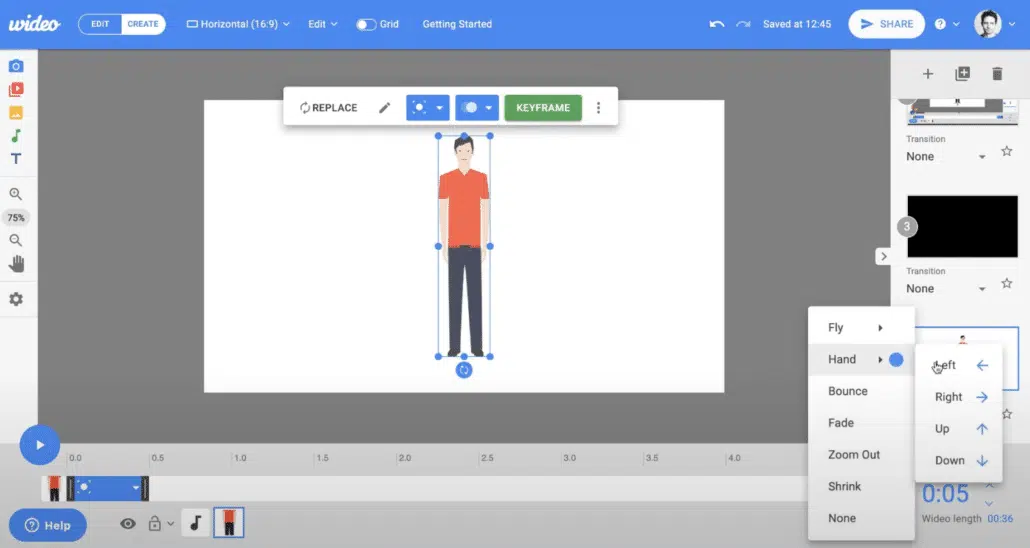
Pros: You can eventually learn to make any kind of custom animated explainer video you can imagine
Cons: If you don’t have any artistic ability, this is going to be an up hill journey to learn everything you need to have in your artistic and technical skillset to create a quality video.
Hire An Animation Studio
Hiring an animation studio is usually the go to route if someone wants to make an explainer video. Animation studios are great if you want to make a really long explainer video; however, explainer videos tend to be 5 minutes or less. Animation studios typically focus on longer videos (5-22+ minute episodes) but some are willing on to take on shorter projects.

Pros: Animation houses are large and fully staffed to help you create explainer videos.
Cons: Hiring an animation studio is the most expensive kind of explainer video maker you can hire. Some studios only focus on specific animation styles so be sure to check out their portfolio.
Hire A Freelance Explainer Video Maker
Freelancers can help you make an explainer video. Most have the design and animation skills to help you make something fun to watch. Be sure to pay attention to their storytelling abilities; just because someone is good at creating beautiful animations doesn’t mean they’re automatically a good storyteller.

Pros: Low cost way to hire an explainer video maker to create your video for you.
Cons: Freelancers usually focus on a few specific visual styles. Since you’re working remotely, there’s always the possibility the freelancer could ghost you in the middle of production. They may or may not be able to help you develop your script and storyboard.
How do you make an explainer video?
Our explainer video maker production team has created hundreds of successful explainer videos by following this production process:
Questionnaire & Phone Call

Production begins with a questionnaire and or a phone call to learn more details about what you want to show and communicate in your explainer video.
Script

Download Video Igniter’s Free Script Writing Template
We use the information from the questionnaire and phone call to draft a script for your explainer video.
Send us feedback for your explainer video, we’ll incorporate the edits and send it back to you to review and approve for production.
Storyboard
Next, we turn your script into a storyboard – aka a set of text instructions and sketches for the illustrators and animators so they know what to create.
You get an opportunity to review the storyboard and request revisions before approving the document for production.
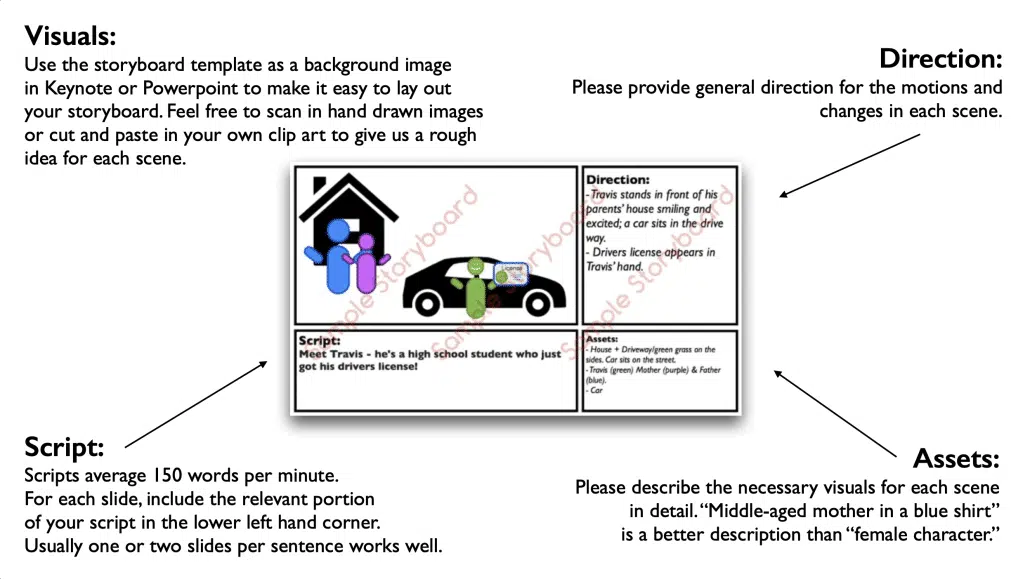
Download Video Igniter’s Free Storyboard Template
Illustrations
Our art director will develop some custom visual concepts for your explainer video.

Let them know which option you like best and they’ll work with you to refine and polish your favorite option. Then, the art director will oversee the production of all of the custom illustrations for your video.
You get an opportunity to review all of the art and request edits before approving the illustrations for production.
VoiceOver

You will receive several voiceover auditions to listen to. Let our team know which one you like best and then we’ll hire them to record the full voiceover. You will get an opportunity to review the voiceover and request edits before approving it for production.
Soundtrack

You will also receive several soundtrack options for your explainer video. Let us know which one you like best and then we’ll license it for use in your explainer video.
Animation
Once everything is approved, our explainer video maker team finally gets to animate your video!

Take some time to review the explainer video with your team and members of your target audience. Collect everyone’s feedback and send it to us to incorporate your edits for the final draft.
What is the best explainer video software?
For 2D animated explainer videos, the answer is Adobe After Effects. It provides all the tools you need to create custom animated motion graphics and animated characters. The learning curve is moderate; you can pick up the basics within a few hours.
How do you find and hire an explainer video creator?

Here are some animated video. production resources that will help you find and hire the right explainer video maker for your project:
- How do you outsource an animated video project?
- 9 Things to look for when hiring an animator.
- How do you hire an animator?
- What is Video Igniter Animation?
- What’s the difference between hiring an animation studio, a freelance animator and Video Igniter?
- What goes into production cost of an animated video?
- Pros and Cons of Different Animation Styles
How do you make a free explainer video?
Check out this companion article about how to make animated videos for free.
How do you save money on your explainer video budget?
✅ Write the script instead of hiring your explainer video maker to create it for you. Download our free script writing template.
✅ Make the storyboard for your explainer video. Download our free storyboard creation template.
✅ Record the voiceover for your explainer video. Watch 1:31 in this video to learn how to do it for free.
✅ Use free legal music. Just be sure to give the artist credit.
✅ Consider using stock assets like icons, clip art, stock photos and text to reduce the illustration costs for your explainer video maker.
The Rise of AI: Using Artificial Intelligence as an Explainer Video Maker

The landscape of explainer video production has shifted dramatically with the introduction of AI tools. If you are searching for an “explainer video maker,” you will inevitably encounter AI-powered solutions. It is important to understand where these tools fit in the production ecosystem and how they compare to human-led creative teams.
AI Script Generators
Tools like ChatGPT and Jasper have revolutionized the pre-production phase. You can input your product features and target audience, and within seconds, receive a rough draft for a 60-second script.
- Pro: Extremely fast and helps overcome writer’s block.
- Con: Often lacks the “human touch,” humor, and nuance required to truly connect with a viewer emotionally. It serves better as a brainstorming partner than a final writer.
AI Voiceover vs. Human Talent
Modern text-to-speech (TTS) tools are becoming surprisingly realistic. Many DIY explainer video makers now include integrated AI voiceovers.
- The Verdict: For internal training videos or rough drafts, AI voiceovers are sufficient. However, for a flagship marketing video on your homepage, nothing beats the inflection, pacing, and emotional resonance of a professional human voice actor. A robotic voice can subconsciously lower the perceived value of your brand.
Text-to-Video Generation
Emerging platforms now allow you to type a prompt and generate a video clip. While impressive, these “generative video” tools often struggle with brand consistency. They may create a cool-looking scene, but they cannot yet reliably keep your specific character wearing your specific company colors consistent across 15 different scenes. For true brand storytelling, custom animation (where humans control every pixel) remains the gold standard.
5 Common Mistakes to Avoid When Using a DIY Explainer Video Maker

If you decide to use a DIY software platform (like Vyond, Canva, or PowToon) instead of hiring a professional animated video agency, be careful. Because these tools are “drag-and-drop,” it is easy to clutter your video. To ensure your DIY video ranks well and converts viewers, avoid these common pitfalls:
1. The “Kitchen Sink” Syndrome
Just because the software offers 500 animated icons, doesn’t mean you should use them all. A common amateur mistake is filling every inch of the screen with moving elements. This overwhelms the viewer.
- The Fix: Embrace negative space. Focus on one main visual idea per scene that directly correlates to the sentence being spoken.
2. Mismatched Visual Styles
DIY libraries often pull assets from different artists. You might end up with a flat-design character standing next to a 3D-shaded building, holding a hand-drawn sketch of a phone.
- The Fix: Strict quality control. Ensure every asset you drag onto the canvas shares the same line weight, color palette, and shading style. Inconsistency makes the video look “cheap.”
3. Ignoring Audio Quality
You can forgive mediocre animation, but you cannot forgive bad audio. If you record the voiceover yourself on an iPhone or a laptop microphone, the echo and background noise will ruin the video’s credibility.
- The Fix: If you cannot afford a pro voiceover, invest in a decent USB microphone (like a Blue Yeti) and record in a closet full of clothes to dampen the sound. Throwing a thick blanket over you and the microphone is a free and effective way to avoid having external white noise in your recording.
4. Poor Pacing ( The “Wall of Text”)
DIY creators often try to cram 300 words into a 60-second video. This forces the voiceover to race, leaving no time for the viewer to digest the visuals.
- The Fix: Aim for 130-150 words per minute. If you have to speak faster than a conversational pace to fit the time limit, your script is too long.
5. Weak Call to Action (CTA)
Don’t let the video fade to black. The entire point of using an explainer video maker is to drive action.
- The Fix: Leave the final screen up for at least 5-10 seconds. It should clearly display your website URL and a direct command, such as “Download the App Today” or “Schedule Your Free Demo.”
Beyond Production: Distribution Strategies for Your Explainer Video

Once you have used an explainer video maker or agency to produce your file, the work isn’t done. A video sitting on a hard drive generates zero ROI. You need a distribution strategy.
Landing Page Optimization
Placing an explainer video “above the fold” (visible without scrolling) on your landing page can increase conversion rates by up to 80%.
- Tip: Don’t use auto-play with sound. It annoys users and browsers often block it. Instead, use a compelling static thumbnail with a large “Play” button.
Email Marketing
Video is a superpower for email click-through rates (CTR). While you cannot embed the video directly inside most emails, you can insert a GIF loop of the best 3 seconds of your video. Link that GIF to your video landing page.
- Stat: Simply adding the word “Video” to your email subject line can boost open rates by 19%.
Sales Enablement
Your sales team shouldn’t have to repeat the basic “what we do” pitch on every Zoom call.
- Strategy: Send your explainer video to prospects before the meeting. This educates them on the basics, allowing the actual sales call to focus on their specific pain points and closing the deal.
Social Media Adaptation
If you made a 90-second explainer video for your website, don’t just post the same link to TikTok or Instagram.
- Strategy: Ask your video editor (or use your software) to cut “micro-content.” Create three 15-second teaser clips that highlight specific pain points, and use those to drive traffic to the full video on your site.
Key Features to Compare When Choosing Explainer Video Software

If you are shopping for a subscription to an online explainer video maker, don’t just look at the price tag. Look for these specific features that distinguish professional tools from toys:
- Lip-Sync Functionality: Does the character’s mouth move automatically when you upload voice audio? Doing this manually is a nightmare. Good software handles this via auto-sync.
- Asset Customization: Can you change the colors of the props to match your brand’s Hex codes? If the software forces you to use their default blue and orange, your video will look generic.
- 1080p vs 4K Export: Some “free” or “cheap” tiers cap your download quality at 720p. In a professional setting, 1080p is the absolute minimum.
Still have questions about working with an explainer video maker?
Do you have a question about explainer video makers that wasn’t addressed in this FAQ? Use this form to send us your question and we’ll follow up with an answer. We’ll also post the question and answer to this page so other people can benefit from the knowledge.

What is Video Igniter Animation?
Video Igniter Animation is an online animated explainer video production service. By working with our team online, you can get your custom animated video produced faster and for less than hiring a brick and mortar animation studio.
We can help you create any kind of 2D animated video or 3D animation you can imagine. Check out our animated video portfolio!
Do you want to create an animated cryptocurrency video or an animated blockchain explainer video that explains how your technology works? We can help with that too.
Watch our explainer video on our home page to learn more about how we can help you create an animated video. For examples of the kinds of animation our team can produce, check out the demo reel below:
Looking For An Animated Explainer Video Creator In The U.S.?
Video Igniter is headquartered in Seattle, Washington.
Explainer Video Maker Success Stories & Testimonials
“Video Igniter offered us the critical combination of creative value, clear communication, and patience with stakeholder feedback. We ended up with truly high-quality design assets for our video series largely due to the extra level of commitment — and the right balance of efficiencies with flexibility in the process when called for.”
Larry Schlessinger – Sr. Creative Program Manager, Amazon Web Services
“I am beyond satisfied with my experience with Video Igniter. The first drafts of the work were almost exactly what I had in my head when developing the concept. After that each step along the way was seamless until arriving at a perfect finished product. And all this at a tremendous value. Anyone who has considered creating a marketing video should check out Video Igniter.”
Anonymous Customer Feedback

Looking for an explainer video maker? Get in touch!
Schedule a call to discuss your animated video project.
Get a quote for us to create your animated video.
Request access to our newest price sheet.
Create your Video Igniter account.
Fill out a creative brief for your video so that we understand what you want us to create.