Does your company want to make an animated product video but you’re not sure where to get started? 2D and 3D animated videos can help you get the word out about your new product and help people understand how to use it. But animated product videos take a team of talented professionals to produce and most people don’t know where to get started. Luckily, Video Igniter Animation has been producing animated product videos for over a decade and we’re here to share our expertise. We get many questions about how to make an animated product launch video and have organized answers to the most frequently asked questions.
1). Animated Product Video Examples You Can Get From Video Igniter
Video Igniter can create any kind of 2D or 3D animated product video for you. Check out the example videos below.
Are you looking for an example of a different style of animation? Send us a message to let us know what kind of animation example you want to see and we will follow up with relevant production samples.
2). Why make an animated product video?
Get awareness for your product launch
Whether you’re a large established company doing a big media product launch or an unknown startup about to announce their Kickstarter campaign, animated product videos are highly effective for building awareness for your product launch.
Demonstrate what your product does
Animated product videos are excellent for demonstrating what a product does. They’re especially useful for product launches and kickstarter campaigns because the product might not physically exist yet. Animators can create a photorealistic 3D model of your product to show what it looks like and how it works to help you get people to invest in your product development.
Encourage people to buy
At the end of the day, animated product launch videos are about getting people to buy. When you properly structure the script for your video, the viewer should be exposed to a problem they experience, you should exacerbate the perceived significance of that problem, and then let the viewer know what they can buy to alleviate their problem. If you create a video like this and add it to your website, sales will increase.
Makes it easy to share what you do
If someone is very interested in your product or kickstarter campaign, they want to tell people about the awesome thing you’re offering with likeminded people that would also be interested. Sharing photos or a link to a website makes it easy to share what you do… but sharing a link to a video about your product is the easiest way to share and understand what your product does with a large audience.
3). How to choose a producer to make your product launch video?
Looking for an animated product launch video maker but not sure where to start? There are many factors to consider when shopping around for an animation studio, a freelance video animator, or an animated video production company like Video Igniter Animation including: pricing, visual style, storytelling, customer service, production timelines and more. Here are some resources to help you figure out the right production option for your product video:
In order for your product launch video to succeed, you need a compelling script. Rick Cesari is the video marketing genius that turned Oxiclean, The George Foreman Grill and Sonicare into household names. His book Video Persuasion teaches how he created TV ads that were so compelling, people were forced to pick up the phone to call and order what they just saw on TV. In the book, he interviews a veteran copywriter named “Jack” about what makes a compelling script:
“… you want to make sure you don’t just want to talk about the problem-solution, you want to take the knife, you want to twist it and really want to agitate, you want to drive home the point, this is really bothering you, isn’t it? This is really causing problems so you can’t sleep at night. Your day’s ruined because you’ve got this thing going on. You want to beat the drum much more before you offer the solution.”
To make your product compelling, spend a good portion of your video hammering home the notion that this problem is really bugging the viewer before you release the solution.
Storyboarding
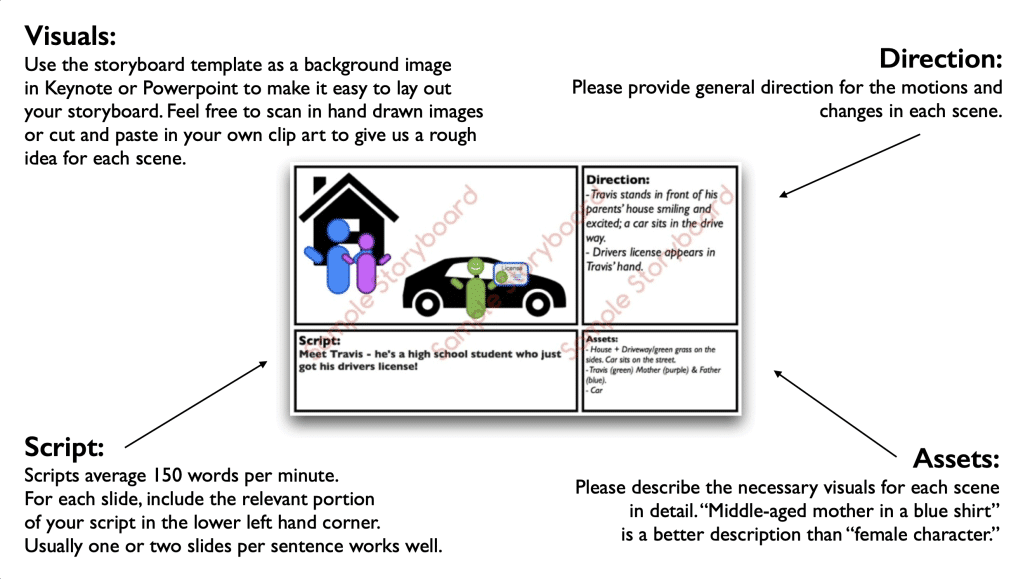
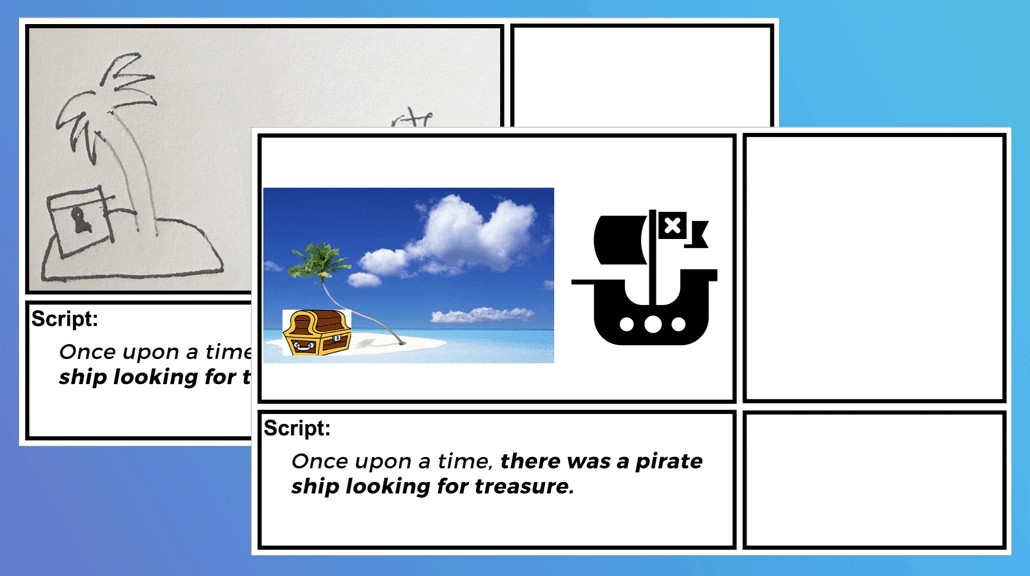
After the script is locked in, the creative team can then dive into creating the storyboard. The storyboard is the blueprint for your animated video. It tells the illustrators what art to create and it tells the animators what motion design needs to happen in each visual. The diagram below shows what information should be included on each slide of a storyboard:
Next, your creative team will procure voiceover auditions from 1-5 voiceover artists for your product video’s narration. After reviewing the auditions, let your creative team know which voice you prefer.
You should also document your script with notes to let the voiceover artist know how to pronounce difficult words, where to speed up/slow down their pacing, when to pause, where to modify their inflection/tone, etc. Your creative team will take care of getting the full voiceover recorded and will give you an opportunity to review the voiceover and request revisions before approving it for animation.
Soundtrack
Soundtracks help to establish the energy the viewer experiences as they watch your animated product launch video. Help your creative team identify the mood you want your viewer to be in as they learn about your new product. Your creative team will select a handful of options for you to review. Try to narrow the selection down to your top 2-3 favorites. That way, when the first draft of the animation is ready to render, they can export versions of the video using each version of the soundtrack so that you can feel which one works best in your animated video.
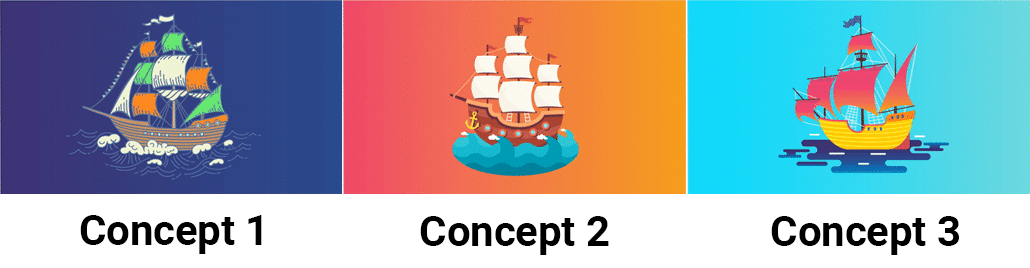
After the storyboard is approved, it’s time to start creating the art for your product animation. Your design team will start by taking one scene from your storyboard and creating it using one or more unique visual styles (based off your brand guidelines). When the art is ready to review, give it a detailed look over and let the art team know what you like and dislike about each piece of concept art.
The art team will then update your preferred concept art and give you another chance to review it and request modifications. When you’re 100% satisfied with the concept art, the illustrators will create the rest of the art for your video using the approved style frame as a reference. You will get an opportunity to review all the art and request revisions before your video gets animated.
Animation
When the art and voiceover are approved, it’s finally time to animate! Each minute of video takes about one week to animate.
As soon as the first draft is ready to review, share it with your internal team and members of your target market. Spend some time making sure the message is clear and that people understand what you are showcasing in your video. Now’s the time to request revisions before you spend time, money and effort promoting your animated product video.
5). What does it cost to make an animated product video?
Animated product videos tend to cost between $3,000-$25,000 to produce. The higher end of that budget range is for videos that include 3D animations of your product. It is possible to create product videos for less. However, be aware that lower quality visuals will result in a decreased perception of your brand.
6). How long does it take to make an animated product launch video?
Don’t wait to the last minute to rush your main piece of marketing collateral out the door before the launch date. Plan ahead! Expect to spend at least 3-8 weeks going through the production process to create your product launch video. Videos longer than 2-3 minutes and videos that include 3D animation may require more time to produce.
7). How long should my video be?
Animated product videos can be made in various lengths. Some are 10 – 30 seconds and are intended to quickly spread awareness to people who would be interested in learning more about the product. Promotional animated explainer videos on websites tend to be 1-2 minutes in length and go more in detail about what the service is and the benefits it offers to people. Animated product videos can also be 3-5+ minutes; these videos tend to focus on customer education and guide people through the experience of how to use the product.
8). The Psychology Behind Animated Product Videos
An animated product video taps into the psychology of visual learning and emotional engagement. Animation makes it easier for viewers to absorb and retain information by presenting concepts in a visually stimulating and easily digestible format. The playful and dynamic nature of animation also reduces resistance to marketing messages, making viewers more receptive to the product’s value proposition. By strategically combining visuals, storytelling, and sound, an animated product video can trigger emotional responses that build trust and encourage conversions.
9). Choosing the Right Animation Style for Your Product
Selecting the right animation style for your animated product video can significantly impact how your audience perceives your brand and offering. Whether it’s 2D animation, 3D visuals, whiteboard animation, or motion graphics, each style serves a different purpose and audience preference. For example, 2D animation is great for explaining concepts in a fun, approachable way, while 3D animation can showcase intricate product features with lifelike detail. The animation style should align with your brand’s personality and the complexity of your product to ensure your animated product video resonates with your target audience.
10). Measuring the ROI of Animated Product Videos
Understanding the return on investment (ROI) of an animated product video is crucial for assessing its impact on your marketing strategy. Key performance indicators (KPIs) like video views, click-through rates, average watch time, and conversion rates can provide insight into how well your video is performing. Tools like Google Analytics and video hosting platforms can help track engagement and sales driven by your animated product video. By regularly reviewing these metrics, you can optimize future campaigns and ensure your video content delivers measurable business value.
11). The Cost-Benefit Analysis of Animated vs. Live-Action Videos
When deciding between an animated product video and a live-action product video, it’s important to weigh the costs and benefits of each. Live-action videos often require larger budgets for sets, actors, and production crews, while animated videos offer more flexibility and creative control at a generally lower cost. Animation also makes it easier to update or repurpose content in the future without re-filming. For businesses looking for a versatile and budget-friendly way to showcase products, an animated product video often proves to be the more cost-effective and scalable option.
12). Leveraging Animated Videos for Product Launches
An animated product video is a powerful tool for launching new products. It creates excitement, communicates key benefits quickly, and helps build anticipation across your marketing channels. Unlike traditional launch materials, animation allows you to dramatize your product’s features and demonstrate real-world use cases in a highly engaging way. A well-crafted animated product video can serve as the centerpiece of your launch strategy, helping you capture attention, drive early interest, and boost initial sales.
13). The Future of Animated Product Videos
The future of animated product videos is being shaped by advancements in technology and shifting consumer behaviors. With the rise of AI-driven animation tools, personalized video content, and interactive video experiences, businesses will be able to create more dynamic and tailored animated product videos than ever before. As attention spans shorten and visual content dominates the digital landscape, animated videos will continue to be a vital part of product marketing strategies. Investing in an animated product video now ensures your brand stays ahead of the curve and adapts to future marketing trends.
Animated Product Video Production Resources
These popular animated product video resources are recommended for your video production journey:
“Video Igniter came to us with a number of creative and engaging ideas and were able to create an exciting, impactful video in a short period of time. And the best part was that it cost much less than other options of similar quality. The video they made is a great marketing tool for us.”
Alex Raymond – Founder, Kapta Systems
“My whole family and everyone on Facebook thinks you are amazing. My whole office is freaking out.”
Patricia Shields – Real Estate Agent
“I am beyond satisfied with my experience with Video Igniter. The first drafts of the work were almost exactly what I had in my head when developing the concept. After that each step along the way was seamless until arriving at a perfect finished product. And all this at a tremendous value. Anyone who has considered creating a marketing video should check out Video Igniter.”
https://videoigniter.com/wp-content/uploads/2022/10/Animated-Product-Video.svg7787Video Igniter Animation/wp-content/uploads/2020/02/logo-v2.svgVideo Igniter Animation2025-04-15 14:50:292025-04-15 21:53:33Frequently Asked Questions About Making An Animated Product Video
If you want to help your company stand out online, getting an animated company video can make your marketing and communications rise above the ocean of noise.
Animated Company Video Examples That Drive Results
Video Igniter can create any kind of 2D or 3D animated video for you. Check out the example videos below.
Are you looking for an example of a different style of animation? Send us a message to let us know what kind of animation example you want to see and we will follow up with relevant production samples.
Why do companies make animated videos?
Capture Attention: Animated videos capture attention in the ocean of live action content online. When everything looks like a video someone filmed on their phone, animated company videos are more likely to stand out and get people to stop and watch to see if they’re interested.
Hold Attention: Furthermore, animated videos for businesses hold viewer’s attention longer than live action or talking head videos. By constantly introducing something new in motion, animations keep the viewer’s attention focused.
Makes it easy to understand new and complex ideas: Corporate animated explainer videos do a great job of breaking down a complex idea, or a company’s product/service offering, and make it easier for your target audience to understand what they offer.
People remember the message longer: Since animated business videos use a combination of narration and visuals that reinforce the narration, it not only becomes easier for the viewer to understand the content but the visual metaphors also make it easier for the viewer to retain the information longer.
Improve conversions and generate more leads: Adding an animated business video to your company website can improve your website’s conversion rate. You can use videos to increase sales, generate more leads, encourage more app downloads, get people to sign up for your service and contact your sales team for a demo.
Increase SEO: Animated videos can boost your company’s SEO in two ways: 1). Having people watch videos on your site keeps them on your site longer which helps your site rank higher on Google 2). Getting your video to show up in Google Search results makes it more likely for people to click on your video and visit your website.
How To Make An Animated Company Video:
1). Pick An Animated Video Production Company or Freelancer
In addition to looking for quality visuals, make sure you pay attention to the storytelling capabilities of the service providers you are looking into. Lots of companies can make video animations that pretty but lack compelling storytelling.
Now that you’ve picked an animator for your video, it’s time to develop the script. Many animated video production companies are capable of helping you organize your thoughts to create a script for your video. You can save hundreds or thousands of dollars on your production budget by creating the script yourself. Aim for 140-180 words for a 60-second script.
Next, it’s time to create the storyboard for your company video. The storyboard is like a blueprint for your illustrators and animators. It tells them what to design for each scene. It also tells them what should move in each scene and how to transition from one scene to the next. Animation companies prefer to create the storyboard and share it with their clients for feedback. This is because animation production companies have a better grasp on how to articulate the motion and scene design details in a way that animators and designers will understand what to do.
That being said, video animators are also comfortable working from a storyboard that you provide. You can save hundreds or thousands of dollars on your production budget by creating the storyboard yourself so it’s worth considering. If you want to learn more about creating your own storyboard, check out our storyboard creation guide and download our free storyboard template.
You’ll want to ensure you have a professional sounding voiceover to represent your company. You can get quality sounding voiceover artists from websites like Fiverr, Voices123, and VoiceBunny. We recommend auditioning 3-5 of your favorite candidates by having them record the first few sentences of your script – instead of paying for them to record the full script all at once. After you’ve reviewed the voiceovers, you or the animation studio you work with can hire the VO talent to record the full voiceover. Some VO artists charge extra if you plan to use their voice in a paid media campaign (online and or on TV). Make sure to let your VO artist know how you plan to use the video so that you don’t get in trouble with voice licensing costs down the line.
When you share your script with your VO artist, we recommend including speaking notes (in parenthesis like this) with the voiceover. Let them know how to pronounce difficult words. Where to speed up or slow down the rate they’re speaking at. When to modify the inflection of their voice, etc.
The next thing to think about is soundtrack selection. Don’t overlook the importance of this step. Picking the right soundtrack for your company’s animated video can have a big impact on whether or not people continue watching your video. Obviously, if you choose some off-putting music, people will stop watching or mute your video. We recommend picking a few soundtracks and rendering out versions of your company’s animated video so that you can see and feel how they go together. If you pick 3-5 options, usually one will stand out as a clear winner.
This is one of the most fun parts of the animation production process. Seeing the concept of your animated video come to life. The art team will start by creating concept art from a few key scenes of your company’s animated video.
When you review the options, your job is to figure out which style you like best and if there are any specific refinements you want to make to the concept art before the rest of your art is created. After the concept art is locked in, the art team will create all of the art for your animated video. You get another chance to review the art and request small edits before production begins.
7). Animation
Finally, it’s time for the magic to happen. One animator can animate about one minute of video in a week. When you view the first draft of your animated business video, show it to members of your target audience to ensure they understand the message and key takeaways of the video. Collect your feedback and send it to the animation team to wrap up the final draft of the video.
Deep Dive: For an in depth look at the production process, check out this companion article, “How To Make A Video Animation.”
How long does it take to make an animated company video?
2D animated videos take about 3-5 weeks to create a 60 second animated video. 3D animated videos require about twice as much time. You can shave a week or two off of your production timeline if you provide the script and or the storyboard for your company’s animated video.
How long does it take to make an animated company video?
If you need your animated video produced faster, rush delivery options are available. with Video Igniter’s production team to discuss.
It costs between $1500-$5000 to produce a quality 60-second 2D animated video. 3D animated videos require a custom quote. There are ways to make cheaper animated videos but the lower production quality may result a decreased perception of your brand. Check out this article for a more in depth look at what goes into the cost of an animated video.
Common Mistakes to Avoid When Making an Animated Company Video
A polished animated company video can be a marketing powerhouse—but it’s easy to stumble during production. From unclear goals to poor pacing, small missteps can lead to underwhelming results. Here’s how to avoid the most common pitfalls when creating your next animated video.
Overloading the Script with Too Much Info
Cramming every detail into your video overwhelms viewers. Focus on the core message and guide people to where they can learn more. A good explainer simplifies, not complicates. If needed, save extra content for follow-up videos or supporting resources.
Using a Style That Doesn’t Fit the Brand
The animation style should match your brand’s tone, audience, and industry. A whimsical cartoon may feel off-brand for a serious B2B SaaS product, while a stiff motion graphic could be boring for a fun DTC brand. Make sure the visuals support your message.
Starting Without a Clear Goal or CTA
Every video needs a purpose. Whether it’s to generate leads, explain a service, or boost sign-ups, start with a clear goal—and craft your call to action around it. Without this focus, your video might look great but fall flat in terms of business results.
Poor Voiceover or Audio Quality
Bad audio instantly lowers perceived quality. Always use a professional voiceover and make sure the background music and sound design enhance—not distract from—your message. Viewers often tolerate weak visuals, but not weak sound.
Ignoring the Importance of Storyboarding
Jumping straight into animation without planning is a recipe for chaos. Storyboarding helps align your team, visualize pacing, and catch issues early. It’s a crucial pre-production step that sets the stage for a smooth creative process.
Lack of Revisions or Feedback Loops
Don’t wait until the final render to give feedback. Build in review stages after scripting, storyboarding, and animatics to make sure everyone is on the same page. More feedback upfront = fewer costly revisions later.
Making It Too Long (or Too Short)
Your video should be long enough to tell your story—but short enough to keep attention. For most explainer videos, 60–90 seconds is the sweet spot. Anything longer risks losing viewers unless it’s highly engaging or detailed.
Not Optimizing for Mobile or Accessibility
Your audience is likely watching on mobile or with the sound off. Add captions, ensure the text is readable on small screens, and use a clear visual structure. Accessibility = broader reach and better user experience.
Forgetting SEO and Distribution Strategy
Even the best video won’t perform if no one sees it. Optimize your video title, description, and file name for video SEO. Host it on platforms like YouTube or Vimeo, embed it on key pages, and promote it through email, ads, and social channels.
Fixes & Prevention Tips for Each Mistake
To avoid these pitfalls:
Start with a strategy brief.
Work with experienced writers and animators.
Prioritize clarity, pacing, and structure.
Test and refine based on viewer feedback and performance data.
How to Choose the Right Animation Studio for Your Company Video
Partnering with the right animation studio can make or break your company video. While great ideas are important, it’s the execution—scriptwriting, design, animation, voiceover, and revisions—that determines how professional and effective your final video will be. Choosing the right team ensures your vision is brought to life with quality, clarity, and creativity.
What to Look for in an Animation Studio
Finding the right fit starts with doing your research. Don’t just look at price—examine the studio’s portfolio, their process, and how well they understand your brand and goals.
Portfolio Relevance
Review the studio’s past work to see if they’ve done similar videos in your industry. A strong, diverse portfolio demonstrates their ability to adapt to different styles and messaging needs.
Experience in Your Industry
Studios that have worked with similar companies or sectors will already understand the pain points, jargon, and audience expectations—making the process smoother and more strategic.
Animation Quality & Style Variety
Watch for clean visuals, smooth transitions, and cohesive storytelling. Studios that offer multiple animation styles (2D, 3D, motion graphics, etc.) give you more flexibility in choosing what’s best for your brand.
Key Questions to Ask Before Hiring
Before signing a contract, ask important questions like:
What’s included in your pricing?
How many rounds of revisions are allowed?
What’s your average turnaround time?
Do you handle scripting and voiceover?
Can I speak with past clients?
Red Flags to Watch Out For
Be cautious of studios with vague pricing, limited portfolios, poor communication, or overly templated work. If it feels like a “one-size-fits-all” approach, it probably won’t result in a video that truly reflects your brand.
Budget vs. Quality Considerations
It’s tempting to go with the cheapest option, but lower prices often come with compromises in quality, customization, and support. A well-made video is an investment that continues to deliver ROI—so prioritize value over cost.
Understanding Their Production Process
A reliable studio will walk you through a clear, step-by-step production process that includes scripting, storyboarding, voiceovers, animation, and revisions. Transparency at every stage reduces confusion and helps you stay on schedule.
Importance of Communication & Revisions
Frequent updates and feedback loops are essential to ensuring your video turns out the way you envision it. Choose a team that values collaboration and encourages your input.
Working with Freelancers vs. Studios
While a freelance animator can be more affordable, studios often bring a full team of specialists to the table. This means faster delivery, higher quality, and a more polished final product.
Tips for Getting an Accurate Quote
Provide detailed info about your goals, video length, target audience, style preferences, and deadline. The more clarity you offer up front, the more accurate your quote—and the smoother your production experience.
Top Benefits of Using Animated Company Videos for Brand Marketing
Animated company videos have become a go-to marketing tool for brands looking to stand out in a crowded digital landscape. From social media campaigns to homepage explainer videos, animation offers a unique way to tell your brand’s story in a visually compelling and memorable way. Let’s dive into the top benefits of using animated company videos to elevate your brand marketing strategy.
Why Animated Content Captures Attention
In a world where attention spans are shrinking, animation cuts through the noise. Movement, color, and creative storytelling naturally draw the eye—especially on busy social feeds and cluttered websites. Animated company videos are visually dynamic, enabling brands to instantly grab and hold viewers’ attention far more effectively than static text, still images & live action video.
Increased Brand Recall with Visual Storytelling
Studies show that people remember 80% of what they see, compared to just 20% of what they read. Animation leverages this cognitive preference by combining engaging visuals with powerful narratives. Whether you’re introducing your company or explaining your product, an animated video helps viewers retain your message—and your brand—long after they’ve watched it.
Simplifying Complex Ideas for Faster Understanding
Got a product that’s difficult to explain? An innovative service with a lot of moving parts? Animated company videos excel at breaking down complex information into digestible, easy-to-understand visuals. By pairing clear voiceovers with illustrative animation, your audience can quickly grasp the value of your offering without feeling overwhelmed.
Boosting Social Media Engagement Rates
Animated company videos perform exceptionally well on social platforms like Instagram, LinkedIn, and TikTok. Their eye-catching visuals are made for scrolling feeds, and they tend to generate more likes, shares, and comments than traditional posts. With a strong hook in the first few seconds, animated content increases both engagement and reach—helping you build brand awareness faster.
Enhancing Website Conversion Rates
An animated explainer video on your homepage or landing page can dramatically improve conversions. Why? Because it gives visitors a quick, compelling overview of your business or product—making it easier for them to understand what you offer and take the next step. Whether it’s clicking a CTA or filling out a form, animated videos help guide users toward action.
Strengthening Brand Identity with Custom Animation Styles
Animation gives you complete control over how your brand is presented. From custom character animation and branded color palettes to typography and transitions, every detail can be designed to reflect your brand’s tone and personality. This level of visual consistency reinforces your identity and builds stronger recognition with your target audience.
Versatility Across Marketing Channels
One of the biggest advantages of creating an animated company video is its flexibility. A single animated video can be used across your website, email campaigns, trade show booths, digital ads, sales presentations, and even internal training. This multi-purpose value makes it a smart investment that continues to pay off across different stages of your marketing funnel.
Building Trust Through Professional Visual Communication
High-quality animated company videos signal professionalism, attention to detail, and a commitment to quality. A well-produced video makes a strong first impression and helps position your brand as trustworthy and credible. This emotional connection plays a key role in influencing buying decisions and building long-term customer relationships.
Animated Company Video Benefits – Final Thoughts
Whether you’re a startup trying to make a splash or an established brand looking to boost conversions, animated company videos are a powerful marketing asset. They communicate your message clearly, engage your audience visually, and drive real results across every stage of your funnel.
How to Use an Animated Company Video on Your Homepage
Your homepage is often the first impression potential customers get of your business—so it needs to grab attention fast, build trust quickly, and guide users to take action. One of the most effective ways to do that? Add an animated company video. A well-placed, well-produced video can drastically improve user engagement, clarify your offering, and boost conversions.
Why Add an Animated Video to Your Homepage?
Visitors form opinions about your site—and your business—within seconds. An animated video gives them an immediate, engaging way to understand who you are and what you offer. Instead of reading dense blocks of text, they can watch a quick, visual story that gets straight to the point. Plus, homepage videos can increase average time on site and reduce bounce rates, both of which are good for SEO.
What Type of Animated Company Video Works Best?
There are a few formats that work especially well for homepage videos:
Company Overview: Introduce your business, team, and core offering in a friendly, visual format.
Mission & Vision: Tell people why your company exists and what drives your brand forward.
Quick Explainer or Elevator Pitch: Break down what you do, who it’s for, and why it matters—all in 60–90 seconds.
Where to Place the Video for Maximum Impact
Placement is key. For maximum visibility, consider embedding your animated company video above the fold, so it’s one of the first things visitors see. If your homepage design doesn’t allow for that, use a scroll-triggered video that activates as users move down the page. Either approach should align with your site layout and user behavior.
Best Practices for Autoplay, Muting, and Captions
If your video autoplays, make sure it starts muted by default (to avoid annoying visitors), and include captions so users can understand the message without sound. You can also add a prominent play button to let viewers opt in. Captions and text overlays also improve accessibility and SEO.
Keeping It Short, Clear, and Actionable
Homepage videos should be short and sweet — ideally under 90 seconds. Focus on clarity, benefits, and the next step you want users to take. Use a concise script, strong visuals, and a clear call to action to move viewers along the customer journey.
How to Track Engagement and Conversions
Use tools like Wistia, Vidyard, or YouTube analytics to track video views, drop-off points, and engagement. Pair this with website analytics to see how viewers interact with your page after watching. Look at metrics like click-through rate, scroll depth, and conversion rate for a full picture.
CTA Placement After the Video
Right after your video is the perfect place for a strong call to action — whether it’s a signup form, quote request, or demo button. Viewers who’ve just watched your video are more informed and more likely to act, so guide them to the next logical step.
A/B Testing Video Placement and Messaging
Try different placements, thumbnails, and intros to see what performs best. You might find that tweaking your CTA text or video length improves conversion. A/B testing tools like Google Optimize or VWO can help you experiment and optimize your homepage video setup over time.
Using Animated Company Videos in Sales Funnels
Animated videos aren’t just great for your homepage—they can play a powerful role at every stage of your sales funnel. From building brand awareness to closing deals and driving post-sale engagement, animated content helps explain, persuade, and convert.
Overview of Sales Funnels: Awareness → Consideration → Conversion
A typical funnel moves customers from awareness (learning about your brand), to consideration (evaluating your solution), to conversion (taking action). The right type of animated video at each stage helps move prospects forward by answering questions, reducing friction, and reinforcing trust.
Top-of-Funnel Use Cases
At the top of the funnel, your goal is visibility. Animated brand videos, teaser clips, and eye-catching animated social media posts are perfect for capturing attention and introducing people to your company. These videos should be short, memorable, and highly shareable to maximize reach.
Mid-Funnel Use Cases
Now that people know who you are, it’s time to educate them on why they should care. Mid-funnel animated videos include product explainers that show how your offering solves real problems, or customer testimonial animations that share success stories and social proof in a fun, engaging way.
Bottom-of-Funnel Use Cases
When it’s time to convert, animated case study videos and personalized sales animations can tip the scales. These videos dig into results, outcomes, or use cases that help justify a decision. Personal touches, such as custom videos for leads or decision-makers, add an extra layer of attention that can win deals.
Post-Sale Use Cases (Retention & Upsells)
The funnel doesn’t end at the sale. Use animated videos to onboard new customers, explain advanced features, or promote related products and services. These videos help build loyalty, reduce churn, and increase customer lifetime value.
Where to Embed Videos in Your Funnel
Strategically place videos on landing pages, in email sequences, social media ads, CRM campaigns, or even during live sales calls. Videos can live inside webinars, blog content, or FAQs—wherever they help answer questions or overcome objections.
Metrics to Track at Each Funnel Stage
Each video type should have different goals. Track views and shares for awareness videos, watch time and click-throughs for mid-funnel content, and conversions or deal closings for bottom-funnel assets. Post-sale, track support requests or upsell clicks to measure effectiveness.
Best Animated Company Video Styles for Different Industries
Choosing the right animation style is critical when creating an animated company video. Every industry has its own unique audience, tone, and messaging needs—and the animation style you choose can either reinforce or undermine your brand’s message. When done right, animation becomes a strategic tool that helps communicate ideas clearly while resonating with your target market.
Why Animation Style Matters
Animation style isn’t just about aesthetics; it sets the tone for your entire message. A playful 2D cartoon animation might work well for a startup, but it may not convey the professionalism needed in a finance or healthcare setting. Selecting the right style ensures your video feels aligned with your audience’s expectations while enhancing clarity and trust.
Overview of Common Animation Styles
There are several popular animation styles used in company videos, each with their own strengths:
2D Animation
Classic, versatile, and budget-friendly—2D animation is perfect for storytelling and character-driven explainers.
3D Animation
Ideal for showcasing products, processes, or environments in detail. 3D animation offers realism and polish, often used in industries like manufacturing and healthcare.
Motion Graphics
Great for presenting data, abstract concepts, or tech-related content. Motion graphics rely on clean visuals and typography rather than characters or storytelling.
Whiteboard Animation
This hand-drawn style mimics someone drawing on a whiteboard. Whiteboard animation videos are often used for educational or internal communication videos where clarity and simplicity are key.
Stop-Motion / Cutout
Quirky, tactile, and visually distinct, stop-motion and cutout styles can add personality to brand storytelling. While more niche, they’re very memorable.
Best Styles by Industry
To help guide your decision, here’s a look at which animation styles work best by industry:
Tech/SaaS: Motion graphics and clean 2D animation help explain software features, APIs, and platforms in an engaging, digestible format.
Healthcare: Whiteboard animations & 2D animation are useful for breaking down complex medical concepts, while 3D animation is great for illustrating anatomy or surgical procedures.
Finance: Minimalist motion graphics convey professionalism and clarity—perfect for explaining investment tools, financial services, or fintech apps.
Retail/E-commerce: 2D animation with relatable characters is perfect for showcasing customer experiences, product benefits, and seasonal campaigns.
Manufacturing: 3D product animations help demonstrate machinery, production lines, or complex hardware in action.
Startups:2D explainer videos with humor and personality are ideal for creating emotional connections and quickly articulating value propositions.
Choosing the Right Style for Your Brand
When selecting an animation style, think about your audience, your message, and the emotion you want to evoke. Do you need to build trust? Inspire action? Simplify a technical topic? The right animation style can do all of that—if it aligns with your goals and brand voice.
Need help picking the perfect animation style?Let’s chat!
Hire Video Igniter To Make Your Animated Company Video!
We’re an animated corporate video production company that makes custom animated videos for world-class brands like T-Mobile, Amazon Web Services and Snoop Dogg @ prices startups can afford. Check out our portfolio.
Animated Company Video Success Stories & Testimonials
“I run a video production company and outsource animation. The team at Video Igniter did a great job in taking the concept I very crudely drew out and made it into a beautiful animation. The review process was easy and their turnaround time was very quick. I’d def recommend them if you’re looking for an animation project.”
Pat Henderson – Founder,Path8 Productions
“Video Igniter came to us with a number of creative and engaging ideas and were able to create an exciting, impactful video in a short period of time. And the best part was that it cost much less than other options of similar quality. The video they made is a great marketing tool for us.”
Alex Raymond – Founder, Kapta Systems
“I found exactly what I needed: custom animated production with lots of options, fair price and fast communication. I loved working with the Video Igniter Team. Million thanks.”
https://videoigniter.com/wp-content/uploads/2022/09/Animated-Company-Video.svg7787Video Igniter Animation/wp-content/uploads/2020/02/logo-v2.svgVideo Igniter Animation2025-04-14 15:40:232026-10-03 04:48:40Thinking About Getting An Animated Company Video?
Animated infographic videos are a great way to explain new information and help people visualize data and information. Animated video infographics can help bring data to life and make it easier for us to understand and compare different things. They’re also incredibly fascinating to watch. Your video engagement rates will go through the roof if you’re used to only making ‘talking head’ videos. We get a lot of questions about making animated infographic videos and wanted to create a resource with answers to all those questions.
If you have a question about animated infographics that isn’t answered in this article, you can use our contact form to ask your question or click the image below to with a member of our production team:

Examples of Animated Infographic Videos You Can Get From Video Igniter
Video Igniter can create any kind of 2D or 3D animated video for you. Check out the example videos below.
Are you looking for an example of a different style of animation? Send us a message to let us know what kind of animation example you want to see and we will follow up with relevant production samples.
Why do people make animated infographics?
Animated infographics help keep people’s attention when explaining new data and information. By using a custom animated visuals to enhance what the narrator is explaining, the viewer has more context to be able to understand the data that is being presented to them. Sometimes, animation is the only way to visually articulate what needs to be explained. The added benefit of using animation is that people love watching animations. It helps keep the viewer’s attention focused while they learn. It improves their ability to comprehend what is being explained. And most importantly – it increases their ability to retain the information.
How to make animated infographic video:
Research research research.
The first step to create an animated info video is to identify which facts and statistics you want to present in the video. In many cases, Internet research is sufficient for identifying facts. Just make sure you have credible sources for everything. More advanced videos may require industry experts, scientists and statisticians to help make sense of the data you want to present.
However you plan to generate content for your animated video, make sure you can verify the sources. Keep track of your sources so that you can include them within your video or in the description section for your video.
Research And Write The Script
Now it’s time to tie the facts together into an interesting narrative. Look at all the information you want to present and identify how you want to organize the information so that viewers will have enough context to understand each new piece of information.
Sometimes, animated infographics videos don’t include the use of a voiceover and rely entirely on data visualization and text on screen to present the story. If you plan on using a voiceover, write out the voiceover script for your animated infographic video. If you don’t plan on using a voiceover, write detailed descriptions of what you want to present on screen and how you want to show it. The more detailed you can be, the better.
Create Your Storyboard
After you’ve organized the presentation of information, it’s time to get specific and create instructions for the illustrators and animators so they know what to create. The diagram below shows what information is included on each slide of a storyboard. Note that for an animated infographic video, it’s possible you may not have a voiceover to display on each slide.
Pick Out A Soundtrack
Soundtracks are a great way to bring more energy and excitement to your animated video infographic. You may want to consider sourcing the soundtrack early in the production process. If you find a soundtrack with fun beats and interesting moments, you can design your storyboard around the soundtrack so that certain animations happen in sync with specific parts of the song. You can find great soundtracks at reasonable rates on AudioJungle and PremiumBeat.
When you or your animation team look for soundtracks, make sure to select a soundtrack that is appropriate for the vibe of the data story you are presenting in the video. If your video is about climate change, choose something serious or inspirational. Or if your video has more of a focus on tech, choose a soundtrack with a corporate or electronic vibe.
If your animated infographic video includes a voiceover, we recommend auditioning 3-5 voiceover artists. Look for voiceover talent on sites like Fiverr, VoiceBunny or Voices123. Hire your top candidates to record the first 1-3 sentences of your voiceover. Then pick your favorite artist to record the full voiceover.
We recommend adding notes to your script to help your voiceover artist understand how to record the script. This can include notes about the tone/energy to use, how to pronounce difficult words, what inflection to use, when to speed up or slow down, and more.
Create Illustrations For Your Infographic Video
Since you’re making an animated infographic video, you’ll want to find an illustrator or animation studio that has experience with information design and data visualization. Not all illustrators are automatically great data visualizers. Make sure you find someone that has previous experience creating animated visuals that present information in an attractive manner without diluting or introducing bias into the presentation of the data via poor design choices.
After the storyboard is approved, your illustration team will review your brand guidelines and the style references you provide. The illustration team will take one scene from your storyboard and use it to create one or more pieces of concept art.
After you review the concept art, let your illustration team know which design aspects you like and which ones you don’t like. They will use your feedback to revise the art and create a new style frame for the video. You can revise it again if needed. When you are completely happy with the style frame, the illustrator(s) will create the rest of the art for your animated infographic using the style frame as a reference.
You will get a chance to review all the art and request revisions before approving it for production.
Animate Your Infographic Video
Finally – the research is done, the voiceover is approved and the art is locked in. Time to make the magic happen. Your animators will take about one week to animate each minute of animation. Projects longer than 2 minutes will likely use more than one video animator in order to increase the number of minutes of animation that can be animated each week. When you get the first draft of your animated infographic, give it a detailed review. Internally and externally. Have your in house team review it to make sure it stays true to your brand’s guidelines. It’s also important to share it with members of your target audience to ensure they understand what is being communicated in each of the visuals.
Provide feedback to your animation team using a format similar to this:
0:01-0:05: Speed up the appearance of the logo so it can be on screen longer.
1:32: Remove the green outline.
0:25, 0:47, & 2:12: Some sort of unintended glitch effect appears when the graph animates into view? Please investigate.
Sound Effects
Finally, after your animated infographic is approved, a sound effects specialist will go through to add sound effects to make the motion graphics pop even more.
How to choose a producer to make your animated infographic video?
Looking for an animated infographics video producer but not sure where to start? There are many factors to consider when shopping around for an animation studio, a freelance animator, or a production service like Video Igniter Animation including: pricing, visual style, storytelling, customer service, production timelines and more. Here are some resources to help you figure out the right production option for your animated infographic video:
What does it cost to make an animated infographics video?
The animation, design, voiceover and music components of an animated infographic video typically cost $1,000-$4,500 for each minute of 2D animation. The research and script writing/storyboard creation can vary in cost depending on how much research needs to be done. If the research hasn’t been done, consider handling that part of production in-house. If you already have facts and sources you can provide to your animation team, they can help develop the script and storyboard and craft the overall narrative flow of the information for your animated infographic.
How long does it take to make an animated video infographic?
Animated infographics take 2-6 weeks to create a 1-2 minute 2D animated infographic. Rush delivery is available if you need to guarantee delivery before a quickly approaching deadline. To learn more about the production workflow for an animated infographic video – including how long each stage of production takes – check out this companion article.
How long should an animated infographic be?
Animated infographics can be 30 seconds and they can also go over 5 minutes. Length isn’t as important when it comes to an animated infographic if you can keep the information relevant and interesting. If you’re making a documentary, it’s possible that you’ll be creating a variety of 3-30+ second clips to intersperse throughout the film.
Tips to keep your animated infographic budget low
Do your own research
If you don’t already have statistics prepared for your animated infographic video, you can do it yourself or you can hire someone to do it for you. For some videos, simple internet research is enough to find interesting facts with sources you can integrate into your infographic explainer video.
Create your script (and storyboard)
Organizing data into a logical story is a unique skillset. Your average copywriter may not possess the necessary experience to turn data into a compelling story for an animated infographic video. If you can’t find a writer and a storyboard artist that can help you think through what order to present the information and how to bring it to life with visuals, consider taking a stab at it yourself. You know your target audience best so you stand a good chance at being able to craft a good first draft of how you want to logically present the stats and information in your animated infographic.
Voiceover’s cost $10-$300 per 1-2 minutes of recorded audio for an animated infographic video in English. You can avoid this production cost by recording your own voiceover at home – without having to buy any professional equipment or software. Check out the 1:31 in Episode 3 of The Video Igniter Show to see how you can create your own professional sounding recording at home for free.
Use stock assets
If you don’t have a budget for an animated infographics video with fully custom illustrations, consider letting your illustration team create your video using some stock assets. Using pre-created icons, fonts, images, etc, can help reduce your video’s production budget. Affordable stylish icons are available at The Noun Project – you can use them for for free if you credit the creator.
The Psychological Impact of Animated Infographic Videos on Viewer
Animated infographic videos are more than just visually appealing—they tap directly into the way our brains process and retain information. Unlike static visuals or plain text, animation introduces movement, color, sound, and storytelling, which can dramatically improve how an audience understands and remembers complex information.
At a neurological level, our brains are wired to pay attention to motion. Animated infographic videos harness this cognitive reflex to guide the viewer’s focus toward key data points and important insights. By combining motion graphics with carefully curated voiceovers and music, these videos activate multiple areas of the brain simultaneously, increasing attention and engagement.
Emotion also plays a crucial role. A well-crafted animated infographic video can evoke feelings of curiosity, excitement, or urgency—emotions that drive deeper connection with content. For example, videos that illustrate environmental or social issues using animation tend to generate stronger empathy and higher engagement than static reports.
By visualizing data dynamically, animated infographic videos help audiences better recall statistics, trends, and messages long after the video ends.
Common Mistakes to Avoid When Creating an Animated Infographic Video
While animated infographic videos are highly effective tools for communication, many businesses make critical mistakes that limit their impact. One of the most common errors is overloading the video with too much information. Just because animation offers creative freedom doesn’t mean you should cram every fact or figure into one video. Keep it focused, simple, and purposeful.
Another frequent mistake is failing to establish a strong narrative structure. A successful animated infographic video isn’t just a slideshow of stats—it’s a story with a clear beginning, middle, and end. Without that flow, viewers may lose interest or miss the point entirely.
Brand inconsistency is another pitfall. When your visuals, tone, or messaging don’t align with your company’s brand, the video can feel disjointed and unprofessional. Your animated infographic video should reinforce your brand’s identity in every frame—through colors, fonts, voiceover style, and pacing.
Technical details matter too. Poor-quality audio or voiceovers can ruin the viewer experience, no matter how good the visuals are. Likewise, neglecting to include a clear call-to-action (CTA) means viewers may walk away without knowing what to do next.
Other common issues include overcomplicating the design, not optimizing for mobile viewing, rushing the animation pacing, and ignoring accessibility best practices. If your animated infographic video lacks subtitles, for example, it becomes less effective for mobile viewers and those with hearing impairments.
Avoiding these mistakes ensures your animated infographic video delivers maximum value—whether you’re educating, marketing, or driving conversions.
How to Use Animated Infographic Videos in Your Social Media Strategy
Social media platforms are saturated with content, making it increasingly difficult to stand out. That’s where animated infographic videos come in. Their eye-catching motion and data-driven storytelling are perfect for stopping thumbs and grabbing attention in a crowded feed.
To get the most out of your animated infographic video on social media, it’s essential to choose the right platform. Short, vertical videos perform well on TikTok, Instagram Reels, and Stories, while longer-form, horizontal formats are better suited for LinkedIn or YouTube. Tailor your video’s length and orientation to fit the habits of your audience on each platform.
Animated infographic videos also work best when paired with platform-specific call-to-actions (CTAs). For instance, a “Swipe Up” on Instagram or “Click the link” on LinkedIn can drive viewers to your landing page or blog post. Be sure to include subtitles, as many users watch videos with the sound off.
Hashtags and captions are also key to discoverability. Combine trending hashtags with descriptive keywords like #animatedinfographic or #visualdata to increase reach. And don’t forget to use your caption to set the stage—highlighting the data point or question your video answers.
Another tip is to repurpose your animated infographic video content. A single 60-second video can be sliced into bite-sized clips, GIFs, or carousels to create multiple posts across different platforms. This helps you maintain a consistent message while maximizing content value.
Finally, measure your success. Look at engagement metrics like views, shares, watch time, and clicks. These insights can guide future video production and help you fine-tune your content strategy over time. When used correctly, animated infographic videos can supercharge your social media presence and elevate your brand’s voice online.
How Animated Infographic Videos Improve Website Engagement Metrics
Using an animated infographic video on your website is a proven strategy for increasing user engagement and improving key performance indicators. These dynamic visuals not only make your content more engaging but also help deliver complex information in a more digestible and entertaining way. When visitors land on a page that features an animated infographic video, they’re far more likely to stick around.
One of the biggest benefits is reduced bounce rates. Users are more inclined to stay on a website that offers rich, interactive content. Animated infographic videos quickly communicate value and encourage visitors to continue exploring your site. They offer instant clarity, which is especially useful on landing pages or product detail pages where grabbing attention fast is crucial.
These videos also significantly increase average time on page. Instead of quickly skimming through paragraphs of text, users are more likely to watch an entire video, especially if it’s concise and visually compelling. This behavior signals to search engines that your site provides valuable content—boosting your SEO and helping your page rank higher.
Conversions also tend to improve when animated infographic videos are used strategically. Whether it’s guiding users to sign up for a service, download a resource, or make a purchase, the right video can increase clarity and trust—two major factors in conversion rate optimization. When viewers see data visualized clearly, they’re more confident in taking the next step.
To maximize results, be sure to embed your animated infographic video above the fold or near your call-to-action. Monitor performance using tools like Google Analytics or heatmaps to track interactions and make data-informed adjustments. With the right implementation, these videos can become one of your website’s most powerful engagement tools.
How to Measure the ROI of Your Animated Infographic Video
Creating an animated infographic video is an investment—one that you should be able to justify with clear returns. Measuring the ROI of your video starts with defining its purpose. Are you trying to generate leads, increase sales, educate your audience, or build brand awareness? Your objective will dictate which performance metrics to track.
For marketing and sales goals, monitor conversions, cost-per-lead, and click-through rates from video-linked CTAs. Tools like Google Analytics, YouTube analytics, and video hosting platforms (like Wistia or Vimeo) can help you determine how well your animated infographic video is contributing to these goals. If you’re using it for education or internal training, completion rates and user feedback are key performance indicators.
It’s also important to consider attribution. Depending on your sales funnel, your animated infographic video might be one of several touchpoints. In these cases, use multi-touch or linear attribution models to calculate ROI more accurately. A single view might not lead to an immediate purchase, but it can play a vital role in building trust and pushing prospects further down the funnel.
Don’t forget to account for intangible benefits. Animated infographic videos can boost your credibility, reinforce your branding, and increase your visibility across search engines and social media. While harder to quantify, these factors play a major role in your long-term growth.
To calculate ROI, subtract your production and distribution costs from the total value generated (revenue, leads, or other conversions attributed to the video), then divide by the initial cost. This will give you a clear picture of whether your animated infographic video is paying off—and how you can make the next one even more effective.
The Science Behind Data Visualization in Animated Infographic Videos
At the core of every effective animated infographic video is data visualization—a discipline rooted in both art and science. The way you present data can make or break how well your audience understands and engages with it. Animated infographic videos harness the power of motion, color, and hierarchy to transform raw numbers into memorable narratives.
Our brains are naturally wired to recognize patterns, and animated visuals help guide that recognition. Unlike static charts or spreadsheets, an animated infographic video uses movement to highlight important shifts, trends, or comparisons. By layering animation over data, you create a guided experience that makes information easier to digest and remember.
Color theory also plays a huge role. Strategic use of contrasting colors helps draw the eye to key figures, while consistent color-coding can group related data points. Similarly, visual hierarchy—established through size, position, and motion—ensures that the most important data stands out clearly.
Choosing the right type of chart or graphic is critical. Bar graphs, pie charts, timelines, and animated maps are especially effective in motion-based storytelling. The goal is to communicate the data quickly and accurately without overwhelming the viewer. Animation can show changes over time, emphasize specific data points, and break down large data sets into smaller, sequential scenes for better comprehension.
It’s important, however, to maintain integrity. Over-stylizing your animated infographic video can lead to misinterpretation if visual metaphors distort the meaning of the data. Clarity should always come first. A well-designed animated infographic video finds the balance between creativity and precision, making complex ideas accessible to everyone.
When done right, data visualization in animated videos doesn’t just inform—it inspires. It empowers viewers to grasp new insights, connect with your message, and take action based on what they’ve learned.
Still Have Questions About Animated Infographic Videos?
Do you have a question about animated infographic videos that wasn’t answered in this FAQ? Use this contact form to contact us with your question. We’ll follow up with a response and add the Q+A to this FAQ.
People looking for answers about animated infographic videos may also find the answer to their question in this article about how to create an animated explainer video.
Hire Video Igniter to Create Your Animated Infographic Video
Video Igniter is an animation studio for hire that provides world class design and animation services at prices startups can afford.
“Video Igniter came to us with a number of creative and engaging ideas and were able to create an exciting, impactful video in a short period of time. And the best part was that it cost much less than other options of similar quality. The video they made is a great marketing tool for us.”
Alex Raymond – Founder, Kapta Systems
“I run a video production company and outsource animation. The team at Video Igniter did a great job in taking the concept I very crudely drew out and made it into a beautiful animation. The review process was easy and their turnaround time was very quick. I’d def recommend them if you’re looking for an animation project.”
Pat Henderson – Founder,Path8 Productions
“My whole family and everyone on Facebook thinks you are amazing. My whole office is freaking out.”
Patricia Shields – Real Estate Agent
“Video Igniter offered us the critical combination of creative value, clear communication, and patience with stakeholder feedback. We ended up with truly high-quality design assets for our video series largely due to the extra level of commitment — and the right balance of efficiencies with flexibility in the process when called for.”
Larry Schlessinger – Sr. Creative Program Manager, Amazon Web Services
“I am beyond satisfied with my experience with Video Igniter. The first drafts of the work were almost exactly what I had in my head when developing the concept. After that each step along the way was seamless until arriving at a perfect finished product. And all this at a tremendous value. Anyone who has considered creating a marketing video should check out Video Igniter.”
Anonymous Customer Feedback
Get in touch about your animated infographic video
https://videoigniter.com/wp-content/uploads/2022/10/Animated-Infographic-Video-Guide.svg7787Video Igniter Animation/wp-content/uploads/2020/02/logo-v2.svgVideo Igniter Animation2025-04-10 13:30:392025-04-10 20:32:07Frequently Asked Questions About Making An Animated Infographic Video
Animated lyric videos are a fun way for fans to experience music. By animating the lyrics into view in fun and unique ways, artists can tell new visual stories that help fans connect with the lyrics. It’s also possible to create these types of videos for speeches, famous quotes and important messages. Kinetic typography is the art form that describes animating text in and out of view in sync with a voiceover.
If you want to learn how to make an animated lyric video, you came to the right place. In this guide we’ll provide an overview of the production process and answer some of the most commonly asked questions about making animated lyric videos.
If you have a question about animated lyric videos that isn’t answered in this article, you can use our contact form to ask your question or click the image below to with a member of our production team:
Examples of Animated Lyric Videos:
Examples of Kinetic Typography Videos:
Kinetic typography is similar to an animated lyric video but the animation and appearance of the words may or may not be tied to a song. Instead, the words animate and appear on screen in sync with someone speaking an important message. The visuals and voiceover work together to reinforce the message in the viewer’s mind in fun and playful ways. Some kinetic typography videos don’t have a narrator at all and rely entirely on visuals and text animating into view to explain the message.
How To Make An Animated Lyric Video:
Pick out your song
The song is going to be the anchor for your entire lyric video. Make sure that you pick a song that you have the rights to use. Different platforms have different agreements with different record labels. Do your homework beforehand so that you don’t spend all your time creating an amazing animated video only to have the streaming platforms take down your video and add a copyright strike to your account.
You could also choose to pick a recording of a famous speech and create kinetic typography animated visuals that sync up with the words in the speech.
Pick out style examples
Take a look at other animated videos, other animated lyric videos and other non-video sources for design inspiration. Write a few notes about what you like about the style examples you selected. Now you can speak to different animators about the specific visual style you want. Have them review the style examples you selected to confirm they are capable of producing a similar visual style.
Pick Your Animated Lyric Video Maker
Are you making the animated lyric video or are you planning on hiring someone to create it for you? Even if you don’t know how to make an animated lyric video, you can create a simple one for free. Use Powerpoint/Keynote/Google Slides to create a simple animated slide deck that syncs up with your lyrics. Want to create something more custom designed and unique? Consider hiring an animation studio, freelancer, or Video Igniter to create your custom animated lyric video.
Deep Dive:Learn the pros and cons of working with an animation studio, a freelance animator and Video Igniter.
Script
Script creation is one of the first steps in creating an animated video. This part is already taken care of for you when you create an animated lyric music video. That being said, it still is worth while to go through the lyrics of your song and get clear about exactly which words you want to show on screen.
Some song lyrics have extra words that may or may not be included in the written version of the lyrics. It’s up to you to decide if you want to visually show text for all those “ooooh’s,” “ahhhhh’s,” and instances of “babyayyyyy (echo).”
Storyboard
As you create the storyboard for an animated lyric video, consider how you want to ‘chunk’ words together when they display on screen. When you create a storyboard for an animated video, you typically put one sentence on each slide of the storyboard. For an animated lyric video, consider breaking up lines into multiple slides. Or maybe even just showing one word at a time.
In either case, use this as an opportunity to map out and frame out all the scenes for your animated music video. Then, go through the ‘direction’ section of the storyboard and input notes to explain how the word(s) will appear for that particular slide and how they will transition to the next slide.
Normally, finding the voiceover and music are separate steps in creating an animated video. In this case, you should have already picked out your song which comes with the voiceover (aka the lyrics). Just make sure you have proper permission/usage rights to post your lyric video. Read more about YouTube’s copyright policies.
Art
After your storyboard is approved, your art team can create all the art for your lyric video. They’ll start by creating a few pieces of concept art for one of the key scenes in the animation. You then review the art and provide your feedback to refine your favorite piece of concept art. Once the concept art is dialed in and approved, the 2D animation artist will create all the art for your animated lyrics video. You will get another opportunity to review all the art and provide feedback before moving into animation.
Animation
Your art is approved! You have proper usage rights for the song you want to use! It’s time to animate!
Animation takes about one week for one animator to animate one minute of 2D video. The animator will deliver a first draft of the animation as soon as it is ready. Take the time to do a detailed review with your team and your target audience. Send your final revisions to the video animator so they can apply the final polish and finish your animated lyric video.
Learn More: Want to learn more about the production process and how long each phase of production takes? Check out this companion article that explains the animation production workflow and timeline:
What does it cost to make an animated lyric video?
For a quality, custom 2D animated lyric video, expect to spend $500-$5,000 per minute of animation. Get a quote for your animated lyric video. Or, request access to our newest price sheet.
How long does it take to make?
Typically it takes 3-5 weeks to make one minute of custom animated content. For each additional minute of content, add .5-1 weeks. Rush delivery options are available. to discuss rush delivery options.
Benefits of Animated Lyric Videos for Artists
Animated lyric videos aren’t just a creative way to showcase your music—they’re also a powerful tool for building your brand and engaging your audience. Unlike traditional static posts or basic visualizers, animated lyric videos offer dynamic visuals that keep viewers interested and watching until the end. The longer someone watches your content, the more likely they are to share it or listen to your track again—helping drive up views, streams, and overall engagement.
These videos are also an excellent way to extend the life of a song. If you’ve already released the audio, an animated lyric video can be a great follow-up piece of content that keeps your fans engaged while you work on a full music video. In many cases, artists use lyric videos as a primary visual asset—especially for singles or tracks that may not receive a traditional music video treatment.
Another major benefit of animated lyric videos is the opportunity to reinforce your visual brand. The animation style, colors, fonts, and motion graphics can all be tailored to reflect your musical identity, making your content instantly recognizable across platforms. Whether you’re an indie artist looking to grow your fanbase or a label looking for promotional content, lyric videos offer a flexible and budget-friendly solution to keep your visuals fresh and on-brand.
Balancing Text and Imagery in Lyric Videos
One of the most important aspects of creating a successful animated lyric video is finding the right balance between the on-screen text and the supporting visuals. While it’s tempting to go all out with flashy animations, the lyrics should always be the main focus—they’re the star of the show. Using clear, legible fonts and ensuring high contrast between the text and background are key to maintaining readability. You want your viewers to absorb the words without straining their eyes or getting distracted.
Equally important is the visual design. Imagery should complement the mood and message of the song, not compete with the lyrics. Subtle motion graphics, color shifts, or symbolic illustrations can help reinforce the emotional tone without overwhelming the viewer. It’s about enhancing the song’s story, not retelling it frame-by-frame.
Pacing also plays a critical role. The kinetic typography for the lyrics should appear in sync with the vocals, giving viewers just enough time to read each line before moving to the next. Avoid cramming too many words on the screen or rushing through verses—it’s better to break lines into manageable chunks and let the music guide the flow. When done right, the synergy between text and imagery creates a seamless and immersive experience that pulls your audience deeper into your music.
Optimizing Your Animated Lyric Video for Social Media Platforms
Creating a compelling animated lyric video is only half the battle—optimizing it for social media platforms is what ensures it reaches the widest audience possible. Each platform has its own best practices and ideal video dimensions. For instance, vertical (9:16) videos perform best on TikTok, Instagram Reels, and YouTube Shorts, while square (1:1) formats tend to get more traction in Instagram feeds. Reformatting your animated lyric video to suit these platforms can help boost visibility and engagement.
In addition to formatting, consider creating short teaser clips from your full-length animated lyric video. These bite-sized previews can generate excitement, especially if you highlight a catchy chorus or impactful lyric moment. Sharing these clips as part of your song’s launch strategy can encourage fans to click through and watch the full video.
Captions also play a vital role in performance. Include the keyword “animated lyric video” in your post descriptions, hashtags, and video titles to improve search visibility. Tagging relevant pages, using trending audio clips (when appropriate), and posting at optimal times can further increase your video’s reach. Lastly, don’t forget to include a clear call-to-action—whether it’s encouraging viewers to stream the full song, share the video, or check out your latest album.
Budgeting for an Animated Lyric Video
When planning an animated lyric video, one of the most common questions artists ask is: “How much does animation cost?” The answer depends on several factors, including the complexity of the animation, the length of the song, and the level of customization required. Understanding these variables will help you budget effectively and get the most value out of your investment.
If you’re working with a limited budget, you can still create a high-quality animated lyric video by using pre-made templates or working with freelance animators. While these options may offer less customization, they’re great for producing visually engaging videos quickly and affordably. Mid-range budgets allow for more personalized visuals, including unique motion graphics, synced lyrics, and tailored branding elements that reflect your style as an artist.
On the higher end of the spectrum, fully custom animated lyric videos involve original illustrations, detailed animation, and advanced effects. These productions require more time and collaboration, but the result is a one-of-a-kind visual experience that elevates your music and strengthens your brand.
To avoid overspending, finalize your music and lyrics before production begins, limit revision rounds, and provide a clear creative brief. This not only keeps costs down but also helps ensure a smooth workflow from start to finish. Whether you’re an independent artist or part of a label, smart budgeting can turn your animated lyric video into a high-impact promotional asset without breaking the bank.
Tips for Synchronizing Lyrics with Visuals in an Animated Lyric Video
The most important aspect of creating an effective animated lyric video is ensuring the lyrics are perfectly synchronized with the music. When the text appears at the exact moment it’s sung, it creates a smooth and immersive experience that keeps viewers engaged. Poor syncing, on the other hand, can be jarring and distracting—causing fans to lose interest or miss key lyrics entirely.
To get started, it’s essential to use a timed lyric sheet or a software tool that enables you to mark timestamps for each line or word in your song. These time markers help the animator align the movement of each lyric with the exact beat and vocal cue. This step is especially important in fast-paced or rhythmically complex tracks, where split-second timing can make or break the flow of the video.
Another tip for enhancing synchronization in your animated lyric video is to incorporate visual motion that complements the energy and flow of the music. For example, you can animate individual words to appear with a bounce, flicker, or slide effect that matches the beat. This kind of visual reinforcement not only adds flair but also reinforces the rhythm and emotional tone of the song. The goal is to create a seamless blend of audio and visuals that feels as natural and expressive as the music itself.
Finally, always test your animated lyric video before publishing. Watch it with fresh ears and eyes, or ask friends and fans for feedback. If the lyrics appear even a half-second too early or too late, it can throw off the entire experience. A polished, well-synced lyric video doesn’t just look professional—it enhances the emotional impact of your song and keeps viewers coming back for repeat listens.
Collaborating with Animators and Designers to Create Your Animated Lyric Video
Creating a high-quality animated lyric video is a team effort—and your collaboration with animators and designers can make all the difference in the final product. Whether you’re working with a freelance artist or a full-service animation studio, clear communication is essential for transforming your vision into a visual experience that resonates with fans.
The process typically begins with sharing your song and finalized lyrics, along with any initial ideas you have for the video’s tone, style, or story. The more direction you can give at this stage—such as color palettes, font preferences, or references to existing lyric videos—the smoother the creative process will be. A well-crafted creative brief can save time, reduce revisions, and help everyone stay aligned from day one.
Next comes storyboarding, a step that’s often overlooked but incredibly valuable. A storyboard maps out the visual flow of your animated lyric video scene by scene, showing where lyrics will appear and how animations will evolve. This gives you a clear picture of how your video will look and feel before full production begins. It’s also your chance to provide feedback on timing, transitions, and visual direction—before any time-consuming animation work starts.
During production, keeping communication open is key. Most animators will provide a rough cut or preview version of the video for you to review. Take your time to review it closely, making sure the lyrics sync properly, the visuals align with your brand, and the overall energy matches your song. When giving feedback, be specific and constructive to help your team deliver the best possible version of your animated lyric video.
The right collaboration can elevate your project from a simple lyric display to an unforgettable visual experience that fans love to share. By working closely with a talented animation team, you can bring your music to life in a way that enhances your brand, deepens fan connection, and maximizes the reach of your song.
Future Trends in Animated Lyric Videos
The world of animated lyric videos is evolving quickly, thanks to advances in technology and changing audience preferences. As fans expect more immersive and interactive content, artists and creators are pushing the boundaries of what an animated lyric video can be.
One exciting trend on the rise is interactive lyric videos, where viewers can influence the visual experience. Whether it’s choosing color themes, navigating different storylines, or unlocking Easter eggs hidden in the animation, these experiences give fans a reason to watch—and rewatch—your content. This type of interactivity can deepen fan engagement and transform your animated lyric video into a share-worthy experience.
We’re also seeing a rise in AI-powered animation tools that streamline the production process. These tools can auto-sync lyrics, generate motion effects based on music tempo, and even create visual styles based on mood or genre. As AI continues to improve, artists will have access to faster, more affordable ways to produce high-quality lyric videos without sacrificing creativity.
Finally, expect to see more hybrid animation techniques that blend 2D, 3D, and motion graphics to create a cinematic feel. These future-forward animated lyric videos go beyond simple text overlays and evolve into mini visual journeys that stand on their own. For artists looking to make a big impact, investing in these emerging trends can be a game-changer for music promotion and fan engagement.
Common Mistakes to Avoid When Creating an Animated Lyric Video
While creating an animated lyric video is a great way to elevate your music, there are some common pitfalls that can derail your project. Avoiding these mistakes can save time, money, and ensure a more polished final product that truly enhances your song.
We already touched on this, but it bears repeating: lyric timing is one of the most frequent issues. When lyrics appear on screen too early or too late, it disrupts the viewer’s experience and makes the video feel unprofessional. Always double-check your timing, and consider using tools that allow frame-accurate syncing to ensure everything aligns with the vocal delivery.
Another common misstep is using hard-to-read text. Fancy fonts may look cool, but if they’re not legible on smaller screens, you’ll lose viewer interest fast. Make sure your font is bold, readable, and stands out from the background. High contrast between text and visuals is essential—especially for fans watching on mobile devices.
Overdesigning your video with too many effects or flashy transitions is also a risk. A good animated lyric video supports the music rather than competing with it. Use visuals to enhance the tone and emotion of the track, not to distract from it. Consistency in animation style, pacing, and branding will help your video feel cohesive and professional.
Lastly, skipping the storyboarding phase can lead to confusion during production. A storyboard gives you and your animator a clear plan, helping avoid costly revisions later. With thoughtful planning and attention to detail, your animated lyric video will resonate with viewers and drive better results.
Promoting Your Animated Lyric Video Post-Release
Releasing your animated lyric video is only the beginning. To maximize its reach and impact, you need a well-thought-out promotion strategy that gets it in front of as many eyes—and ears—as possible.
Start by optimizing your video on YouTube, the most common platform for animated lyric videos. Use a keyword-rich title like “[Song Title] – Animated Lyric Video” to improve discoverability. Add a compelling thumbnail, write an engaging description, and include relevant tags to boost your video in search results and recommendations.
Social media is another powerful tool. Tease your animated lyric video ahead of time with countdowns, behind-the-scenes clips, and 15–30 second snippets of your video. Post these across platforms like Instagram, TikTok, Facebook, and X (Twitter), using trending hashtags and tagging collaborators. Encourage fans to share the video and use parts of it in their own content.
Don’t overlook music blogs, YouTube playlist curators, and indie music submission platforms. Sending your animated lyric video to the right curators can increase visibility and generate buzz within niche music communities. You can also run paid ads on platforms like Instagram and YouTube to promote the video to targeted audiences who are likely to enjoy your style of music.
Finally, include a strong call to action in your posts and video description. Whether it’s “Stream the full track on Spotify,” “Follow me for more,” or “Share this with a friend,” directing your audience helps convert views into loyal listeners. A great animated lyric video deserves to be seen—and with the right promotional push, it can become a powerful marketing asset for your music.
Animated Lyric Video Production Resources
These video production guides and resources are popular among people interested in creating an animated lyric video:
What is an animated video maker and how can I use it to create an animated lyric video?
Even though we do work for big name brands, we offer pricing that startups can afford.
We provide our production services 24/7 through Video Igniter’s online production dashboard. This helps us speed up production and lowers your overall production cost.
https://videoigniter.com/wp-content/uploads/2022/09/Animated-Lyric-Video.svg7787Video Igniter Animation/wp-content/uploads/2020/02/logo-v2.svgVideo Igniter Animation2025-04-09 17:24:082025-04-10 00:24:40Animated Lyric Video FAQ
Want to make an explainer video but trying to wrap your head around the appropriate cost of an explainer video? Prices can range widely depending on your production requirements. In this guide, we’ll break down what an explainer video costs including:
1). TL;DR: What is the cost of an explainer video?
If you have a question about the cost of an explainer video that isn’t answered in this article, you can use our contact form to ask your question or click the image below to with a member of our production team:
2). Demo Reels of Explainer Videos At Various Prices
Examples of high end explainer videos ($7500+):
Explainer videos with medium-cost design ($3000+):
Are you looking for an example of a different style of animation? Send us a message to let us know what kind of animation example you want to see and we will follow up with relevant production samples.
Examples of low cost explainer videos ($1000+):
3). What factors go into animated explainer video pricing
Length
First off – the length of your animation is going to be the biggest determining factor in the cost of your explainer video. The longer the project, the more time and resources will be needed to conceive of and produce your explainer video.
Animation style
Next, the animation style will also have a big impact on the cost of your explainer video. 3D animations cost substantially more than 2D animations. Within those two categories, there’s still a wide range in terms of the level of detail in a 2D or 3D explainer video that can affect the cost of your explainer video. If you’re working within a set budget, contact your explainer video producer to see examples of other videos they’ve produced with similar budgets.
Speed of Production
Animators like to have 3-5+ weeks to make explainer videos. They can be produced in less time but you’re going to need to reduce the amount of content they produce or pay extra rush delivery costs to meet your deadline.
Rush delivery costs go towards putting additional animators, designers and project managers on the project so your explainer video can get produced on time. They also get paid a little extra as an incentive to work late nights and weekends to meet your deadline.
Scriptwriting costs can vary widely. You can write the script internally for the cost of your own time. You could hire a decent writer to digest information about your company/service/product/idea and draft a pretty good script for a few hundred dollars. Or you could hire a professional team that’s going to take the time to digest your information and do additional research to understand the target viewer of your explainer video. While their services do cost more, they spend time exploring which messages resonate with your target audience and ultimately make your video message easier to understand and more memorable.
Storyboard Creation
Storyboarding can be done in-house for free. It’s a great way to save money on your production budget. As long as you are able to provide clear details and instructions for what you want the illustrators and animators to create. If you decide to have an animation studio or freelancercreate your storyboard for you, expect to spend at least a few hundred dollars for their time to envision and describe the visuals that need to be created to correspond with each sentence of your explainer video’s script.
VoiceOver and Music Licensing
VoiceOvers and soundtracks typically cost under $100 each. Be sure to look into what it costs to license the soundtrack if you intend to broadcast the explainer video using paid media channels. This can add several hundreds or thousands of dollars to your production budget.
Project Management & Overhead
Animated videos use a bunch of project managers to help keep production moving smoothly. Animators and designers need to have all the production instructions and assets ready and easily available to them when it’s time to animate. Delays lead to wasted production hours. Additionally, production managers spend hours in meetings with clients. They present the content that’s been created for the client and collect and organize feedback to report back to the production team. Production management and overhead costs can add 10%-30%+ on top of the cost of script writing, storyboarding, design and animation.
4). Explainer Video Cost For Each Stage Of The Explainer Video Production Process
Research & Scriptwriting
This phase of production can be free if you provide your own script. Hiring an animation studio, freelancer or marketing agency to write your script could add hundreds or thousands of dollars to your explainer video’s budget.
Storyboarding
This phase of production can also be done on your end to save on costs. However, animation studios prefer to work with their clients to develop storyboards because:
1). Studios are more experienced when it comes to envisioning visuals to correspond with your script and…
2). They know how to articulate those ideas in storyboard form so that the design and animation teams have a clear idea of what they are supposed to create.
For their expertise, you can expect to spend several hundred dollars to a thousand dollars per minute of storyboarded content your animation studio creates for you. Ultimately, creating a storyboard will save you money in the long run. Without a clear instructions, illustrators and animators aren’t going to have a good idea of what you want to create.
VoiceOver
You can hire quality voiceover talent from websites like Voices123 and Fiverr within the $10-$300 range.
Soundtrack
Commercial soundtracks can be licensed for use from sites like AudioJungle and PremiumBeat for $9-$399. Expect to pay more if you plan to broadcast your explainer video using paid media outlets including TV and social media platforms.
Design
Design costs range widely for explainer videos depending on the visual style you chose. Expect to pay at least $300-$1,000 for custom illustrations for your animators to animate. More detailed illustrations can easily cost north of $2,000 to create all the custom 2D art.
Animation
The average rate for a video animator in the US is $40-$50/hour. A 2D explainer video takes about 30-75 hours to animate one minute of of video.
Sound Design
After you approve the animation, the timing of your video is finally locked in. Now, your sound designer can go in and add sound effects to add a little more magic to your explainer video. Depending on how much detail is need, these extra touches can get added to your explainer video for about $40-$150 per 1-2 minutes of video.
5). Tips to reduce the cost of an explainer video
Provide your own script
The first thing you can do to reduce the cost of your animated explainer video is to provide the script for the video. Scriptwriting can be quicker to do internally. The animators making your video can help create your script but they will also need to charge for time to research and learn about your target audience and how to present animated visuals specifically designed for them.
Creating the storyboard for your explainer video can also help shave hundreds or thousands of dollars off the cost of your explainer video. By taking the time to create a storyboard that clearly explains what you want the illustrators to create and the animators to bring to life, you will save money on your project budget in the long run. If you don’t clearly explain what you want them to create, expensive labor hours will be wasted creating the wrong illustrations and animations. Check out our storyboard creation guide and downloadable template if you want to create your own storyboard.
Provide your own voiceover
Voiceovers typically cost $10-$300. If you’re running your video on broadcast media, you may need to pay an additional licensing fee for the voiceover. Broadcast rights can range from $40-$1,000+. If you happen to have someone on staff with a great voice, you can shave a little off your production budget by providing your own voiceover. Episode 3 of The Video Igniter Show explains how you can record your own professional sounding voiceover at home or in the office for free – without having to buy any expensive software or equipment.
Allow for time production – don’t rush it
Rushing production will increase the cost of your explainer video.
Art and proper communication take time to get things right. Projects can be rushed out the door quicker for increased rush delivery rates. But we recommend avoiding rushing production whenever possible. You won’t have to pay as much and you’ll end up with better creative inputs for your explainer video.
Use Stock Assets
If custom designed visuals aren’t as important for your explainer video, you can consider using stock visuals to lower the design cost of your animation. Icons from TheNounProject are incredibly useful for explainer videos.
6). Costs for a 2D explainer video
What does it cost to make an explainer video?
Scriptwriting and storyboarding costs for a 2D explainer video will set you back about $500-$2000 per 60 seconds of video you want created. Or you can create the script and storyboard yourself to save on those particular production expenses. Next, add in the cost of creating the voiceover (~$100) and a basic soundtrack license ($20-$99). Design costs will range from $500-$2,000+ for a 2D explainer video. Finally, add on the cost of animation – another $1,000-$2,000+. In total, expect to spend at least $1,500-$5,000 to create a 60-second 2D explainer video.
3D animations cost a lot more to produce than 2D animation. 3D explainer videos vary widely in price and require phone calls and meetings to figure out the desired visual style before a project quote can be assessed. The level of detail in the visuals and motion design goes up substantially and requires a lot more labor-hours by more talented (read: more expensive) animators to create. Expect to spend at least $3,000-$5,000 for a custom 30 second animated explainer. Don’t be surprised if it costs a lot more.
Dive Deeper: Want to learn more about what goes into creating a 3D animated video? Check out our 3D Animated Video FAQ.
8). Explainer Video Cost FAQ
Explainer Video Cost FAQ
What is the average cost to produce a explainer video?
The average cost for an explainer video is $3,000-$4,000. This provides enough budget to create gorgeous custom visuals and motion designs that will keep viewers engaged and entertained while they are learning. If you really want to visually stun your viewers, you’ll want to spend more than $4k to create your explainer video. It is still possible to create amazing and effective explainer videos for under $3k. Just pick a visual design style that isn’t as expensive to produce so that you can still end up with a great looking video with simpler motion design and visual detail.
How much does a 1 minute explainer video cost?
A 60 second explainer video typically costs between $1,000-$7,500 for a 2D animation. You get what you pay for when it comes to quality. Most companies spend north of $3,000 for quality custom visuals that will deliver a positive impression of their brand. Scriptwriting and storyboarding can increase your production budget. It depends on how much research goes into understanding your target audience and developing the message you are presenting to them.
How much does a 30 second explainer video cost?
While it would be easy to assume that a 30 second explainer video would cost 50% of the cost of a 60 second explainer video, the numbers usually don’t work out that way. Each video project has its own set costs (project management, research, soundtrack licensing, etc) which don’t vary much based on the length of the video. A 30 second explainer video will likely cost 60%-75% of the cost of a 60 second explainer.
The Impact of Video Length on the Cost of an Explainer Video
One of the most important factors that affects the cost of an explainer video is its length. Simply put, the longer the video, the more time and resources it takes to produce. Every second of animation requires additional scripting, storyboarding, design, and animation work. This increases the overall production time and labor involved, which directly raises the animation cost.
Most studios charge based on video duration—typically quoting prices on a per-minute basis. For example, a 60-second explainer video might cost between $3,000 to $7,000 depending on style and complexity, while a 90-second video would cost 50% more due to the extra content that needs to be created. To keep your budget in check, it’s smart to keep your message concise and focus on the core information your audience needs to know. Not only does a shorter video cost less, but it also tends to hold viewers’ attention more effectively.
How Animation Style Influences the Cost of an Explainer Video
The animation style you choose has a major impact on the cost of an explainer video. Different styles require varying levels of detail, skill, and time to produce. For example, whiteboard animation is typically the most affordable option because of its simplicity and limited motion. On the other hand, 2D motion graphics offer more dynamic visuals and are priced in the mid-range. If you’re looking for high-end visuals with depth and realism, 3D animation is the most expensive due to the complexity of modeling, lighting, and rendering.
There are also mixed-media approaches that blend live action, photography, and animation—each with its own pricing tier. Because style impacts both the creative process and technical execution, it’s essential to choose one that aligns with both your brand and your budget. A more complex animation style may increase the cost of an explainer video, but it can also elevate the viewer experience and enhance brand perception.
Stock Assets vs. Custom Graphics: What’s Better for the Cost of an Explainer Video?
Another key factor influencing the cost of an explainer video is whether your production uses stock assets or custom graphics. Stock assets are pre-made visual elements—like characters, icons, or background scenes—that can be licensed and quickly integrated into a video. This approach is typically more affordable and can help reduce production time. However, it comes at the cost of uniqueness and brand consistency. In contrast, custom graphics are created from scratch to match your brand identity and visual style. While custom artwork significantly improves the quality and originality of your video, it requires more design hours and can increase costs. If your brand prioritizes a consistent, premium look, investing in custom graphics is worthwhile. For startups or budget-conscious teams, a hybrid approach—using stock elements with some custom visuals—can help strike the right balance between cost and visual quality.
Revisions and Their Impact on the Cost of an Explainer Video
Revisions are a natural part of the creative process, but they can significantly influence the cost of an explainer video—especially if the scope of feedback isn’t well managed. Most professional animation studios include a set number of revision rounds in their pricing packages. Minor changes, such as adjusting text or timing, typically fall within the included scope. However, major revisions—like rewriting the script or reanimating a scene—require additional time and effort, often resulting in extra charges.
Without clear communication and efficient feedback, revision cycles can quickly extend timelines and inflate costs. To minimize these expenses, it’s important to establish alignment during the early stages of scripting and storyboarding. Providing consolidated, timely feedback helps avoid costly delays and unnecessary edits. By understanding how revisions are handled in your production agreement, you can keep the cost of an explainer video under control and ensure a smoother creative process.
Hidden Costs That Can Increase the Cost of an Explainer Video
While many production companies offer flat-rate pricing, it’s important to be aware of hidden fees that can unexpectedly increase the cost of an explainer video. These costs often come from things like additional script revisions, premium voiceover licensing, rush delivery fees, or extra animation work beyond the original scope. Music licensing and usage rights for voiceovers are two common areas where extra charges may apply, especially if you’re planning to distribute your video widely.
If the scope of your project changes midway—such as adding scenes, changing styles, or extending the video length—you can expect the price to go up. To avoid surprise expenses, always ask for a detailed, itemized quote before signing a production contract. Being clear on what’s included (and what’s not) helps you budget more accurately and prevents sticker shock later in the process. Transparency and proactive communication are key to keeping the cost of an explainer video predictable and within budget.
Why Investing in High-Quality Production Pays Off in the Cost of an Explainer Video
When it comes to the cost of an explainer video, investing in high-quality production often delivers far greater long-term value than cutting corners. A professionally produced video—with polished visuals, compelling storytelling, and smooth animation—can significantly increase viewer engagement, boost brand credibility, and drive conversions. While a low-cost video may save money upfront, it could result in a generic or forgettable piece of content that doesn’t achieve your marketing goals.
High-end production ensures that your video is not only visually impressive but also strategically aligned with your messaging and brand identity. Better still, a well-crafted explainer video has a longer shelf life and can be repurposed across multiple platforms, giving you a higher return on your investment. If your video is customer-facing, part of a pitch, or tied to revenue goals, paying more for quality can elevate your results and make the cost of an explainer video well worth it.
Balancing Quality and Budget: Navigating the Cost of an Explainer Video
Finding the right balance between production quality and budget is one of the biggest challenges when determining the cost of an explainer video. While you want a video that looks polished and professional, you also need to work within your financial limits. The good news is that there are creative ways to reduce costs to create an affordable animation without sacrificing too much quality. For example, using pre-designed templates, stock assets, or simplified animation styles can help bring costs down.
Hiring a boutique animation studio or experienced freelancer can also provide quality results at a lower price point compared to large agencies. That said, going too cheap often leads to generic videos, missed deadlines, or low engagement. To make the most of your budget, identify which elements—like storytelling, branding, or animation quality—are most important to your goals. With careful planning and smart compromises, you can manage the cost of an explainer video while still creating content that delivers impact.
Cost Of An Explainer Video Production Resources
These articles and resources are recommended for people interested in the cost of creating an explainer video:
“I run a video production company and outsource animation. The team at Video Igniter did a great job in taking the concept I very crudely drew out and made it into a beautiful animation. The review process was easy and their turnaround time was very quick. I’d def recommend them if you’re looking for an animation project.”
Pat Henderson – Founder,Path8 Productions
“Video Igniter came to us with a number of creative and engaging ideas and were able to create an exciting, impactful video in a short period of time. And the best part was that it cost much less than other options of similar quality. The video they made is a great marketing tool for us.”
Alex Raymond – Founder, Kapta Systems
“I found exactly what I needed: custom animated production with lots of options, fair price and fast communication. I loved working with the Video Igniter Team. Million thanks.”
Antonina Rome, MD – Bioresona
Get in touch to figure out your explainer video’s cost
https://videoigniter.com/wp-content/uploads/2022/09/Cost-Of-An-Explainer-Video.svg7787Video Igniter Animation/wp-content/uploads/2020/02/logo-v2.svgVideo Igniter Animation2025-04-08 17:04:042025-04-09 00:04:44What Goes Into The Cost Of An Explainer Video?
Are you looking for an example of a different style of animation? Send us a message to let us know what kind of animation example you want to see and we will follow up with relevant production samples.
Explainer Video Definition
Explainer videos are educational videos that break down a topic into small understandable components in order to help the viewer understand new information. They can be animated, live-action, illustrated on whiteboards or a combination of all these. Explainer videos make it easier for people to understand new information because they combine custom visuals with a voiceover to explain big and complex topics. These videos are designed to be easy to digest and help the viewer retain the information longer; they can be short (a minute or less) or 5-10+ minutes long.
For the purpose of this article, we will mostly be focusing on animated explainer videos – although much of this information also applies to explainer videos made with live-action video and stock footage.
What’s the difference between a commercial and an explainer?
Commercials are advertisements purely to get people’s attention and to get them to buy stuff. Explainer videos break down a concept, new idea, product, service or business into smaller parts to make it easier to understand. A growing number of businesses create explainer videos that serve as educational advertisements for their company.
How can an explainer video help your business?
How can explainer videos help your business?
Makes it easy for people to understand what you do
Explainer video simplify what your business does. It breaks down the core benefits you can deliver to your clients. The use of custom designed visuals and a narrative voice improves people’s ability to understand and visualize what you do (compared to just reading about it on your website or in a white paper).
Makes it easy to share what your business does
Having your entire business presentation packaged up into a short video file makes it much easier to send your pitch to anyone that’s interested in your business.
Your explainer video makes it easy to share your company’s key messages.
Explainer videos hold people’s attention
Animated explainer videos are designed with eye-catching visuals that focus the viewer’s attention on the most important details that are needed to understand the content of the video. Reading PDFs, white papers and watching talking head CEO videos are boring. People enjoy watching (animated) explainer videos because it gives them something delightful to focus on while information is being processed by the brain.
Explainer videos increase conversion rates
Explainer videos that are designed to speak to a specific target audience’s needs can be used to improve the conversion rate on landing pages on your website. That means you could be generating more leads, more user sign ups, more app downloads or closing more sales just by putting educational video content on your sales pages.
Explainer videos help people remember information longer
The combination of complimentary visuals and a voiceover not only make it easier for people to understand new information, it also creates new visual metaphors that make it easier to remember the new information.
There are two ways an explainer video can help your company’s SEO.
1). When people go to your site and watch your video, they stay on your site longer which improves your search rankings in google’s algorithm.
2). With proper implementation, you can get your explainer video to show up in Google Search results. This dramatically increases the odds of someone clicking on your video and going to your website because your information is much more visible and people are more likely to click on a video result than they are to an advertisement or someone else’s website.
Your explainer video could appear at the top of Google’s search results.
What are the segments of an explainer video?
The components of an explainer video are:
– Introduction of the status quo.
– Introduce the main talking point.
– Explain or break down multiple facts/ pieces of information that support your main talking point.
– Summarize what you discussed and inspire the viewer to take action or keep a key takeaway in mind.
The best way to introduce an explainer video is with a compelling fact that captures the viewer’s attention in the first 3-5 seconds. Hooking the viewer with a unique perspective, suggestion or question can be enough to get them to keep watching long enough for you to propose the big unique idea you’re explaining.
Here’s how we recommend structuring your content for an explainer video:
Introduction/Hook (Tell them what you’re going to tell them):
~# of Seconds
Approximate Word Count
30 Second Video
5
13
60 Second Video
10
25
90 Second Video
15
37
Main Topic (Tell them what the solution is):
~# of Seconds
Approximate Word Count
30 Second Video
5
13
60 Second Video
10
25
90 Second Video
15
37
Supporting Facts (Tell them how the solution will help):
~# of Seconds
Approximate Word Count
30 Second Video
10
25
60 Second Video
30
75
90 Second Video
45
112
Summarizing Conclusion (Tell them what you told them & how to get your solution):
Once you’re ready to start making your video, the script is step #1. It’s like the skeleton for your whole video project. It determines the length of your video and informs what visual content needs to be created to compliment it. For an explainer video, we recommend introducing your topic with a captivating hook and then presenting supporting facts that educate the viewer about the different components of the main topic. At the end, it’s best to summarize what you discussed for the viewer.
Next, your script needs to get turned into a storyboard. A storyboard is like the blueprint for a video project. It explains to the producers what content needs to be created, how it should look, and how it connects to the script. You can create the storyboard yourself to save money on your production budget or you can hire your animation service provider to create it for you.
If you haven’t done so already, you’ll need to pick someone to produce your explainer video for you. You could hire a freelance video animator, an animation studio, find a producer on a video production marketplace, or check out Video Igniter Animation. Regardless of who you choose to produce your explainer video, they all should be able to help you develop your script and storyboard if you don’t feel confident creating it on your own.
After your storyboard is approved, your design team will take a key scene from your animation and produce the art using different visual styles. Share your feedback with the illustrator to refine your preferred style.
5). VoiceOver
While not a requirement, almost all explainer videos make use of a narrative voiceover to explain what is going on. Make sure you audition your voiceover talent to hear how they sound reading your script before you pay them to produce the full voiceover. You want to make sure that their voice enhances the presentation and will bring viewers in rather than being offputting or inappropriate for the subject matter. When you share your script with the VO talent, include notes (in parenthesis like this) that lets them know where to change their inflection, how to enunciate certain words, or how to modify the pace at which they are speaking.
Soundtracks are a great way to enhance the experience of consuming your explainer video. They can set a mood that helps keep the viewer focused.
While your voiceover is being produced, check out sites like AudioJungle and PremiumBeat for high quality tracks you can license for your explainer. Looking for a lower cost option? Check out Incompetech for free soundtracks. Facebook also provides a library of free music that can be used in your Facebook/Instagram videos and ads.
After your concept art is approved, the art team gets to work creating all of the custom illustrations for your explainer video. It takes one artist about one week to create the art for one minute of video. The art team will present the art to you for review. You get to provide your feedback and request revisions. When you’re 100% satisfied with the art, animation can begin.
8). Animation
Finally, this is when the magic happens. Be patient. Good animation takes time. Simple 2D animations take about 1 week to animate 1 minute of video (per animator). 3D animations and complex 2D animations require more attention to detail.
How long does it take to make an explainer?
How long does it take to make an explainer video?
Animated explainer videos take 2-5 weeks to produce a 60 second, 2D animation. Live action explainer videos or explainer videos created with stock footage can be produced in 1-4 weeks depending on the length, level of detail, and whether or not the script has been locked in before production begins.
What does it cost to make an explainer?
What does it cost to make an animated video?
Now that you know what’s an explainer video… you might be considering getting one for your business or non-profit. Production prices range widely but expect to spend between $500-$5000 per 60 seconds of animation for a 2D animated explainer video. Click here to get a quote for your explainer video project.
Benefits of Using Explainer Videos in Marketing
Integrating explainer videos into marketing strategies offers numerous advantages:
Improved Engagement & Retention: Videos are inherently engaging, capturing attention more effectively than text. They combine auditory and visual stimuli, enhancing message retention.
Simplifies Complex Ideas: Explainer videos break down intricate concepts into digestible content, making it easier for audiences to understand and relate to the message.
Boosts Conversion Rates: By clearly articulating the value proposition, explainer videos can persuade viewers, leading to higher conversion rates.
Enhances SEO & Website Dwell Time: Websites featuring videos are more likely to rank higher in search engine results. Videos also increase dwell time, signaling content relevance to search engines.
Great for Social Media & Sharing: Engaging videos are highly shareable, extending reach and visibility across social platforms.
Builds Brand Awareness & Trust: Consistent and professional videos reinforce brand identity and establish credibility with the audience.
Cost-Effective Marketing Tool: With advancements in technology, producing high-quality explainer videos has become more affordable, offering a significant return on investment.
Common Mistakes to Avoid in Explainer Video Production
Creating an effective explainer video involves more than just good visuals—it requires strategic planning, strong messaging, and attention to detail throughout the production process. Unfortunately, many businesses fall into common traps that reduce the impact of their videos or hurt viewer engagement. Avoiding these pitfalls can save time, money, and frustration, while helping you produce a video that actually drives results.
Overcomplicating the Message
One of the most common issues in explainer video production is trying to explain too much at once. Explainer videos are meant to simplify, not overload. When the script includes too many ideas or technical jargon, it becomes difficult for viewers to stay focused or remember the key takeaway. The best explainer videos stick to one core message and communicate it as clearly and concisely as possible.
The script and voiceover are the backbone of your explainer video. A weak script—one that lacks structure, clarity, or emotional appeal—can confuse viewers or make your brand seem unprofessional. Similarly, using an unpolished voiceover can distract from the message or reduce credibility. A professionally written script paired with a confident, well-paced voiceover helps ensure your message is understood and trusted.
Low-Quality Animation or Design
Even with a solid script, low production quality can undermine your video. Outdated visuals, clunky transitions, or inconsistent branding create a negative impression and make your video look cheap. Investing in high-quality animation and clean, modern design pays off in the form of better engagement, higher perceived value, and a stronger brand image.
Ignoring the Target Audience
If your explainer video doesn’t speak to your audience’s needs, pain points, or interests, it won’t resonate. One-size-fits-all messaging rarely works. It’s critical to research your audience and tailor the language, tone, and visuals specifically to them. A video made for software developers should look and sound very different from one targeting busy parents or small business owners.
No Clear CTA (Call-to-Action)
After engaging your viewers, you need to tell them what to do next—whether it’s signing up for a demo, visiting your website, or making a purchase. A common mistake is ending the video without a strong call-to-action or placing it too early or vaguely. A clear, compelling CTA at the end of your explainer video ensures your viewers take the desired action.
Video is Too Long or Too Short
Timing is everything in explainer video production. Videos that drag on too long risk losing viewer attention, while videos that are too short may feel rushed and lack clarity. The sweet spot is typically between 60–90 seconds, which provides enough time to explain the core message without overwhelming your audience. However, the ideal length may vary based on your content and platform.
Rushing the Production Process
Trying to shortcut the production timeline often leads to avoidable errors—like script issues, poor sound design, or missed brand alignment. Great explainer videos require time to plan, write, animate, and review properly. Rushing through these steps can compromise the quality and effectiveness of your final product. Allow room for creative development and revisions so your video can shine.
How to Avoid These Mistakes
Start with a clear creative brief and a solid understanding of your audience. Work with experienced professionals who can guide you through creating the script, storyboard, voiceover, design, and animation. Use a structured production process with checkpoints for review and feedback. And above all, stay focused on your core message and what your audience needs to hear to take action.
Integrating Explainer Videos into Your Marketing Strategy
Explainer videos aren’t just eye-catching content—they’re powerful marketing tools that can be used strategically across your entire digital ecosystem. When integrated thoughtfully, these videos can boost engagement, increase conversions, and support every stage of your customer journey. Below are some of the most effective ways to incorporate explainer videos into your marketing strategy.
Use on Homepage or Landing Pages
Your homepage or product landing page is often the first impression a visitor has of your brand. Adding an explainer video here can quickly communicate what you do, how you solve a problem, and why visitors should stick around. Studies show that landing pages with videos tend to convert better because they simplify information and build trust faster than text alone.
Incorporate into Email Campaigns
Email marketing remains a high-ROI channel, and including explainer videos in your campaigns can dramatically improve open and click-through rates. Whether you’re nurturing leads, launching a new product, or onboarding new customers, videos help communicate your message more clearly and keep recipients engaged. Even using the word “video” in a subject line has been shown to increase open rates.
Leverage on Social Media Channels
Social platforms are ideal for sharing short, punchy explainer videos. They’re great for grabbing attention while scrolling, and they help distill complex messages into bite-sized content viewers can easily digest. Whether you’re posting organically or running paid campaigns, explainer videos can increase visibility, shares, and engagement on platforms like Facebook, Instagram, LinkedIn, and TikTok.
Use in Paid Advertising Funnels
Explainer videos can be extremely effective in paid advertising funnels, especially at the top and middle of the funnel. They’re ideal for introducing your brand to new audiences and helping potential customers understand your value proposition. Pairing an explainer video with retargeting ads or email follow-ups can help move prospects closer to conversion by reinforcing your message in a visually memorable way.
Add to Blog Posts and Educational Content
Enhancing your written content with explainer videos is a great way to improve engagement and time on page. Embedding a relevant video in your blog posts not only enriches the reader experience but also helps with SEO by increasing dwell time. Videos also cater to visual learners and those who prefer to watch rather than read, making your content more accessible and effective.
Sales Enablement and Internal Use
Explainer videos aren’t just for external marketing. They’re powerful tools for your sales and support teams as well. A short video can help sales reps explain a complex product more clearly during pitches or follow-ups. Internally, explainer videos are also useful for onboarding employees, training staff, and aligning team members on new processes or updates.
Measuring Effectiveness
To make the most of your explainer video strategy, you need to track performance. Key metrics to monitor include video views, click-through rates, conversion rates, and average watch time. Tools like Google Analytics, YouTube Analytics, and video hosting platforms with heatmaps and engagement data can provide valuable insights into how your video is performing and where it can be improved.
Conclusion: Strategic Video Integration Tips
To get the best ROI from your explainer videos, don’t treat them as standalone assets. Integrate them intentionally across multiple touchpoints in your marketing funnel, aligning each video with your audience’s needs at that stage of the journey. Whether you’re educating, converting, or nurturing leads, a well-placed explainer video can drive results and strengthen your entire marketing strategy.
Building a Video Marketing Funnel with Explainer Videos
A well-structured video marketing funnel helps guide your audience from first discovering your brand to becoming loyal customers—and explainer videos are one of the most powerful tools for moving people through that journey. These videos clarify complex ideas, build trust, and make your message more memorable. When placed strategically throughout your funnel, explainer videos can boost engagement, improve conversions, and create a more cohesive customer experience.
Why Funnels Need Explainer Videos
Funnels work best when you deliver the right content at the right time. Explainer videos are flexible assets that can be adapted to every stage of the funnel—helping potential customers understand what you do, how you solve their problem, and why they should choose you over the competition. Whether you’re targeting cold leads or nurturing warm prospects, explainer videos can shorten the sales cycle by simplifying information and making emotional connections.
Top of Funnel: Brand Awareness Explainers
At the top of the funnel (TOFU), your goal is to attract attention and introduce your brand to new audiences. This is where short, high-level explainer videos shine. These videos should answer the big questions: What is your brand? What do you offer? Why should people care? Keep the messaging light, engaging, and problem-focused. You’re not trying to sell yet—just spark curiosity and build awareness through social media, YouTube ads, and homepage placements.
Middle of Funnel: Problem/Solution Explainers
Once your audience is aware of your brand, they move into the middle of the funnel (MOFU), where they’re actively researching solutions to their problem. This is the perfect time to use explainer videos that go a little deeper—focusing on how your product or service specifically solves their issue. These videos can showcase features, benefits, use cases, and differentiators. Use them in email sequences, product pages, and case studies to build trust and guide decision-making.
Bottom of Funnel: Product Demos & Testimonials
At the bottom of the funnel (BOFU), your audience is close to making a purchase decision. This is where more detailed explainer content—like product demos, walkthroughs, or customer testimonial videos—can help seal the deal. These videos should address common objections, highlight results, and reinforce credibility. The goal is to remove any final friction and make the buyer feel confident that they’re choosing the right solution.
Post-Sale: Onboarding and Training Videos
The funnel doesn’t end after a sale. Post-purchase explainer videos are essential for customer success and retention. Use onboarding videos to help new users get started quickly, and training videos to guide them through more advanced features. When customers feel supported, they’re more likely to become long-term users, refer others, and leave positive reviews. These videos can also reduce support requests by proactively answering common questions.
Tips for Mapping Content to Funnel Stages
When building a funnel-driven video strategy, start by identifying the buyer journey and pinpointing what questions or hesitations arise at each stage. Create explainer videos that directly address those points. Use shorter, high-level videos for top-of-funnel awareness and save longer, more detailed videos for bottom-of-funnel conversion. Always keep the viewer’s mindset in focus—what do they need to know right now to move forward?
Using Analytics to Refine the Funnel
Analytics are key to optimizing your video funnel over time. Track metrics like view count, watch time, click-through rate, and conversion rate at each funnel stage. Look for drop-off points or stages where leads aren’t progressing. Use that data to adjust your video content, placement, or messaging. A well-optimized funnel evolves with your audience and continues to deliver better results with every iteration.
Final Thoughts: Funnel-Driven Video Strategy
Explainer videos are more than just great storytelling tools—they’re strategic assets that can drive real growth when used across your marketing funnel. By mapping the right videos to each stage, you can attract new leads, educate prospects, convert customers, and build long-term loyalty. A thoughtful, data-driven video funnel doesn’t just inform—it guides, nurtures, and converts.
Measuring the Success of Explainer Videos
Creating a great explainer video is just the beginning. To truly maximize its impact, you need to measure how well it’s performing. Tracking key metrics gives you insight into what’s working, what needs improvement, and how your video contributes to your overall marketing goals. Without data, you’re just guessing. But with the right performance indicators, you can fine-tune your strategy and make smarter decisions for future video content.
Why Tracking Video Success Matters
Explainer videos are an investment—of time, money, and creative energy. Measuring success ensures you’re getting a return on that investment. By analyzing performance data, you can determine if your video is effectively communicating your message, engaging your target audience, and driving the actions you want, whether that’s increased sign-ups, sales, or simply brand awareness.
Key Performance Indicators (KPIs)
Several key metrics can help you evaluate the success of your explainer video, depending on its goals and where it’s being used. Whether you’re tracking engagement on a landing page, conversions in a paid campaign, or viewership on social media, these KPIs provide a clear snapshot of performance.
View Count
While it’s one of the most basic metrics, view count gives you an idea of how many people have seen your video. It’s a good top-of-funnel indicator, especially when paired with other metrics, but it doesn’t tell the whole story—especially if viewers aren’t sticking around or taking action.
Watch Time
Watch time tells you how long people are staying engaged with your video. If viewers are dropping off in the first few seconds, your hook might not be strong enough. If they watch all the way through, it’s a sign that your script, pacing, and visuals are working effectively. High watch time is also a positive ranking factor on platforms like YouTube.
Click-Through Rate (CTR)
If your explainer video includes a clickable call-to-action—whether it’s to visit a website, sign up for a demo, or download a guide—CTR measures how many people are taking that next step. A low CTR might indicate that your CTA needs to be clearer or better aligned with the viewer’s needs.
Conversion Rate
Ultimately, one of the most important metrics is how many viewers convert after watching your video. This could mean completing a purchase, filling out a form, or scheduling a call. Tracking conversions helps tie your video directly to revenue or lead generation, making it easier to justify ROI and scale your video strategy.
Engagement Rate
Engagement rate refers to how viewers are interacting with your video—are they liking, sharing, commenting, or reacting? This metric is especially important on social media, where algorithm visibility is heavily influenced by user engagement. High engagement typically means your video is resonating emotionally or offering strong value.
Bounce Rate (on Landing Pages)
If your explainer video is featured on a landing page, you’ll want to keep an eye on bounce rate. A lower bounce rate often means visitors are staying to learn more, possibly influenced by the video content. Conversely, a high bounce rate could signal that the video isn’t answering their questions or is turning people away.
Tools for Video Analytics
There are plenty of tools available to help track and analyze video performance. YouTube Analytics provides detailed insights on audience retention, watch time, CTR, and traffic sources. Wistia and Vimeo offer heatmaps and advanced viewer tracking. Google Analytics can be used to assess video impact on web traffic, bounce rate, and conversion goals—especially when videos are embedded on your site or in landing pages.
Interpreting Data to Improve Future Videos
Tracking metrics is only useful if you act on them. If your video’s watch time is low, consider revisiting your script or hook. If conversions are underwhelming, experiment with a different CTA or landing page layout. Use the data to guide A/B testing, refine your messaging, and develop videos that speak more directly to your audience’s needs.
Final Thoughts on Measuring ROI
Measuring the success of your explainer video helps you prove its value and optimize future campaigns. By tracking the right KPIs and using those insights to continuously improve, you’ll create explainer videos that not only look great—but also deliver real business results. Don’t just create content—create content that performs.
Explainer Video Production Resources
These popular articles, guides and resources are recommended for people interested in creating an animated explainer video:
“I run a video production company and outsource animation. The team at Video Igniter did a great job in taking the concept I very crudely drew out and made it into a beautiful animation. The review process was easy and their turnaround time was very quick. I’d def recommend them if you’re looking for an animation project.”
Pat Henderson – Founder,Path8 Productions
“Video Igniter came to us with a number of creative and engaging ideas and were able to create an exciting, impactful video in a short period of time. And the best part was that it cost much less than other options of similar quality. The video they made is a great marketing tool for us.”
Alex Raymond – Founder, Kapta Systems
“I found exactly what I needed: custom animated production with lots of options, fair price and fast communication. I loved working with the Video Igniter Team. Million thanks.”
Animated videos are the eye candy of the online world. They’re educational, they’re entertaining, they can be funny, and they’re gorgeous to watch! If only they weren’t so difficult to create… Professional illustrators and animators hone their skills over many years of using programs like Illustrator, After Effects, Cinema4D and more. Luckily, there are several easy ways you can make animated videos online. In this article, we’ll explain what they are and the pros and cons of each type of online animated video maker.
Examples of Videos That Video Igniter’s Online Animated Video Maker Can Create For You
Are you looking for an example of a different style of animation? Send us a message to let us know what kind of animation example you want to see and we will follow up with relevant production samples.
Types of Online Animated Video Makers:
There are 3 main types of online animated video makers:
1). DIY Template Animated Video Makers
2). Online Video Production Marketplaces
3). Video Igniter – The Online Animated Video Maker
DIY Template Animation:
You can save a lot of money on your animated video if you create it yourself. A growing number of companies (PowToon, Wideo, Vyond, etc) offer pre-created scenes, characters and objects you can use to make an animated video.
These online animated video makers are simpler and easier to use than professional animation software. You will still need to spend some time learning how they work but they also help take a lot of the work off your hands. For example – instead of learning how to make a character walk across a scene, you can select a pre-designed character and tell the program when you want the character to walk across the scene.
Customizable templates are also common on these sites which makes it even easier for you to create an animated video online. However, these templates limit the way you can present information in your video.
Pros:
These programs are simpler to use than professional animation software and can take a lot of the detailed animation work off your hands.
They come with thousands of pre-created objects, scenes and characters you can use to create your animated video. They tend to cost between $19-$150/month to access the pre-created art and the online video editing program.
Cons:
Still takes a while to learn how to use the program to get it to do what you want it to do. And even then the controls can be limited.
These service utilize stock asset libraries that anyone else can use, it’s very likely that other people are creating videos that use those same scenes and characters. This can lower your company’s brand perception if people recognize scenes and characters used in another company’s video.
You can’t create a custom animated video. You are limited to the styles provided by these companies. This makes it difficult to make a custom branded animation.
Examples of animations created using online animated video makers:
Quality can vary widely from the production samples they post.
People compete to be the cheapest option and quality suffers as a result.
These companies don’t specialize in animated video production. Their online production experience has room for improvement.
Quality You Can Expect From Online Video Production Marketplaces:
Video Igniter Animation:
Video Igniter is an online animated video maker that uses professional animators to turn your idea into a custom animated video. Our team can produce any kind of animated video you can imagine – whether it’s 2D or 3D. Just create an account and fill out a creative brief describing the animation you want to get created. Our team can help create your script and storyboard if you haven’t created them already. Once they’re approved, we’ll produce the VoiceOver, illustrations and pull some soundtrack options for you to review and ask us to revise before we animate your video.
Your project is managed via Video Igniter’s online dashboard. You can easily stay on top of all aspects of production and share your feedback as we work on your animation. Producing animations via our online animated video maker means we can produce your content faster and put more of your budget into creative execution instead of project management and overhead.
Pros:
We can produce any kind of custom 2D or 3D animation you can imagine.
Low cost and high end production options available.
The Evolution of Online Animated Video Makers: How Technology Has Changed Animation
The world of animation has evolved dramatically over the years, and the rise of the online animated video maker has transformed how businesses, educators, and content creators produce animated video content. Traditionally, animation required expensive software, highly skilled animators, and long production timelines. However, with advancements in cloud computing and artificial intelligence, online animation tools have made high-quality video production accessible to everyone.
In the early 2000s, animation was dominated by desktop-based software like Adobe Flash and After Effects, requiring extensive training to master. As broadband internet improved and cloud technology advanced, online animated video makers emerged, offering intuitive, drag-and-drop interfaces that eliminated the steep learning curve of traditional animation tools. Today, AI-powered platforms can automatically generate characters, suggest animations, and even provide text-to-speech narration, making the process faster and more efficient.
The modern online animated video maker has also adapted to changing content consumption trends. With the rise of mobile video and short-form content on platforms like TikTok and Instagram, these tools now offer optimized templates for vertical videos, animated social media posts, and interactive animations. As technology continues to advance, we can expect further innovation, including real-time collaboration, 3D animation capabilities, and even deeper integration with AI-driven automation.
By understanding how the online animated video maker has evolved, users can make informed decisions about which platform best suits their needs, whether for marketing, education, or storytelling.
How to Write a Winning Script for Your Online Animated Video Maker Project
A great animated video starts with a compelling script. Whether you’re creating an explainer video, a product demo, or an animated educational video, your script lays the foundation for an engaging and effective animation. Using an online animated video maker, you can bring your ideas to life, but without a well-structured script, even the best animations can fall flat.
Before writing, clarify the purpose of your video. Are you educating, entertaining, or persuading? Understanding your audience helps determine the tone, style, and length of the script. For example, a corporate training video might use formal language, while a social media ad may need a fun and snappy approach.
Step 2: Outline the Story Structure
Every great video has a beginning, middle, and end. Start by setting the scene and grabbing the viewer’s attention. The middle section should explain the key message or solution your video presents. Finally, end with a strong call-to-action (CTA), directing viewers on what to do next—whether it’s visiting a website, subscribing, or making a purchase.
Step 3: Keep It Short & Conversational
Attention spans are shorter than ever, so your script should be concise and engaging. Online animated video makers work best with scripts that are easy to follow, ideally keeping videos under two minutes. Use conversational language, avoid jargon, and break down complex ideas into simple, digestible parts.
Step 4: Sync Your Script with Visuals
Unlike live-action videos, animation requires careful coordination between words and visuals. While writing your script, think about what will be shown on screen. Will there be text overlays? Character animations? Motion graphics? Aligning your script with visual elements ensures a smooth and engaging animation.
Step 5: Review, Edit & Optimize
Once your script is complete, read it out loud to check for flow and clarity. Eliminate unnecessary words and ensure that it fits within the desired video length. Many online animated video makers provide voiceover tools, so consider testing your script with AI-generated narration before finalizing it.
A well-crafted script is the backbone of any successful animated video. By following these steps, you can maximize the effectiveness of your online animated video maker and create content that captures your audience’s attention.
Why Storyboarding Matters in the Online Animated Video Maker Workflow
Storyboarding is a critical step in the animation process, providing a visual roadmap for your video. Whether you’re using an online animated video maker or working with professional animators, storyboarding helps streamline production, improve efficiency, and ensure a polished final product.
A storyboard is a sequence of sketches or digital frames that outline key scenes in your video. It acts as a blueprint, showing how the script and animation line up – including character movements, transitions, and text overlays.
Benefits of Storyboarding Before Using an Online Animated Video Maker
Better Visualization: A storyboard enables you to see the entire flow of the animation before production begins. This helps identify potential issues early and make necessary adjustments.
Faster Production: Instead of making major edits during animation, you can refine ideas in the storyboard phase, saving time and effort.
Seamless Collaboration: If you’re working with a team, storyboards provide a clear visual reference, ensuring everyone is aligned on the vision.
Stronger Narrative Flow: Storyboarding helps maintain a logical progression, preventing the animation from feeling disjointed or confusing.
How to Create a Storyboard for Your Online Animated Video Maker Project
Step 1: Break Down Your Script – Identify key scenes and determine what visuals will accompany each section.
Step 2: Sketch the Frames – Use simple drawings or digital tools to create rough representations of each shot.
Step 3: Add Notes & Annotations – Indicate camera movements, transitions, and any special effects.
Step 4: Align with Audio & Voiceover – Ensure that the timing of dialogue and animations syncs properly.
Step 5: Review & Revise – Before moving to animation, refine your storyboard to make sure it clearly communicates your vision.
Using a storyboard within an online animated video maker allows for a smoother, more efficient workflow, ensuring a high-quality end product.
How to Add Professional Voiceovers to Your Online Animated Videos
Voiceovers can elevate an animated video, adding personality, clarity, and engagement. While online animated video makers provide various tools for adding voiceovers, choosing the right voice and recording it effectively can make a big difference in your video’s impact.
Why Use a Voiceover?
Enhances Storytelling – A well-voiced narration brings your script to life.
Improves Accessibility – Helps viewers who prefer auditory learning or have visual impairments.
Boosts Engagement – A human voice keeps audiences interested, making your message more relatable.
Types of Voiceovers in an Online Animated Video Maker
Professional Voice Actors: Hiring a professional ensures high-quality narration, ideal for corporate videos, commercials, and brand storytelling.
AI Text-to-Speech: Many online animated video makers offer AI-generated voices, which can be useful for quick, affordable projects. Be careful though – using a poor quality or robotic sounding voice can have a negative impact on your video’s watch rate.
DIY Voiceovers: If you have a good microphone and clear speech, recording your own voice can add a personal touch. Watch 1:31 in this video to see how to record a professional quality voiceover at home for ree.
Best Practices for Recording Voiceovers
Choose the Right Voice: Consider tone, pitch, age, gender and accent to match your brand’s personality.
Record in a Quiet Space: Avoid background noise to ensure professional audio quality.
Use a High-Quality Microphone: A good mic significantly improves sound clarity.
Edit & Sync with Animation: Trim pauses, breaths and adjust pacing to fit perfectly with the visuals.
Most online animated video makers allow you to upload voiceovers directly or use built-in text-to-speech options. Regardless of which method you choose, a clear and engaging voiceover can take your animation to the next level.
Why Marketers Love Online Animated Video Makers for Advertising and Promotions
In today’s fast-paced digital landscape, marketers are constantly looking for engaging and cost-effective ways to capture their audience’s attention. This is where an online animated video maker becomes an invaluable tool. Animated videos are not only eye-catching but also highly effective in simplifying complex messages, making them perfect for advertising and promotional campaigns.
One of the biggest advantages of using an online animated video maker for marketing is its ability to boost engagement. Studies show that animated videos can significantly increase watch time compared to traditional text-based ads. The combination of dynamic visuals, motion graphics, and storytelling elements makes it easier for brands to connect with their audience on an emotional level.
Additionally, animated videos are highly versatile. Whether you need a short, attention-grabbing ad for social media, an explainer video for your website, or an animated email campaign, an online animated video maker allows marketers to create customized content for different platforms. With built-in templates and drag-and-drop features, even those without design experience can produce professional-quality animations in minutes.
From a cost perspective, animated videos provide a higher return on investment compared to live-action videos, which require actors, locations, and production crews. Many online animated video makers offer affordable subscription plans, making animation accessible to businesses of all sizes.
For digital marketers, leveraging an online animated video maker is a smart strategy to enhance brand storytelling, increase conversion rates, and drive customer engagement. As more brands shift to video marketing, animation continues to be a powerful tool for capturing audience attention and delivering compelling messages.
How Educators Can Use an Online Animated Video Maker for Learning and Teaching
Education is evolving rapidly, and video-based learning has become a powerful tool for teachers and students alike. An online animated video maker enables educators to create visually engaging content that simplifies complex concepts, making learning more interactive and effective.
One of the biggest challenges in education is maintaining student attention. Animated educational videos help solve this by transforming traditional lectures into exciting, story-driven lessons. Whether you’re explaining scientific processes, historical events, or mathematical formulas, animation can break down difficult topics into easily digestible segments.
Additionally, an online animated video maker allows for customization, enabling educators to design lesson materials tailored to their specific curriculum. Teachers can create animated characters, infographics, and interactive visuals that enhance comprehension and retention. These tools are especially useful for younger students who respond well to visual storytelling.
For e-learning and remote education, animated videos provide a seamless way to deliver content. Many online animated video makers integrate with learning management systems (LMS), allowing teachers to embed videos in online courses. This makes animation a valuable resource for digital classrooms, self-paced learning, and training programs.
Moreover, students can also use an online animated video maker to create their own projects, fostering creativity and active learning. By making animations, students develop storytelling skills, improve digital literacy, and gain a deeper understanding of their subject matter.
As the demand for online education grows, the role of animation in teaching continues to expand. Whether in traditional classrooms, online courses, or corporate training, an online animated video maker empowers educators to make learning more dynamic and engaging.
How to Create Corporate Training Videos with an Online Animated Video Maker
Corporate training is essential for onboarding employees, improving workplace efficiency, and ensuring compliance with industry regulations. Instead of relying on lengthy manuals or dull PowerPoint presentations, businesses are turning to an online animated video maker to create engaging and effective training content.
Animated training videos provide several advantages over traditional training methods. First, they make learning more interactive by using visual storytelling, characters, and motion graphics to explain key concepts. Whether it’s teaching new employees about company policies or demonstrating safety procedures, animation helps improve information retention.
Another key benefit of using an online animated video maker for corporate training is consistency. Unlike in-person training sessions, which may vary depending on the instructor, animated videos ensure that every employee receives the same high-quality training experience. This is particularly useful for large organizations with multiple locations.
Additionally, animated training videos can be accessed on-demand, allowing employees to learn at their own pace. Many online animated video makers support mobile-friendly formats, making it easy for workers to complete training modules anytime, anywhere.
Common types of corporate training videos include:
Onboarding videos: Introducing new hires to company culture, policies, and expectations.
Compliance training: Ensuring employees understand legal and ethical guidelines.
Product and software tutorials: Teaching staff how to use new tools and systems.
Soft skills development: Enhancing communication, leadership, and teamwork abilities.
By using an online animated video maker, businesses can streamline their training programs, reduce costs, and create engaging content that enhances employee learning. As corporate training continues to evolve, animation is proving to be a valuable tool for keeping employees informed and motivated.
Using an Online Animated Video Maker for Non-Profits and Social Campaigns
Non-profit organizations rely on compelling storytelling to inspire action, attract donors, and raise awareness for important causes. An online animated video maker provides a cost-effective way for non-profits to create visually engaging content that resonates with audiences and amplifies their message.
One of the biggest advantages of using animation for social campaigns is its ability to simplify complex issues. Many non-profit initiatives deal with sensitive or intricate topics, including: environmental conservation, mental health awareness, or humanitarian aid. Animated videos break down these topics into digestible, emotionally impactful narratives that make it easier for viewers to understand and engage.
An online animated video maker enables non-profits to create professional-quality videos without the need for expensive production equipment. Unlike live-action videos, which require actors, locations, and filming crews, animation enables organizations to tell their stories using characters, icons, and motion graphics—all within an affordable digital platform.
Fundraising campaigns: Creating heartfelt appeals that encourage donations.
Educational videos: Informing the public about social issues and policy changes.
Volunteer recruitment: Showcasing the impact of volunteering and how people can get involved.
Event promotion: Highlighting upcoming initiatives, charity events, and community projects.
Additionally, animation makes it easy to repurpose content across multiple platforms. A single animated video can be shared on social media, embedded in email campaigns, or displayed on a non-profit’s website to maximize its reach. Many online animated video makers also offer translation and captioning features, helping organizations reach a global audience.
By leveraging the power of an online animated video maker, non-profits can enhance their storytelling, raise awareness, and drive meaningful change. With animation, organizations can create emotionally compelling content that inspires action and leaves a lasting impact.
How Small Businesses Can Leverage an Online Animated Video Maker for Growth
In today’s digital marketplace, small businesses need cost-effective strategies to stand out and attract customers. Video marketing has become one of the most powerful tools for business growth, but hiring professional animation studios can be expensive. This is where an online animated video maker becomes a game-changer, allowing small businesses to create high-quality animated videos without a big budget or technical expertise.
Why Animated Videos Work for Small Businesses
Animated videos are engaging, visually appealing, and perfect for explaining products or services in a way that’s easy to understand. Instead of relying on lengthy text descriptions or static images, businesses can use animation to tell compelling stories that capture customer attention. Whether it’s a 30-second social media ad or a detailed explainer video, an online animated video maker helps businesses create professional content that resonates with their audience.
Ways Small Businesses Can Use an Online Animated Video Maker
Explainer Videos:Animated explainer videos are an excellent way to introduce a product, demonstrate its benefits, and highlight how it solves customer problems. These videos can be embedded on websites, shared on social media, or included in email marketing campaigns to drive engagement.
Social Media Marketing: Platforms like Instagram, Facebook, and TikTok prioritize video content. Small businesses can use an online animated video maker to create eye-catching animated social media posts that boost brand visibility and attract new customers.
Email Marketing Campaigns: Including an animated video in email campaigns can significantly increase open rates and conversions. Animated videos make emails more interactive and engaging, encouraging recipients to take action.
Product Demos & Tutorials: Businesses selling products or software can use an online animated video maker to create step-by-step tutorials that guide customers through the features and benefits of their offerings. This enhances user experience and reduces customer support inquiries. Deep Dive: How To Make An Animation For Product Marketing.
The Cost-Effective Advantage of an Online Animated Video Maker
One of the biggest advantages of using an online animated video maker is affordability. Traditional animation production can cost thousands of dollars, making it inaccessible for small businesses. However, with online tools, business owners can create their own professional animations at a fraction of the cost. Many platforms offer free versions or low-cost subscription plans, making animation accessible to startups and small enterprises.
How to Get Started with an Online Animated Video Maker
Choose the Right Platform: Select an online animated video maker that aligns with your business needs, whether it’s customizable templates, AI-powered voiceovers, or character animation.
Keep Videos Short & Engaging: Attention spans are short, so it’s best to create concise videos (30-90 seconds) that quickly deliver the key message.
Incorporate Branding Elements: Customize animations with company logos, brand colors, and fonts to maintain a consistent brand identity.
Include a Clear Call-to-Action (CTA): Every video should guide viewers toward the next step, whether it’s visiting a website, signing up for a service, or making a purchase.
Final Thoughts
For small businesses looking to expand their reach, increase engagement, and drive sales, an online animated video maker is an essential tool. With minimal investment, businesses can create professional-quality videos that enhance their marketing efforts and set them apart from competitors. As video content continues to dominate digital marketing, leveraging animation can help small businesses scale efficiently and connect with their audience in a memorable way.
Online Animated Video Maker Resources
These popular explainer video resources are recommended for your video production journey:
Educators and businesses can greatly benefit from educating their students or new/current employees with educational animated videos. Here are the main ways animated videos help improve education:
People have short attention spans, animation holds people’s attention longer than live action or film.
The new digital native generation expects this level of quality when it comes to educational materials. They love the medium and are more likely to be engaged with the material compared to reading out of a book or watching someone speak or teach a class.
Video format makes the information sharable and easy for people to rewatch or relearn the material whenever it is convenient for them.
Animation makes it easier for people to understand new concepts.
Because the content is so engaging, people are more likely to remember the content longer.
If you have a question about animated educational videos that isn’t answered in this article, you can use our contact form to ask your question or click the image below to with a member of our production team:
Examples Of Animated Educational Videos You Can Get From Video Igniter:
Are you looking for an example of a different style of animation? Send us a message to let us know what kind of animation example you want to see and we will follow up with relevant production samples.
How To Make Educational Animated Videos
1). Brainstorm Educational Ideas That Need To Be Communicated
If you are interested in creating educational videos (also referred to as an “explainer video“), the first step is to brainstorm all the educational topics that need to be included in the video. Write down a list of all the details that need to be part of the video for people to fully understand the topic.
2). Organize The Content Into Chunks
The next step is to organize all the topics and details into chunks of information that logically make sense together.
3). Outline The Content
Now that your topics are clustered together, organize them into an outline so that you can logically map out how one topic leads into the next.
4). Draft The Script
After you organize your outline, it’s time to flesh out the content into a full script. Bear in mind that every 150 words in the script equals one minute of animation.
Next, brainstorm a visual for each scene or sentence of your script. Think of what would be helpful to show the viewer when the narrator is explaining each part of the script. After you add these notes to your script, go through your script to revise it and see what content you can cut out. Sometimes it makes sense to say something and show it at the same time. In other cases, it can be redundant; make sure that everything compliments each other. It’s a good idea to run your script and visual notes by a few other people to ensure everything makes logical sense before proceeding to the next step.
6). Create The Storyboard
The next step is to convert your script and visual notes into a storyboard. A storyboard is like a blueprint that explains to the illustrators and animators what they are supposed to create.Download our storyboard creation guide and template here.
Below is an example of what each slide of your storyboard should look like. Put one sentence on each slide. Include a rough mockup of the scene. Add bulletpoint notes to describe the motion that should happen in the scene. Don’t forget a list of all the assets that need to be created for each slide.
7). Pick A Producer For Your Animated Educational Video
The easiest way to make an animated video for school or employee training is to hire Video Igniter to turn your idea into a custom animated video. Your second option is to hire a freelancer or animation studio. Check out this companion article that compares what it’s like to use Video Igniter to make your animated educational video instead of hiring a freelancer or animation studio.
Alternately, you could spend the time to learn to create them using an animated educational video maker like Vyond, PowToon or Wideo. These services are the best option if you’re looking for an animated explainer video maker for teachers because they dramatically lower your production cost. The trade off is you have to spend the time creating the animation yourself using a library of pre-created characters, scenes and objects.
8). VoiceOver
Educational animated videos typically have a narrator explaining the information shown in the video. You can get voiceovers recorded from sites like VoiceBunny, Voices123, or Fiverr. You could even record your own pro quality VoiceOver for free – even if you have no professional recording equipment.
9). Pick Out Music
Adding a soundtrack can aid memory recall for people who have see your animated educational videos.
Background music enhances the experience of watching your educational animated video. It isn’t a requirement but it helps keep viewers engaged and studies suggest music helps with memory retention of the information presented in the video. Sites like AudioJungle, PremiumBeat and Pond5 have large libraries of stock audio that are affordable to license. Check out Incompetech for music you can use for free.
10). Art Creation Process
If you’re getting a custom animated video produced, your animation team will send you a few pieces of concept art created from a scene in your video. You get to provide them feedback to refine your favorite style until you love it. Then, they will produce all of the custom illustrations and give you an opportunity to request revisions before moving into production.
11). Animation
When everything gets your sign off (voiceover + music + illustrations), the animators will get to work! It takes about one week for one animator to animate one minute of video. Once the first draft is ready to review, test it on members of your target audience (i.e. students, trainees, new/current employees, etc) to see if they understand and retain the information presented in the video.
12). Bonus: Get Your Content Online So It’s Sharable
One of the strengths of educational animated videos is that they make it very easy to share the information so it can be consumed anytime the viewer is ready. Use a hosting service like YouTube, Vimeo, or Wistia to upload your video for free and get a link to share the content with the people you are educating. These services can also provide you an “embed code” which enables you to paste the video into your website.
What does it cost to make an educational animated video?
When you provide the script/storyboard for your educational animated video, the cost per minute can be very reasonable – starting at $500-$1500/minute. Fancier 2D animations and 3D animations will cost north of $3,500/minute to create. Read more about animation production costs.
How long does it take to make?
A 60 second animated video typically takes 4-5 weeks to produce. Different animation styles can increase or decrease the amount of time it takes to create an animated educational video. Contact us on our Get A Quote page to get a timeline estimate for your educational animated video project or series.
Incorporating Storytelling Techniques in Educational Animation
Storytelling is a powerful tool in education, helping learners connect emotionally with content, retain information, and stay engaged throughout a lesson. Animated educational videos that incorporate storytelling techniques can transform dry, complex topics into compelling narratives that captivate audiences and enhance understanding.
Several key storytelling elements can elevate an animated educational video. Well-developed animated characters act as guides, making abstract or challenging concepts more relatable. A strong narrative structure—consisting of a clear beginning, middle, and end—helps learners follow along seamlessly. Conflict and resolution add intrigue, as challenges motivate viewers to stay engaged and discover solutions. Most importantly, an emotional connection fosters deeper learning by making content more memorable.
There are various techniques to enhance storytelling in educational animations. Metaphors and analogies simplify complex ideas, making them easier to understand. Visual storytelling techniques, such as exaggerated expressions or color shifts, can convey emotions and emphasize key learning points. Balancing education with entertainment ensures that videos remain informative without feeling like lectures.
Case studies highlight the impact of storytelling in educational animation. Successful examples include animated explainer videos for science concepts that use engaging characters and problem-solving scenarios. Another example is historical storytelling, where key figures narrate their own experiences, making history feel immersive.
To integrate storytelling effectively, content creators should focus on making narratives engaging yet educational. Keeping stories concise, relatable, and emotionally driven will ensure that animated educational videos resonate with learners and improve retention.
The Role of Color Psychology in Animated Educational Content
Color plays a significant role in how learners perceive and absorb information. In animated educational videos, strategic use of color can influence emotions, improve focus, and enhance comprehension. By understanding color psychology, educators and content creators can design more effective visual learning experiences.
Different colors evoke specific psychological responses. Blue, for example, promotes trust, calmness, and concentration, making it ideal for serious or technical educational content. Red commands attention and can be used to highlight critical points or urgent information. Yellow encourages creativity and positivity, often used in content aimed at younger audiences. Green represents balance and harmony, making it a great choice for instructional videos that require ease of comprehension.
Choosing the right colors for educational videos involves more than aesthetics. Highlights and contrast should be used to guide the viewer’s attention and improve readability. Ensuring that key information stands out helps learners absorb critical details more effectively.
Case studies demonstrate the power of color in animated educational videos. For instance, explainer videos focused on scientific concepts often use blue and green tones to create a calming, informative atmosphere, while motivational learning content may use energetic colors like yellow and orange to evoke enthusiasm.
Selecting a color palette that aligns with the subject matter and audience ensures that animated educational videos are both engaging and easy to understand. Thoughtful use of color enhances learning outcomes by reinforcing key messages and maintaining viewer attention.
Accessibility Considerations for Animated Educational Videos
Designing animated educational videos through the lens of accessibility is essential for creating inclusive learning experiences. Accessible content allows individuals with disabilities to engage with educational materials just as effectively as other learners.
Several key accessibility features improve the inclusivity of animated videos. Subtitles and closed captions help those who are deaf or hard of hearing follow along with the content. High-contrast color schemes improve visibility for individuals with visual impairments. Audio descriptions provide additional context for visually impaired learners, explaining important on-screen actions that are not conveyed through narration. Additionally, using a simplified animation style can make content easier to process for viewers with cognitive disabilities.
Adhering to accessibility standards, such as the Web Content Accessibility Guidelines (WCAG), ensures compliance and enhances usability. Legal requirements vary by region, but meeting these guidelines benefits both content creators and audiences by expanding reach and engagement.
Tools and techniques for improving accessibility include using video editing software that supports closed captions, testing videos with diverse focus groups, and incorporating user feedback to refine accessibility features.
By prioritizing accessibility, educators and content creators ensure that animated educational videos are effective for all learners, regardless of their abilities. Implementing best practices not only makes content more inclusive but also enhances the overall learning experience for a wider audience.
Comparing 2D vs. 3D Animation for Educational Purposes
When creating animated educational videos, choosing between 2D and 3D animation is a critical decision that impacts cost, engagement, and effectiveness. Both styles offer unique benefits, and the right choice depends on the subject matter, audience, and production budget.
2D animation is often more cost-effective and faster to produce than 3D animation. Its simplified visuals help learners focus on key concepts without unnecessary distractions. This makes it particularly useful for explainer videos, history lessons, and language tutorials. The flat, stylized nature of 2D animation also allows for creative storytelling while maintaining clarity.
3D animation, on the other hand, provides realism and depth, making it ideal for complex subjects that require detailed visualization. Scientific and medical animations benefit from 3D models, which help learners grasp intricate structures, such as anatomy or molecular interactions. The added depth and movement of 3D animation create an immersive learning experience that can enhance engagement and retention.
Deciding whether to use 2D or 3D animation depends on several factors. If budget constraints and fast production times are priorities, 2D animation is the better choice. However, if the subject matter requires a high level of detail or spatial understanding, 3D animation is more effective. Some projects even combine both styles to achieve a balance between simplicity and realism.
By understanding the strengths of each animation style, educators and content creators can select the best format for their animated educational videos, ensuring optimal learning outcomes for their audience.
Integrating Interactive Elements into Animated Educational Videos
Interactive elements enhance the effectiveness of an animated educational video by promoting active learning. Viewers are more likely to retain information when they engage with the content rather than passively watch it. By incorporating interactivity, educators can create more immersive and personalized learning experiences.
There are several types of interactivity that can be integrated into animated educational videos. Clickable elements, such as buttons or hotspots, allow viewers to explore topics at their own pace. Choose-your-own-adventure style learning enables users to make decisions that affect the storyline, encouraging deeper engagement. Embedded quizzes and assessments provide immediate feedback, reinforcing key concepts and measuring comprehension in real time.
Several software platforms support the creation of interactive animated videos. Tools like Adobe Animate, Vyond, and Articulate Storyline offer built-in features for adding interactivity to animations. By leveraging these technologies, educators can develop content that actively involves learners, making lessons more engaging and effective.
Case studies show that interactive animated educational videos significantly improve retention rates and learner engagement. For example, language-learning apps often use interactive videos where users click on objects and hear their corresponding translations. These engaging formats make learning more dynamic and effective.
To maximize the impact of interactive elements, it is essential to balance interactivity with animation. Overloading a video with too many interactive features can be distracting. Instead, strategic placement of interactive components ensures that they enhance rather than hinder the learning experience.
Utilizing Data Visualization in Educational Animation
Data visualization is a powerful tool that enhances the clarity and effectiveness of an animated educational video. Complex information is easier to understand when presented visually, making data-driven topics more accessible to learners.
Effective data visualization follows three key principles: simplicity, consistency, and emphasis on key takeaways. Simple visuals prevent cognitive overload, allowing learners to focus on essential information. Consistency in colors, fonts, and animation styles helps create a seamless learning experience. Highlighting key data points ensures that viewers grasp the most critical insights quickly.
There are several ways to represent data in an animated educational video. Graphs, charts, and infographics make numerical data more digestible. Motion graphics can illustrate trends and changes over time, providing a more engaging alternative to static data presentation.
Best practices for animating data include using smooth transitions to guide viewers through the information and avoiding excessive complexity. Overloading a video with too much data at once can be overwhelming. Instead, presenting one key insight at a time helps learners absorb the information more effectively.
By incorporating well-designed data visualizations, educators can enhance comprehension and retention in animated educational videos, making abstract concepts more concrete and understandable.
Best Practices for Scriptwriting in Educational Animations
The script is the foundation of any animated educational video. A well-structured script ensures that the content is clear, engaging, and effective in delivering educational objectives.
An effective script follows a logical structure. The introduction sets the stage by capturing the audience’s attention and introducing the topic. The main content section presents information in a structured manner, using problem-solving approaches or step-by-step explanations. The conclusion reinforces key takeaways and may include a call to action, encouraging further learning.
Writing for visual storytelling requires careful consideration of language. Keeping sentences short and clear helps maintain engagement. Since animation is a visual medium, scripts should complement the visuals rather than describe them verbatim. Using conversational language makes content more relatable, while integrating storytelling elements can make the lesson more memorable.
Reviewing and refining the script is essential for clarity and engagement. Reading the script aloud helps identify awkward phrasing or overly complex sentences. Gathering feedback from peers or test audiences ensures that the message is effectively conveyed.
By following these best practices, scriptwriters can craft compelling narratives that enhance the educational impact of animated videos.
The Impact of Animation Style on Learning Outcomes
The animation style of an educational video plays a crucial role in how effectively learners absorb information. Different styles impact comprehension, engagement, and retention in unique ways.
Several common animation styles are used in educational content. Whiteboard animation simplifies complex topics by drawing illustrations in real time, making it ideal for explainer videos. Motion graphics use dynamic visuals and text to present data-driven content effectively. Character-driven animation introduces relatable personas that guide learners through a lesson, fostering engagement and emotional connection.
Matching the animation style to learning objectives ensures that the content is both engaging and educational. Simple visuals work best for abstract concepts, while more detailed animations are necessary for technical subjects like science or engineering.
Case studies highlight how different animation styles impact learning outcomes. Research shows that character-driven animations are particularly effective for storytelling-based lessons, while motion graphics excel at presenting numerical data.
Selecting the right animation style enhances the effectiveness of an animated educational video, ensuring that it aligns with both the subject matter and audience preferences.
Strategies for Effective Voiceover Narration in Educational Videos
Voiceover narration plays a critical role in the success of an animated educational video. The tone, clarity, and pacing of the narration significantly impact viewer comprehension and engagement.
A great voiceover follows key principles. Clarity and pacing ensure that viewers can understand and absorb the information. The tone of voice should match the subject matter—enthusiastic for younger audiences, professional for corporate training, and calm for complex subjects.
Choosing the right voice is essential. While professional voice actors bring expertise, AI-generated voices offer cost-effective alternatives. Selecting a voice that aligns with the educational objective enhances the overall learning experience.
High-quality audio recording is crucial. Using a good microphone, reducing background noise, and applying audio editing techniques improve sound clarity. These technical considerations help maintain viewer attention and engagement.
By following these best practices, educators can enhance the effectiveness of animated educational videos, ensuring that the message is delivered clearly and effectively.
Optimizing Educational Video Length for Maximum Engagement
Video length is a crucial factor in the success of an animated educational video. Studies show that shorter videos tend to have higher engagement rates, making it essential to optimize content duration.
The ideal length depends on the type of educational video. Explainer videos typically perform best at 1-3 minutes, tutorials range from 5-10 minutes, and in-depth lessons may extend to 15-20 minutes. Keeping videos concise ensures that viewers remain engaged without feeling overwhelmed.
Strategies for keeping videos concise include cutting unnecessary content, focusing on key points, and using animation efficiently to convey information quickly. Breaking long topics into smaller segments can also improve retention.
Audience retention analytics provide valuable insights into the optimal video length. By analyzing drop-off rates, educators can adjust content duration to maximize engagement.
Following best practices in video length optimization ensures that animated educational videos remain engaging, informative, and effective.
Cost-Benefit Analysis of Producing Animated Educational Videos
Producing an animated educational video requires an investment of time, effort, and budget, but the long-term benefits often outweigh the costs. Understanding the financial implications of animation production helps educators and organizations make informed decisions.
Several factors influence production costs. The complexity of the animation style significantly impacts expenses—2D animation is generally more affordable than 3D animation, while motion graphics provide a cost-effective middle ground. Additional costs include scriptwriting, voiceover talent, background music, and revisions. Each of these elements contributes to the final budget, making it essential to allocate resources effectively.
Despite the initial costs, animated educational videos offer substantial returns on investment (ROI). These videos increase learner engagement, improve knowledge retention, and enhance brand credibility for educational platforms. Additionally, once produced, these videos can be repurposed across multiple courses or platforms, further maximizing their value.
For those on a limited budget, cost-saving strategies can help reduce expenses without compromising quality. Simplifying animation styles, using in-house voice talent, or leveraging animation software with pre-built assets can significantly lower costs. Investing in high-quality content upfront ensures long-term educational benefits, making animation a worthwhile investment for educators and training organizations.
By understanding both the costs and benefits, educators and businesses can make well-informed financial decisions, ensuring that animated educational videos provide value without exceeding budget constraints.
Evaluating the Effectiveness of Animated Videos in Education
Measuring the effectiveness of an animated educational video is essential to ensure that it meets learning objectives and engages viewers effectively. Without proper evaluation, it’s difficult to determine whether a video successfully enhances comprehension and retention.
Key metrics help assess the impact of educational videos. Retention rates indicate how much of the video learners watch before disengaging, while quiz performance provides insights into whether the video effectively conveys key concepts. Viewer feedback, collected through surveys or comments, offers qualitative data on the clarity and engagement of the content.
Gathering feedback from learners is crucial in refining future videos. Conducting A/B testing with different animation styles or video lengths can help determine which formats work best for different audiences. Analyzing engagement metrics through video analytics tools allows content creators to optimize educational animations for maximum effectiveness.
By using data-driven insights, educators and content creators can improve the design and delivery of animated educational videos, ensuring that they remain engaging, informative, and impactful.
Translating and Localizing Animated Educational Videos
To reach a global audience, it’s essential to translate and localize your videos. Localization goes beyond language translation—it involves adapting the content to fit cultural and regional preferences to ensure accessibility and effectiveness.
The localization process involves several steps. Translating the script into different languages is the first stage, but adjustments may also be needed to ensure that cultural nuances are accurately conveyed. Visual elements, such as icons or characters, may require modification to align with cultural expectations. For instance, gestures or symbols that are common in one country might have different meanings elsewhere.
Best practices for global accessibility include adding subtitles in multiple languages, offering voiceover narration in different accents or dialects, and ensuring that text on screen is adaptable for translation. These efforts help make educational content more inclusive and effective for diverse learners worldwide.
By prioritizing translation and localization, educators can expand the reach of their animated educational videos, making high-quality learning materials available to audiences across different cultures and languages.
Tips for Maintaining Viewer Attention Throughout an Educational Video
Keeping viewers engaged throughout an animated educational video is crucial to maximizing its learning potential. With short attention spans and distractions, it’s important to use strategies that sustain interest and encourage information retention.
Several techniques can help maintain viewer attention. Dynamic visuals, such as smooth animations and transitions, keep learners visually engaged. The pacing of the video should be optimized—too slow, and viewers may lose interest; too fast, and they may struggle to absorb the information. Storytelling elements, such as character-driven narratives or real-world examples, help create an emotional connection that encourages sustained attention.
Balancing information delivery with engagement is key. Breaking up complex concepts into smaller, digestible segments prevents cognitive overload. Incorporating interactive elements, quizzes, or call-to-action prompts can also encourage active participation and reinforce learning.
By implementing these strategies, content creators can ensure that animated educational videos hold the audience’s attention from start to finish, leading to more effective learning outcomes.
Common Pitfalls to Avoid in Educational Animation Production
Creating an effective animated educational video requires careful planning, and avoiding common pitfalls is essential to maintaining clarity, engagement, and instructional value. Many animation projects fail to achieve their learning objectives due to missteps in pacing, visuals, and complexity.
One of the most frequent mistakes is poor pacing. If a video moves too quickly, viewers may struggle to absorb the information; if it’s too slow, they may lose interest. The key is to maintain a steady rhythm that aligns with the complexity of the subject matter and the target audience’s comprehension level. Strategic pauses and well-timed transitions help reinforce learning without overwhelming the viewer.
Another common issue is unclear visuals. Animation should enhance understanding, not create confusion. Overly detailed or cluttered designs can distract from the core message, while overly simplistic visuals may fail to illustrate complex concepts effectively. Ensuring that animations align with the narration and reinforce key points is essential for clarity.
Excessive complexity is another pitfall. While it’s tempting to include every detail in an educational animation, overloading the video with information can lead to cognitive overload. Simplifying explanations, using concise scripting, and breaking down complex topics into digestible segments improve comprehension and retention.
Avoiding these common pitfalls ensures that animated educational videos remain engaging, informative, and easy to follow. By focusing on pacing, clarity, and simplicity, educators and content creators can produce high-quality videos that effectively communicate their intended lessons.
Integrating Assessment Tools within Animated Educational Content
Assessments are a critical component of any learning experience, and integrating them within an animated educational video can enhance retention and comprehension. By incorporating quizzes, interactive checkpoints, and other assessment tools, educators can gauge learner understanding and reinforce key concepts.
There are several types of assessments that can be embedded in animated videos. Quizzes at the end of a lesson help measure retention and ensure that viewers grasp key points. Interactive checkpoints, where viewers answer questions mid-video, encourage active engagement and allow learners to apply knowledge immediately. Gamified assessments, such as rewards for correct answers, further motivate participation and reinforce learning.
The effectiveness of these assessments depends on thoughtful integration. Rather than disrupting the flow of the animation, assessments should complement the educational narrative. Placing questions at natural breaks in the content ensures they feel seamless rather than intrusive. Providing immediate feedback and explanations for correct or incorrect answers helps reinforce learning outcomes.
By embedding assessment tools into animated educational videos, educators can create a more interactive and effective learning experience. These tools not only measure comprehension but also enhance engagement, making animated content a powerful medium for education.
Animated Educational Video Production Resources
These popular articles and resources are recommended for people interested in creating animated educational videos:
Our online production service delivers a streamlined production experience which lowers your production cost + more of your budget is put towards creativity, storytelling and production quality instead of overhead and project management costs.
Contact Us To Make Your Animated Educational Video
Do you want to create an animated educational video series or a stand alone animated video to help educate people? Below are several ways to get in touch with us to discuss your project:
https://videoigniter.com/wp-content/uploads/2022/09/Animated-Educational-Video.svg7787Video Igniter Animation/wp-content/uploads/2020/02/logo-v2.svgVideo Igniter Animation2025-04-02 14:49:162025-04-07 22:52:29How To Produce An Animated Educational Video
This article dives into the world of animated video pricing and what goes into the various costs associated with production. What you’ll find is that animated videos could be produced for as little as a thousand dollars. But you’ll end up spending more to make something high quality, custom, original and longer than 30 seconds.
If you have a question about animated video pricing that isn’t answered in this article, you can use our contact form to ask your question or click the image below to with a member of our production team:
What kinds of pricing options are there for animated videos?
Animated Video Pricing: You Get What You Pay For
Sure, you can find freelancers online who can make animated videos for a few hundred bucks. But the quality is going to show. Most people aren’t aware of how much time and effort goes into making quality custom animated videos. In order to create something you will be proud of, expect to spend at least a few thousand dollars to hire some talented illustrators and animators to create your video.
Below are some examples of the kinds of quality you can expect to get when you have a large production budget vs something closer to the $1,000 – $2,000 range.
Examples of high end animated videos:
Examples of low cost animated videos:
What factors contribute to an animated video’s price?
Following length, the style of an animated video is the second biggest contributing factor to the cost of making an animated video. The more complex the visual design and motion detail, the more the animated video will cost. Unique visual styles require talented, expensive animators. 3D animated videos cost an order of magnitude more than 2D animated videos to produce.
Timeline
Finally, speed is the last factor. The faster you want your animated video, the more it will cost. A simple 60 second animated video can be produced in 3-5 weeks – although rush delivery options are available if you need it faster. We recommend never rushing an animated video project if you can avoid it. It’s best to allow time for all the creatives to work their magic without a time crunch looming overhead.
1). The script writer/team does extended research to learn and understand the target audience for the video to figure out how to best present ideas and elements of the story in a way that will resonate with them.
2). The script writing team tests their script on the target audience to see if they understand and appreciate the way the story was told – before anyone spends time actually creating the animation.
Storyboarding
A storyboard is like a blueprint for an animated video. It describes to the illustrators and animators what they’re supposed to illustrate and animate.
Each voiceover for your animated video will cost between $10 to $300 per minute of recorded audio. If you plan to display your animated video using paid broadcast media (TV or online), you may need to pay your voiceover artist additional licensing fees for the voiceover recording’s broadcast rights.
Soundtrack
Soundtracks are in a similar ballpark with voiceovers. Marketplaces like AudioJungle and PremiumBeat license professional quality soundtracks for $10 to $300+
A significant portion of an animated video’s price goes into the creation of the custom art that is created for the video. Depending on the style of animation being created, art could eat up the majority of a video’s production budget. For B2B animated explainer promo videos, expect to spend $1,000 to $2,000+ per minute of animation for quality illustrations that are sleek, modern, and appropriate for high end c-suite marketing communications.
Animation
If art didn’t eat up the majority of the production budget, animation certainly will. Of course, this does vary depending on the style of animation being created. Expect to spend $2,000+/min for sleek animation and motion design when creating commercial and corporate explainer videos.
Sound Design
Finally, after the timing of the animation is locked in, sound engineers will add sound effects and double check to ensure levels are balanced between all voiceovers, soundtracks and sound effects. These final touches can cost $50 to $1,000/minute depending on the level of detail and expertise needed to finalize audio effects for your animation.
How to keep costs down for your animated video project
Write your script
Researching and writing a script for an animated video is the backbone of the entire project. This is not an area to skimp on. If you can’t afford the price to hire a professional script writer for your animated video, write the script yourself. After all, you’re probably the expert on your story/vision/idea/product/service that you want to feature in the animation. If anything, at least try to write the first draft and the animators working on your video can help review and polish your script so that it gets approved for production.
Create your storyboard
Storyboarding is the process of reading through your script and then documenting what you want the animators and illustrate to create. If you can brainstorm ideas for the visuals and clearly articulate your ideas, consider creating the storyboard for your animated video to save hundreds or thousands of dollars off your production budget.
Another way to keep pricing low for your animated video is to provide the voiceover for your video. You can save you up to $100 to $300 for each minute of video that’s being created because that’s what it costs to hire one from an online voiceover marketplace. Even more if your video is being produced in a language that isn’t English. For tips on how to record a professional sounding voiceover at home for free, check out Episode 3 of The Video Igniter Show.
Use stock assets
Not every piece of your animated video needs to be made from scratch. In order to help keep the cost of your animated video down, consider using some stock assets in this video. This could include backgrounds, 3D models, stock photos, stock designed animated characters, icons, fonts and more!
Animated Video Pricing FAQ:
How long does it take to make an animated video?
It takes three to six weeks to make a 60-second animated video. Each stage of production takes about one week to create the assets, review them with the client and integrate the edits. You can shave a few weeks off the timeline by providing the script and or the storyboard.
What does a typical minute long animated video cost?
A typical minute long animated video can cost as little as $1,000 to $5,000 but easily go over $20,000. This is a wide range that encompasses many visual styles and levels of production quality. You can get high quality custom 2D animations produced between $3,000 and $7,500/ per minute. Access our current pricing page here.
How do I figure out the pricing for my animated video?
Animated videos require 10’s, 100’s or 1,000’s of labor hours from talented individuals to create. While some animated videos can be created by a single individual, it still takes a lot of effort for one person to write the script, brainstorm the visuals, record the voiceovers, find good music and sound effects for the animation, create the art and then finally, animate the video. Most projects require a team of specialized individuals who focus on individual aspects of production from storytelling to scene design, lighting, sound effects and various forms of animation.
How to Choose the Right Animation Style for Your Budget
Choosing the right animation style is critical when planning your animated video pricing. The style you select directly impacts your budget, as different animation types have varying production costs. For instance, 2D animation tends to be more affordable due to simpler designs and quicker production times. In contrast, 3D animation requires advanced skills and more time, making it more expensive. Other styles like motion graphics or stop-motion also vary in cost depending on their complexity and detail.
To make the best decision for your budget, evaluate your project’s goals, the level of detail required, and the desired impact on your audience. By aligning the animation style with both your project goals and budget, you can ensure that your video delivers the intended message without overspending.
How Animation Complexity Impacts Your Animated Video Pricing
The complexity of your animation plays a crucial role in determining animated video pricing. More intricate animations require additional resources, time, and effort, all of which increase costs. Visual complexity can include detailed backgrounds, advanced character animation, or intricate motion sequences. High-quality audio design also adds to the cost if multiple sound effects or voiceovers are needed. Simple animations, like flat design or basic motion graphics, are usually more affordable, while complex visual storytelling or high-end 3D effects tend to increase both time and cost. Understanding these factors will help you better allocate your budget and make informed decisions about animation complexity.
Voiceover Talent Costs and Their Influence on Animated Video Pricing
Voiceover talent plays an important role in animated video pricing. The voice actor you choose can significantly impact both your video’s effectiveness and budget. Professional voice actors typically charge more for their services, but they bring a high level of expertise, ensuring clear, engaging narration that aligns with your brand. On the other hand, hiring less experienced talent or using freelancers can reduce costs, though it might require more direction and editing.
Additionally, pricing may fluctuate based on the length of the script, the number of voiceovers required, and the talent’s reputation. Make sure to account for these factors when estimating the overall animated video pricing, as voiceover costs can be a substantial portion of the total budget.
Tips for Negotiating Better Animated Video Pricing with Studios
Negotiating the best animated video pricing with an animation studio involves clear communication and strategic planning. Start by understanding your project’s scope and having a clear vision of what you need. Asking for multiple quotes can help you compare different pricing models and services offered. Don’t hesitate to negotiate deadlines and scope—sometimes offering more flexible timelines can result in cost savings. It’s also important to request a detailed cost breakdown so you can understand where your money is going. Asking about additional fees like revisions, extra animation details, or rush charges can also help avoid surprise costs. Effective negotiation is about balancing quality with budget, ensuring that you get the best value for your investment.
2D vs. 3D Animation: How They Affect Your Animated Video Pricing
When considering animated video pricing, it’s important to understand how the choice between 2D and 3D animation can significantly influence the overall cost. 2D animation is typically more affordable because it involves simpler designs, fewer resources, and quicker production times. It’s ideal for explainer videos or animated social media posts where speed and cost-efficiency are key.
On the other hand, 3D animation is more intricate and resource-intensive. Creating high-quality 3D visuals involves more specialized artists, advanced software, and longer production times, resulting in higher costs.
Ultimately, the choice between 2D and 3D animation should be based on your project’s objectives, audience, and available budget. 2D works well for straightforward messaging, while 3D is suited for projects that demand more depth and visual impact.
How to Choose the Best Animation Studio for Your Budget
Hiring the right animation studio is crucial for managing your animated video pricing effectively. Start by evaluating studios based on your project needs—do they specialize in your animation style, and do their previous works align with your vision?
Researching studio animation portfolios, reading client reviews, and assessing past projects will help you find a studio that fits both your style and budget. Studios with extensive experience and a strong reputation may charge higher fees, but their work often delivers better results.
On the other hand, smaller or less experienced studios may offer more budget-friendly options, but there could be trade-offs in terms of quality and turnaround time. Ensure that the studio you choose offers clear communication, transparency in pricing, and a willingness to work within your budget.
Custom vs. Template-Based Animations: How Pricing Differs
When it comes to animated video pricing, understanding the difference between custom animations and template-based animations is essential. Custom animations are tailored specifically to your brand, audience, and message, requiring a full production process that includes storyboarding, character design, and detailed animation. This level of customization leads to higher costs due to the increased production time and the need for specialized animators.
On the other hand, template-based animations use pre-designed assets and structures, making them quicker and more affordable to produce. While template animations can be highly effective for simple explainer videos or short marketing clips, they lack the unique touch that custom animations provide. Balancing your project’s requirements with available resources will help you decide whether to opt for a custom or template-based approach.
Hidden Costs in Animated Video Pricing: What to Watch Out For
When estimating your animated video pricing, it’s important to be aware of hidden costs that can unexpectedly inflate your budget. These may include costs for storyboarding, revisions, and additional revisions beyond the initial scope. Voiceover licensing, stock music licenses, and custom sound design may also incur extra charges. Additionally, many animation studios charge for additional edits after the initial video draft, especially if they significantly change the animation or audio elements.
To avoid these hidden costs, always request a clear, itemized quote and discuss potential extras upfront with your studio. Being transparent about your needs and setting expectations will help you stay within budget while ensuring your animation meets your vision.
How to Create Cost-Effective Animated Videos Without Sacrificing Quality
Creating a cost-effective animated video doesn’t mean sacrificing quality. By streamlining your project and making strategic choices, you can manage animated video pricing without compromising on results. Start by selecting a simpler animation style, such as 2D or motion graphics, which can be more affordable than high-end 3D animation.
Prioritize essential elements such as the core message, strong visuals, and effective storytelling. Additionally, limit revisions and feedback cycles, which can extend production time and increase costs. Utilize existing assets including logos, color palettes, or stock footage to reduce animation and design costs. By focusing on what matters most, you can create a high-quality animation while staying within your budget.
Short-Form vs. Long-Form Animated Video Pricing: What You Need to Know
The length of your animated video plays a significant role in animated video pricing. Short-form videos (under 2 minutes) tend to have lower production costs due to their concise nature and faster turnaround times. These are ideal for advertisements, social media content, or quick explainer videos.
Long-form videos, like documentaries or in-depth brand videos, typically require more resources, time, and higher production costs. They often involve more detailed animation, a longer script, multiple voiceovers, and complex sound design. Understanding the project scope will help you determine whether a short-form or long-form video fits within your budget and meets your communication objectives.
Maximizing Value: How to Get the Most from Your Animated Video Budget
Maximizing value from your animated video pricing requires strategic planning and smart decisions throughout the production process. Start by clearly defining your project’s goals and making sure the animation style, duration, and complexity align with your budget. Focus on prioritizing key elements such as clear storytelling, strong visuals, and effective messaging, rather than focusing on unnecessary details. Leverage existing resources like templates or pre-designed assets, to reduce costs without sacrificing quality. Communicate openly with your animation studio to ensure they understand your vision and budget constraints. By optimizing your resources and making informed decisions, you can achieve a high-quality animation that maximizes value without exceeding your budget.
Estimating Costs for Animated Videos with Complex Graphics or Motion
Estimating the costs for animated videos that involve complex graphics or motion can be tricky, as these types of animations require more time, skill, and resources. Complex animations, like intricate 3D models, advanced visual effects, or detailed character animation, demand more skilled animators and longer production timelines, which naturally increases costs.
The more detailed the graphics or motion, the higher the budget will likely be due to the additional expertise and tools required. To estimate these costs accurately, consider the level of detail required for each scene, the time it will take to create the effects, and any additional revisions that may be necessary. Understanding these factors will help you plan and budget appropriately for complex animation projects.
How Animation Quality Affects Engagement and Animated Video Pricing
The quality of animation directly influences both viewer engagement and animated video pricing. High-quality animations—whether it’s smooth character movement, rich visual effects, or immersive 3D elements—tend to engage viewers more effectively, leading to increased retention and conversion rates.
These top-tier animations, however, come with a higher price tag due to the specialized skills and time needed to produce them. On the other hand, lower-quality animations may save costs but might not captivate the audience as effectively. For businesses looking to make a strong impression and ensure long-term ROI, investing in quality animation can be worth the higher cost, as it often results in greater viewer engagement and brand recall.
Common Budget Pitfalls in Animated Video Pricing and How to Avoid Them
Animated video pricing can quickly spiral out of control without careful planning. Common budget pitfalls include underestimating production time, overlooking additional revisions, or failing to account for hidden costs like sound design or voiceover fees.
Additionally, complexity creep can drive up costs if new ideas or elements are added to the project after the initial scope is agreed upon. To avoid these pitfalls, create a detailed project brief with clear expectations and a realistic timeline. Establish a transparent cost breakdown with the animation studio and include a contingency budget to cover unforeseen expenses. Effective project management and communication can help keep your animation project on track and within budget.
How to Communicate Your Vision for Accurate Animated Video Pricing
Clear communication is key to ensuring accurate animated video pricing. To communicate your vision effectively, start by providing a detailed project brief that outlines your goals, target audience, and key messaging. Include references to animation styles you admire and explain any specific preferences or constraints. Regularly check in with the studio to ensure they are aligned with your vision throughout the production process. This helps prevent costly revisions or misalignments later on. By keeping the lines of communication open and detailed from the outset, you’ll ensure that the animation stays within your budget while meeting your expectations.
Outsourcing vs. In-House Animation Teams: How Each Affects Pricing
When deciding between outsourcing animation or hiring an in-house animation team, it’s essential to consider how each option impacts animated video pricing. Outsourcing animation to freelance artists or studios often provides a more cost-effective solution, as it offers flexibility and access to global talent. However, this can result in communication challenges, less control over the process, and potential delays. In contrast, in-house animation teams provide more control and consistent quality but come with higher overhead costs, including salaries, benefits, and equipment. For projects with strict timelines or a need for constant iteration, an in-house team may be ideal. For cost-sensitive projects with more flexibility, outsourcing might be the better choice.
Animated Video Pricing & Production Resources
These popular resources are recommended for people interested in animated video pricing:
“From the very beginning, we knew working with Video Igniter was the right decision. Derek was easy to talk to and completely accessible through the entire experience. He offered different options to the creative process, was open to changes and additions to the storyboard, and made sure we were 100% happy with every second of our finished video.
We couldn’t be more satisfied with the finished product and highly recommend Derek and the rest of the Video Igniter team for the quality of their work, pricing that worked within our budget and a personal touch all along the way.”
Chelle Parmele – Fmr. Director of Marketing, SheerID.com
“I run a video production company and outsource animation. The team at Video Igniter did a great job in taking the concept I very crudely drew out and made it into a beautiful animation. The review process was easy and their turnaround time was very quick. I’d def recommend them if you’re looking for an animation project.”
Pat Henderson – Founder,Path8 Productions
“My whole family and everyone on Facebook thinks you are amazing. My whole office is freaking out.”
Patricia Shields – Real Estate Agent
“Video Igniter came to us with a number of creative and engaging ideas and were able to create an exciting, impactful video in a short period of time. And the best part was that it cost much less than other options of similar quality. The video they made is a great marketing tool for us.”
https://videoigniter.com/wp-content/uploads/2022/09/Animated-Video-Pricing.svg7787Video Igniter Animation/wp-content/uploads/2020/02/logo-v2.svgVideo Igniter Animation2025-03-31 13:13:422025-04-07 22:54:16Animated Video Pricing – How do I figure out the right option for my project?
Animated explainer videos are a highly effective way to connect with your target audience – but they aren’t always cheap to produce. Animated videos take dozens, hundreds or thousands of hours to produce. Work is produced by multiple parties and requires tight collaboration and communication to produce high quality custom animated videos. That being said, here are some tips to help you make a cheap animated explainer video!
If you have a question about cheap animated explainer videos that isn’t answered in this article, you can use our contact form to ask your question or click the image below to with a member of our production team:
Tip #1: Write Your Own Script
Our first tip for making an affordable explainer video is to write your own script. Many American animation studios and freelancers charge extra for this service. You can get a discount on your animated explainer video if you write the script yourself. If you’re writing a script for a 60 second animation, your script should be about 150 words long.
Learn More: For more tips on how to write a script to make your explainer video even more affordable, check out our scriptwriting guide.
Tip #2: Create Your Own Storyboard
If you’re looking to make a cheap animated explainer video, you’ll also want to take on the responsibility of creating the storyboard for your animation. A storyboard is basically a blueprint for the design team and the animation team. The storyboard tells them what to create and how to line up the animation of the visuals with the voiceover. Like the script, animation studios and freelance animators charge extra for this phase of production. You can save hundreds or thousands of dollars by creating your own storyboard.
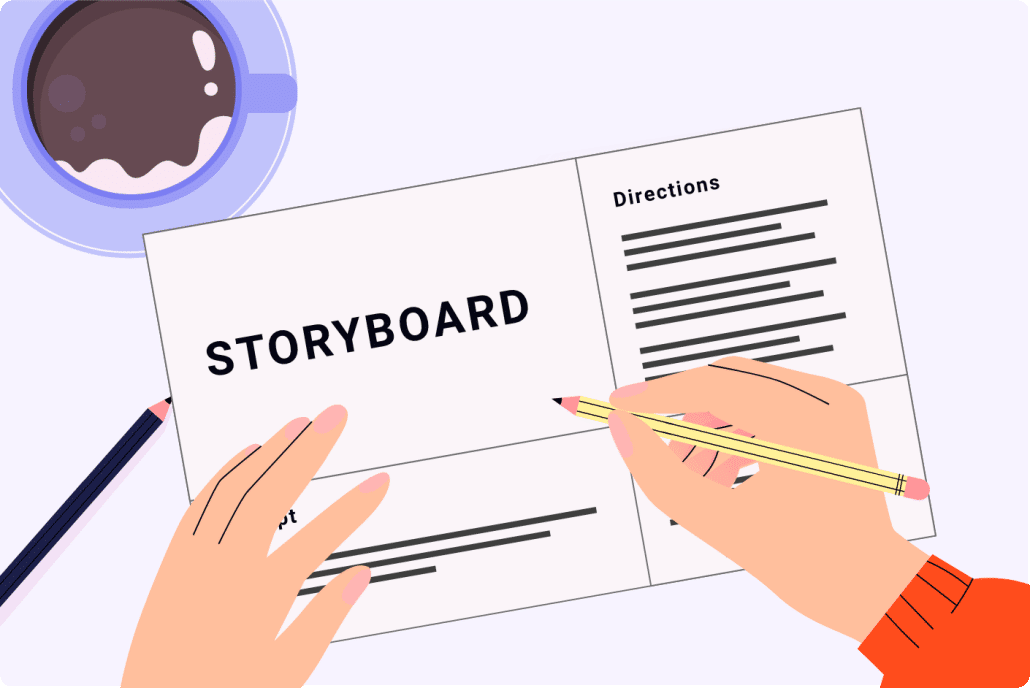
Resource Guide: For storyboard creation tips and a downloadable template to create your own storyboard, check out our storyboard creation guide.
Examples of Cheap Animated Explainer Videos You Can Get From Video Igniter
Are you looking for an example of a different style of animation? Send us a message to let us know what kind of animation example you want to see and we will follow up with relevant production samples.
Tip #3: Provide Your Own VoiceOver
Producing the voiceover for your affordable explainer video is another way you can keep costs down. By recording the voiceover yourself, you don’t have to pay a voiceover artist. You’ll also avoid having to pay extra licensing costs if you want to broadcast the video in paid advertisements on TV or online.
For tips on how to hire voiceover artists or how create your own professional sounding voiceover for free, check out Episode 3 of The Video Igniter Show. That’s right, you can make professional sounding voiceovers for free – you don’t need any special recording equipment to do it.
Tip #4: Use Free Royalty Free Music
In order to keep costs down and make a cheap animated marketing video, you can find some free songs to use for your project. Incompetech offers free royalty free music that you can use in your promotional videos. All you need to do is credit the artist if you use their music.
If you plan on publishing or promoting your video on Instagram or Facebook, Facebook provides a selection of free music you can use in the background of your video.
You can use free legal music when you create a cheap animated explainer video.
How To Create Visuals For A Cheap Animated Marketing Video
When it comes to visuals, you need to understand that you get what you pay for. If your goal is to make an inexpensive explainer video, you can’t expect to get the highest quality custom 2D or 3D visuals for your video. Instead, plan on using stock images, icons, text and clip art for your video. It’s best to think through the visuals during the script and storyboarding phases of production. This ensures your visuals will line up with the script and can be produced within your budget.
If you want to hire someone to produce custom visuals for your animation, you can probably find a low cost freelancer. Just remember that you get what you pay for. A professional animation studio or Video Igniter is going to be able to help you create custom branded art for your video that will make you stand out and capture your target audience’s attention but you’ll need to spend a little than you would for the cheapest freelancer.
If you’re ok with using stock images, character designs, background scenery and objects, you could subscribe to a service like Vyond, Wideo or Powtoon. They offer libraries of visuals you can pick out to use within your animation.
Tips For Keeping Animation Costs Low For An Inexpensive Explainer Video
Like the visuals, you need to understand that you get what you pay for. You can’t make a cheap animated explainer video and expect custom animated characters walking around the scene, speaking to the viewer. But you can still make a quality visual presentation that uses motion to string your ideas together and keep the viewer engaged without having to know how to do animation using professional animation software. You could hire a freelance video animator to add some motion to your visuals. Or you could keep your animation costs even lower by using presentation software like Keynote or Powerpoint. Just lay out your scenes on different slides and add simple transitions and animations to string your visuals together.
If you subscribed to Vyond/Wideo/Powtoon for the visuals for your video, you can also use those programs to add motion to your animation.
Benefits of Cheap Animated Explainer Videos for Small Businesses
In today’s competitive digital marketing landscape, businesses are constantly looking for cost-effective ways to engage their audience. A cheap animated explainer video can be an excellent solution for small businesses seeking to stand out. Explainer videos help businesses convey new and complex information in a visually appealing and easy-to-understand manner. With increasing competition, it’s crucial for small businesses to adopt affordable solutions that yield high returns.
Cost-Effective Marketing Tool
A cheap animated explainer video offers significant savings compared to traditional live-action video production. While live-action video requires expensive filming equipment, actors, and location fees, animated videos can be produced with fewer resources. This makes it a perfect choice for small businesses with tight marketing budgets. Furthermore, the production time is typically shorter, which means small businesses can launch campaigns faster and more affordably.
Boosts Brand Awareness
Animated explainer videos are a powerful tool for brand recognition. By using distinct colors, fonts, and animation styles, businesses can create memorable videos that reinforce their branding. Whether you’re a startup or a small business, a cheap animated explainer video is an affordable way to make your brand stand out in a crowded marketplace.
Increased Engagement and Conversion Rates
Studies have shown that explainer videos, especially those that are animated, significantly increase user engagement. A cheap animated explainer video captures the viewer’s attention with dynamic visuals and clear messaging. By simplifying complicated concepts, these videos are more likely to convert viewers into customers, increasing both engagement and video conversion rates without breaking the bank.
Easy to Produce and Adapt
One of the most significant advantages of a low-cost explainer video is its flexibility. If a small business needs to make adjustments to its product or service offering, animated explainer videos can be quickly edited to reflect these changes. Unlike live-action videos, which may require re-shooting, cheap animated videos allow for easy updates and modifications, ensuring the content stays relevant without extra costs.
How Cheap Animated Explainer Videos Can Boost Conversion Rates
Conversion rates are a critical metric for businesses looking to grow their customer base. A cheap animated explainer video can be a game-changer when it comes to improving conversion rates. These videos not only capture attention but also guide potential customers through a clear, compelling narrative that makes them more likely to take action.
Simplifying Complex Ideas
One of the primary benefits of a low-cost explainer video is its ability to simplify complex concepts. Through animation, businesses can break down intricate ideas or products into digestible, easily understood segments. This is particularly beneficial for businesses offering technical products or services, because animation makes even the most complicated topics approachable and engaging.
Emotional Connection
A cheap animated explainer video can evoke emotions through storytelling, music, and animation, fostering a stronger emotional connection with the audience. Emotionally engaged viewers are more likely to trust your brand and make a purchase. By using relatable scenarios and charming visuals, a well-crafted explainer video can emotionally resonate with potential customers, driving them to act.
Stronger Call-to-Action
Every good explainer video should have a clear call-to-action (CTA) at the end. These videos often end with a direct and persuasive CTA that encourages viewers to sign up, purchase, or contact the business. Including a compelling CTA in a low-cost explainer video helps guide viewers through your conversion funnel more effectively.
Social Proof and Trust Building
Trust is essential in converting leads into customers. Cheap animated explainer videos that incorporate customer testimonials or case studies can provide valuable social proof. Seeing how others have benefited from your product or service builds trust with your audience, ultimately leading to higher conversion rates.
The ROI of Investing in a Cheap Animated Explainer Video
Calculating the return on investment (ROI) is essential for any marketing campaign. When businesses invest in a cheap animated explainer video, they often wonder whether the costs will justify the returns. The good news is that cheap animated explainer videos can deliver impressive ROI by increasing customer engagement, driving sales, and improving brand recognition.
Lower Production Costs vs. Traditional Video Content
Traditional video production can be expensive, with costs ranging from equipment rental to hiring actors and crew. On the other hand, a low-cost explainer video reduces these overheads significantly. While the production quality remains high, businesses don’t have to sacrifice their budgets for expensive video shoots. This cost-effectiveness makes it an excellent choice for businesses looking for an affordable animation to boost their marketing efforts.
Increased Engagement and Lead Generation
A cheap animated explainer video can significantly increase user engagement. By simplifying the messaging around complex products and services, these explainer videos make it easier for potential customers to understand the value being offered. Engaged viewers are more likely to provide their contact information or make a purchase, leading to higher lead generation and conversions, ultimately improving ROI.
Long-Term Marketing Value
One of the greatest advantages of a cheap animated explainer video is its longevity. Unlike other marketing content that may become outdated quickly, an animated explainer video remains relevant over time. With minor updates, these videos can continue to attract traffic and generate leads, providing long-term value and improving ROI well after the initial production.
Performance Metrics to Track ROI
To assess the ROI of a cheap animated explainer video, businesses should track key performance indicators (KPIs) such as view counts, click-through rates (CTR), conversions, and engagement. By analyzing these metrics, businesses can gauge the effectiveness of their video and refine their strategies for even greater ROI.
Common Mistakes to Avoid When Creating a Cheap Animated Explainer Video
Creating a cheap animated explainer video can be a highly cost-effective way to promote your business. However, to make sure your video has the desired impact, you must avoid common mistakes that can lead to wasted resources or poor results. Here’s how to ensure your low-cost explainer video delivers maximum value.
Overcomplicating the Script
One of the most common mistakes in creating a cheap animated explainer video is overcomplicating the script. While it’s tempting to showcase all the features of your product, a cluttered or overly detailed script can confuse viewers. Instead, keep your message concise, focusing on the problem your product/service solves and the solution you offer in a straightforward manner.
Choosing the Wrong Animation Style
Not every animation style will suit your brand or message. A cheap animated explainer video may offer limited animation options, but it’s important to choose a style that aligns with your brand identity. For instance, playful, cartoon-style animations may be perfect for a children’s product but might not work for a more professional, corporate brand.
Ignoring Target Audience
The most effective explainer videos are tailored to a specific target audience. Failing to understand your audience’s needs and preferences can lead to a video that misses the mark. A cheap animated explainer video should speak directly to your audience’s pain points and offer solutions that resonate with them.
Underestimating the Power of Sound and Voiceover
Even in a cheap animated explainer video, sound quality and voiceover matter. Poor audio can undermine the professionalism of your video. Ensure that your voiceover is clear, engaging, and well-matched to the tone of your animation. Music and sound effects should complement the visuals and enhance the viewer’s experience.
Skipping the Call to Action
A cheap animated explainer video without a clear call to action (CTA) is a missed opportunity. Your CTA should direct the viewer on what to do next—whether it’s visiting your website, signing up for a newsletter, or making a purchase. Without a strong CTA, viewers may not take the next step toward conversion.
Cost-Effective Tools for Creating Professional Cheap Animated Explainer Videos
Creating a professional-quality cheap animated explainer video doesn’t have to involve expensive software or agencies. There are several low-cost tools available that enable businesses to create high-quality explainer videos without breaking the bank. By leveraging these tools & resources, businesses can produce effective explainer videos on a budget.
Free and Affordable Animation Software
Several software platforms offer affordable options for creating animated explainer videos. For example, platforms like Powtoon, Vyond, and Animaker provide user-friendly interfaces and a wide variety of templates for creating low-cost animated videos. These tools are ideal for businesses with limited resources but still want to produce visually appealing and professional videos.
DIY Animation Tools
For those looking to create their own videos from scratch, Biteable and Renderforest are affordable DIY animation tools that allow users to create videos without prior animation experience. These platforms often include step-by-step tutorials, helping businesses create professional-quality videos quickly and inexpensively.
Templates and Pre-Designed Assets
Using pre-designed templates, assets & 3D models is an excellent way to save both time and money when creating a cheap animated explainer video. Many animation tools offer templates for common business needs, such as product demos or customer testimonials. By customizing these templates, businesses can create unique videos without the need for expensive custom animation.
Outsourcing to Freelancers or Small Studios
If creating an animated explainer video in-house is not an option, outsourcing to a freelance animator can be a cost-effective alternative. Platforms like Fiverr and Upwork provide access to skilled animators who can create a professional-quality cheap animated explainer video at a fraction of the cost of larger animation studios.
Cheap Animation Video Production Resources
These popular video production resources are recommended for your video production journey:
Creating a cheap animated explainer video is possible if you use some or all of these tips. If you have a budget of at least $500-$1000, you could consider connecting with a freelance animator or Video Igniter to help create an inexpensive animated explainer video that includes custom visuals and some nice animation detail to keep your viewers engaged. Want to speak with a member of our animated video production company about creating an affordable explainer video? Check out our animated video portfolio to see our latest and greatest creations.
https://videoigniter.com/wp-content/uploads/2022/08/Cheap-Animated-Explainer-Video.svg7787Video Igniter Animation/wp-content/uploads/2020/02/logo-v2.svgVideo Igniter Animation2025-03-27 13:51:062025-03-27 20:52:54How To Make A Cheap Animated Explainer Video